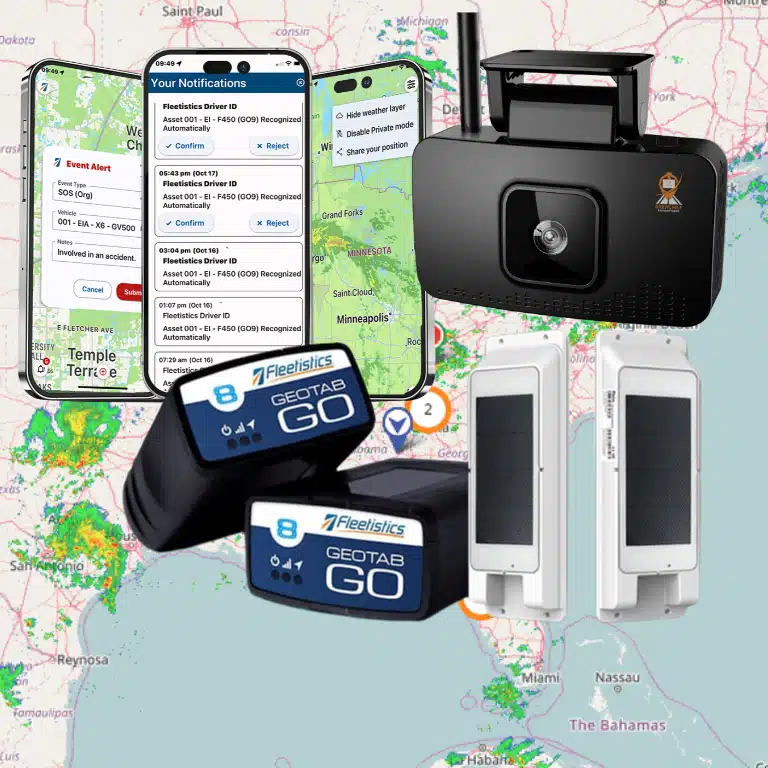

Here is how to assess fleet management systems for construction tech: start with the operational decisions your team needs to make across vehicles, heavy equipment, and jobsites. Define assets and workflows, compare options against the same real scenarios, then test the strongest fit in a measured pilot. The goal is to establish whether information is dependable, actionable, and manageable for the people who use it.
Discuss your construction fleet requirements
What should you define before comparing systems?
Construction fleets rarely consist of one uniform asset type. A road vehicle may need trip history, diagnostics, and driver workflows. A trailer may sit unattended between jobs. A generator, compressor, or attachment may need to be located even when it is not running. Separate these use cases instead of assuming one device, update interval, or report will suit every asset.
Write down the operational decisions you want to improve. “Reduce downtime” is too broad to test by itself. One measurable version is to identify engine faults on assigned service trucks and route them to the maintenance coordinator. Another is to show supervisors which tagged assets are inside a staging area.
- Inventory: List trucks, trailers, powered equipment, attachments, and other assets. Record make, model, power source, typical location, and who is accountable.
- Workflows: Identify who dispatches, assigns equipment, schedules maintenance, investigates alerts, and reviews reports.
- Operating conditions: Note remote sites, indoor storage, intermittent cellular coverage, dust, vibration, temperature, and installation restrictions.
- Success measures: Pick a few indicators, identify a current baseline, assign an owner, and set a review period.
For context on connected fleet data, see this overview of fleet telematics and the guide to GPS tracking technologies. Use these concepts to frame requirements, not to assume every asset provides identical data.
Which construction fleet capabilities should you evaluate?
Group capabilities by task and asset class. Then ask what a manager would do with the result. A location point nobody can interpret, an alert without an owner, or a report that arrives too late may pass a feature checklist but fail to support the job.
Location, utilization, and geofences
Check how current and historical locations are displayed and whether site boundaries can be represented clearly. Ask what happens when an asset is powered down, parked indoors, or beyond reliable coverage. Find out how often locations update under those conditions and whether the platform distinguishes a new position from an old one.
Define utilization before reviewing dashboards. Engine hours, movement, assigned workdays, and days on site answer different questions. A loader that remains at a site for a week may be exactly where it is needed, while a vehicle that moves frequently may still be underused for its assigned role. Agree on the measure that matches the decision.
Geofences help only when boundaries and notifications reflect actual site operations. Decide who receives a movement alert, what qualifies as an exception, and how the recipient documents follow-up. Review fleet geofencing practices and consider whether IoT asset tracking fits equipment that does not provide vehicle-style data.
Vehicle diagnostics and maintenance
For trucks and service vehicles, confirm which data is available for the actual models and years in your fleet. Ask whether diagnostic alerts can be routed to the person who schedules service and whether vehicle assignments and service records can be kept current. Tracking can organize information and surface issues; it does not replace inspections or a maintenance program.
Map the workflow from alert to review, work order, repair, and return to service. Identify what happens if an alert is incorrect, duplicated, or arrives while the vehicle is already at a shop. Compare the proposed process with your current one and see the fleet maintenance overview. If trailers move between sites or are staged separately, assess trailer tracking options as a distinct use case.
Safety and operator workflows
If your evaluation includes dashcams or safety analytics, examine which events are captured, how managers review them, and how coaching is handled. Ask who can access location data or footage, how long it is retained, and how employees are informed. Operators should understand why tools are used and how questions are addressed. A clear policy and consistent review process matter as much as the device. See fleet safety solutions and AI dashcam evaluation considerations.
How do you assess fleet management systems for construction tech?
Build a scorecard around your requirements. Record whether each option meets a need directly, needs configuration, depends on another system, or cannot provide it. Ask providers to demonstrate the same scenarios with comparable assets. Include implementation effort, training, installation, support, and the work needed to keep asset and user records accurate.
| Evaluation area | Questions to ask | Evidence to request |
|---|---|---|
| Asset coverage | Can devices and workflows handle trucks, trailers, and equipment? | Device recommendations and sample asset setup |
| Location and alerts | Can staff locate assets and manage useful movement or zone alerts? | Demonstration using a jobsite scenario |
| Maintenance | Can available vehicle data support the service process? | Example from alert through repair follow-up |
| Safety | Can managers review events and coach consistently? | Sample review process and access controls |
| Reports and integration | Can information reach the people and systems that need it? | Example report, integration details, data-access terms |
| Deployment and support | How are devices installed, staff trained, and issues handled? | Written rollout plan and responsibility list |
Separate must-haves from preferences. Reliable identification of critical equipment may be essential; a particular dashboard layout may not be. Ask each provider to show how a supervisor finds a specific asset, confirms its status, and communicates the next action. Include a data integration review if fleet information needs to connect to business systems.
How can you make a scorecard useful?
Give each requirement a clear definition and an evidence standard before demos begin. For example, “locate a trailer” could mean identify its last reported position, show when that position was recorded, and explain what the user should do if the update is stale. Without that definition, one provider may demonstrate a map while another demonstrates an operational process, making the comparison uneven.
Use a simple rating such as meets, partly meets, does not meet, or not tested. Add a note for dependencies, such as additional hardware, data entry, or an integration. Do not hide a limitation inside an average score. A high overall rating cannot compensate for a missing requirement that is essential to a specific jobsite workflow.
How do you test the system against real jobsite conditions?
A demonstration is a useful first filter, not proof that a solution will work in the field. A practical pilot should represent assets, users, and conditions that could expose a limitation. Keep the scope manageable, but do not select only the easiest vehicles or most reliable site.
- Choose a representative group. Include at least one vehicle and one relevant equipment or trailer case, along with the users who will act on the information. Include a location or connectivity condition that matters to the operation.
- Write test scenarios. For example, locate a parked trailer, review a vehicle fault, or determine whether an asset crossed a defined site boundary. State what success looks like before testing.
- Record a baseline. Capture current search time, dispatch delays, missed maintenance reminders, or another measure that is available and consistently defined.
- Configure only what the test needs. Set up relevant assets, users, geofences, alerts, and reports. Too many alerts or complicated settings can obscure whether the core workflow works.
- Train participants. Explain what the system records, how to use it, who can access information, and where to raise questions. Include supervisors and operators, not only the administrator.
- Review evidence at set intervals. Check data quality, missed or duplicate alerts, response time, user adoption, and any change to the target measure.
- Document the decision. Expand, adjust, or stop based on agreed requirements. Record limitations and open questions, not only positive feedback.
For a worked example, imagine a contractor often spends time asking several crews where a shared trailer was last staged. Before the pilot, define the sample search situations, note how the current process works, and agree who will verify the reported location. During the test, record the timestamp and usefulness of each position, whether staff can distinguish similar trailers, and what happens when the trailer is out of coverage. The result should indicate not just whether a dot appeared on a map, but whether the process gave the right person enough information to act.
A second scenario might involve a service truck diagnostic alert. Decide in advance who reviews the alert, how it is checked against the vehicle and maintenance record, and how the repair is tracked. Count alerts that lead to a review, not just alerts generated. This guards against judging a system by notification volume instead of a useful maintenance workflow.
The University of Minnesota’s Center for Transportation Studies describes benchmarking as a way to assess fleet-management practices that can be adapted for use. Its research supports using defined measures rather than relying on impressions; see Benchmarking Fleet Management.
How should you measure value and implementation effort?
Use a before-and-after record for each pilot objective. If the goal is locating equipment, record how often staff search and how long representative searches take. If the goal is maintenance visibility, track relevant alerts, review time, and whether follow-up is documented. Keep definitions consistent so a change in measurement does not look like a change in performance.
Do not credit the platform for every improvement observed during a pilot. Weather, project phase, staffing, and asset assignments can all change. Note those factors and distinguish a verified operational change from an estimate. A useful evaluation may reveal that the data is valuable but a workflow or asset record needs improvement before broader rollout.
Include implementation and ongoing effort: installation coordination, asset labeling, user setup, training time, alert review, data cleanup, and integration work. Ask who owns each task after launch. A tool that looks simple in a demonstration may create work if nobody maintains assignments or closes the loop on alerts.
Make a worksheet with one row per objective: current process, baseline, pilot result, effort required, remaining uncertainty, and owner. For example, a team testing equipment location might find that an asset is visible at the site level but its labeling scheme makes two similar machines hard to distinguish. That is not simply pass or fail; it identifies a correction to make before scaling.
Which measures should go in the pilot worksheet?
- Findability: Time to identify an asset and whether its reported location was useful for the task.
- Data quality: Missing, stale, duplicated, or mismatched asset information, with examples for follow-up.
- Workflow completion: Whether the assigned person reviewed and closed alerts or maintenance tasks.
- Adoption: Whether intended users can complete the test steps after training, and what questions recur.
- Effort: Staff time for setup, updates, training, reviews, and ongoing administration.
Do not force a single blended return figure if the pilot is too small to support one. A clear record of observed changes, costs still to confirm, and unresolved risks is more useful than a precise-looking estimate built on assumptions.
How do you plan a rollout that can grow with the fleet?
Construction operations change as projects open and close, equipment moves, and seasonal work shifts. Test whether your team can add sites, assets, and users without losing consistent naming or permissions. Decide how equipment is assigned when it moves between projects and who updates those records.
Build a staged rollout. Start with a defined asset group, review the first weeks of use, resolve configuration and training issues, then expand to the next group. Keep a short change log of settings, alert recipients, and reasons for updates. This helps managers understand why a report or alert changed rather than treating every difference as a system fault.
Consider how the platform fits with other tools. Confirm what data can be exported or integrated, what identifiers are shared, and which system remains authoritative for maintenance or employee records. Fleetistics works with Geotab technology and offers options intended to be matched to fleet requirements. Learn more about fleet tracking and telematics solutions or review Geotab GO10 device details as part of an asset-specific discussion.
What should you ask a provider before choosing?
Use direct questions to uncover fit, tradeoffs, and ownership. Ask for answers tied to your own assets rather than a generic product tour.
- Which device and installation approach fits each asset, and what tradeoffs should we understand?
- What happens to data when an asset is offline or has limited connectivity?
- Can we demonstrate our jobsite, maintenance, and equipment-assignment workflows before rollout?
- What information can managers see, and how are employee notice and access handled?
- What training, implementation assistance, and ongoing support are available?
- How can data be exported or connected to existing systems, and what work does that require?
- What will the pilot prove, and what findings would justify expanding it?
- How are device issues, inaccurate records, and alert changes reported and resolved?
For a broader view of connected fleet workflows, consult the guide to advanced fleet management. Fleetistics combines Geotab technology with a modular approach, so a discussion can focus on matching tools and workflows to the vehicles and equipment you operate rather than assuming one configuration fits everyone.
Frequently asked questions
Should one system track vehicles and heavy equipment?
A platform may support both, but devices, available data, and workflows can differ. Evaluate each asset class separately and confirm that the proposed setup works for its jobsite use case.
How many assets should be included in a pilot?
There is no universal number. Choose a manageable group that represents vehicle types, equipment, locations, and users you expect to support. The purpose is to test risks and workflows, not maximize the asset count.
How can we avoid too many alerts?
Begin with a limited set tied to a defined action and owner. Review alert volume and usefulness during the pilot, then adjust boundaries, conditions, or recipients before expanding.
What should count as a successful evaluation?
Success means the system meets essential requirements, users can follow intended workflows, and evidence supports a defensible deployment decision. Document unresolved issues and limitations as well as positive results.
Ready to assess your construction fleet needs?
Map your assets, define the decisions that matter, and compare providers through shared scenarios and a measured pilot. A focused conversation can help clarify which requirements belong in an initial deployment and which can wait.
Choose a system only after its data, workflows, and support have been tested against the demands of your jobsites.