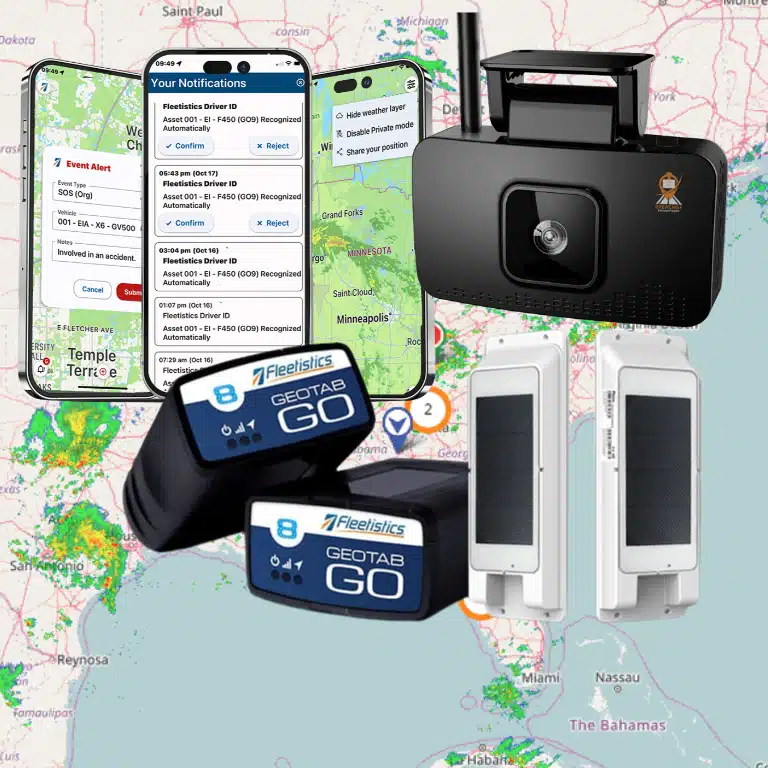
Landscaping fleets rarely consist of vehicles alone. A typical operation may send trucks, trailers, mowers, and crews across several job sites while managers balance routing, customer commitments, equipment security, time records, maintenance, and seasonal demand. Without a shared view of those moving parts, small delays and unanswered questions can become payroll disputes, missed work, or avoidable downtime.
GPS tracking for landscaping companies can connect vehicle and equipment location data with practical operating decisions, including dispatching crews. It can help compare planned and actual routes, verify arrival and departure times, monitor job-site dwell time, and respond to unexpected movement. The right system is not simply a dot on a map. It should match your asset types, operating area, employee communication policies, reporting needs, and growth plans. For a landscaping-specific starting point, review GPS tracking for landscapers.
Contact Fleetistics Today to discuss a tracking approach for your landscaping vehicles, equipment, and crews.
What Should GPS Tracking for Landscaping Companies Cover?
A useful system should account for the way your operation actually moves, not just place a device on each truck. Start with the complete asset picture: pickup trucks, service vehicles, trailers, zero-turn mowers, skid steers, compact equipment, and other powered tools. These assets may leave the yard or remain at a job site. Tracking each category creates a clearer view of what is available, where it is assigned, and whether it is being used as planned.
Vehicle tracking is the right foundation for trucks and vans. It can provide location history, trip details, route visibility, and operational alerts that help managers coordinate crews working across multiple properties. Vehicle data can also support dispatch decisions, service verification, and a clearer understanding of how long a crew vehicle remains at a location.
Asset tracking serves a different purpose. Explore Fleetistics’ asset tracking solution for a broader view of equipment visibility. A trailer or mower may not have the same engine data or power connection as a road vehicle, but its location still matters. Equipment-focused devices can help you identify which assets are at the shop, assigned to a crew, stored at a yard, or left at a customer site. For smaller movable equipment, review GPS tracking for small equipment options that fit the asset’s size, mounting location, and daily operating conditions.
Match the device to the asset
Device selection should follow the equipment, environment, and workflow. A truck may support a vehicle device connected to its electrical system and provide diagnostic information. A trailer or mower may need a weather-resistant unit with a suitable battery arrangement, secure mounting, and dependable location reporting. Hardwired options can reduce charging needs, but they also require installation and should be evaluated as a configuration tradeoff for each asset.
Consider how much vibration, rain, dust, washing, heat, and physical handling the device will encounter. Also ask whether an asset is regularly transferred between crews, stored outdoors, or used in places where a portable device would be impractical. A practical evaluation of GPS tracking hardware should include installation, power, durability, reporting frequency, and maintenance responsibilities, not just the map interface.
How Can GPS Tracking Improve Routes, Crews, and Proof of Service?
Landscaping operations rarely follow the plan perfectly. A crew may finish early, encounter a locked gate, add an urgent stop, or spend longer than expected at a complex property. GPS data gives dispatchers a clearer view of what happened, so they can adjust the day without relying entirely on calls, texts, or end-of-shift recollections.
With automatic vehicle location, a dispatcher can compare planned routes with actual trip history. That comparison can reveal repeated backtracking, avoidable mileage, or jobs assigned in an inefficient sequence. It can also help answer practical questions during the day: Which crew is nearest to a new request? Has a truck left the previous property? Is a vehicle delayed between appointments?
Turn job-site activity into useful operational evidence
Location history can show when a vehicle or crew arrived, when it departed, and how long it remained at a service location. That dwell-time context helps managers distinguish a normal visit from a missed appointment, an unusually long stop, or a schedule that was too aggressive. It does not replace supervisor judgment, but it gives the conversation a more reliable starting point.
The same records can support time-card review. When reported hours do not match the movement and stop history, managers can investigate the difference before approving payroll or assigning blame. When a customer questions whether a crew arrived or how long it worked, arrival and departure records can help verify the service visit and clarify billing disputes. The goal is not to watch employees covertly. It is to create consistent operational records for customers, managers, and crews.
Make dispatch visibility part of a fair crew policy
Tracking works best when employees understand what is collected, why it is collected, and when it applies. Explain whether the system tracks vehicles, equipment, or crew locations; define approved uses such as dispatch. Safety, time verification, and service documentation; and identify who can access the information. A clear policy should also address off-duty use, data retention, and how employees can raise concerns.
Use introducing GPS tracking to employees as a starting point for that communication. When crews see that accurate records can protect them from disputed time cards and help dispatch send support, adoption is more likely to feel practical rather than punitive.
Can GPS Tracking Help Prevent Landscaping Equipment Theft?
GPS tracking cannot guarantee that a trailer or mower will never be stolen, but it can give you earlier visibility when equipment moves outside its expected use. That matters when crews leave a truck or trailer unattended at a job site, equipment is stored overnight, or an asset is moved without the normal dispatch plan.
Use location history and geofences to spot exceptions
A tracker can show the current or recent location of a connected vehicle or asset. This helps an operations manager determine whether it is at a storage yard, job site, or another expected destination. You can also define geofences around yards, facilities, and recurring work areas. An entry or exit alert can prompt a quick check when equipment moves outside an approved schedule or boundary.
The value is not just the alert itself. Location history can help you distinguish a scheduled transfer from an unauthorized movement. Identify the route an asset took, and give responders more useful information than a last-known address. Configure alerts around realistic operating hours and locations so your team can act on meaningful exceptions instead of ignoring excessive notifications.
Build a response and recovery workflow
Before an alert occurs, decide who receives it and what happens next. A practical workflow might include confirming whether the move was authorized, contacting the crew or yard manager, and reviewing the asset’s recent trips. If theft is confirmed, provide current location information to the appropriate authorities and insurer. Keep asset identifiers, descriptions, and registration details accessible so a response does not depend on one person’s memory.
Use the system alongside physical controls such as secured storage, hitch locks, visible asset identification, and sensible key management. Tracking supports response and recovery; it does not replace prevention practices or law-enforcement procedures.
Match the device to the equipment
Ask how each asset is powered, where a tracker can be mounted, and what conditions it must withstand. A trailer may need a weather-resistant device with its own power strategy, while a mower may require a compact mount that tolerates vibration, dust, moisture, and washdowns. Portable rechargeable devices can simplify deployment across changing assets, while hardwired options may reduce charging needs but require installation and access to the equipment battery. That is a configuration tradeoff, not automatically an upgrade.
How Does Tracking Support Maintenance and Seasonal Planning?
Landscaping equipment works hard during the months when your schedule is busiest. A maintenance issue with a truck, mower, trailer, or other asset can disrupt several jobs, force last-minute reassignment, and leave crews waiting for equipment. Tracking does not replace inspections or service expertise, but it gives your team better information for planning both routine maintenance and seasonal changes.
Use diagnostics and alerts to plan service earlier
Vehicle telematics can surface engine diagnostic codes and other configured exceptions so an operations manager can review potential issues before they become an avoidable roadside or job-site problem. Proactive maintenance alerts can support a service schedule based on the condition and use of an asset, rather than relying only on memory or a fixed calendar.
Scheduled maintenance reminders add another layer of control. Set reminders for recurring inspections, oil changes, tire checks, blade service, or other tasks appropriate to each asset. When a vehicle or piece of equipment needs attention, a documented maintenance work order can identify the issue, assign responsibility, and show whether the work was completed before the asset returns to service.
Match maintenance to utilization and demand
Not every asset experiences the same workload. Utilization data can help you distinguish equipment that is consistently in use from equipment that sits idle between projects. That context supports more practical decisions about service timing, fleet size, and seasonal reassignment. A heavily used mower may need attention sooner than a comparable unit stored for much of the month. An underused truck may be available to support another crew.
Before the active season begins, review maintenance status, diagnostic history, utilization, and open work orders for the assets you expect to deploy. Confirm that trucks, trailers, mowers, and attachments are ready for the types of jobs on the schedule. This pre-season review gives you time to arrange service, move equipment between locations, or adjust assignments before a preventable issue affects customers.
Plan storage and seasonal reassignment with better visibility
When demand shifts, use location and utilization records to confirm which assets are stored, reassigned, or ready for the next service cycle. This gives managers a clearer handoff between peak-season operations and off-season maintenance.
How Do You Evaluate a Landscaping GPS Tracking System?
The right system should fit the way your crews, trucks, trailers, mowers, and other assets actually work. Do not evaluate GPS tracking for landscaping companies as a single device or app. Evaluate the complete operating system: hardware, location data, alerts, reports, integrations, implementation, and the support available when your needs change.
Use the questions below to compare providers consistently. A good evaluation makes it easier to identify the capabilities you need now without paying for a rigid package that cannot grow with your business.
| Buyer criterion | What to ask | Why it matters |
|---|---|---|
| Coverage | Will the system cover our service area and provide dependable location updates for vehicles and equipment? | Crews and assets need useful visibility across yards, roads, and job sites, not just near the office. |
| Device fit | Which options fit our trucks, trailers, mowers, and powered equipment? Is professional installation available? | Hardware should match each asset’s power source, mounting needs, and working environment. |
| Alerts | Can we configure geofence, movement, maintenance, safety, and other exception alerts? | Useful alerts help managers focus on events that require attention instead of watching a map continuously. |
| Reporting | Can reports show routes, stops, arrival and departure times, utilization, maintenance, and time at locations? | Clear reporting supports service verification, time-card review, coaching, and better fleet decisions. |
| Integrations | Can tracking data connect with our existing systems, and is API access available? | Free APIs and 300+ integrations can reduce duplicate entry as your workflows become more connected. |
| Support | Who helps with configuration, questions, troubleshooting, and operational changes? | 24/7 support and implementation guidance matter when a vehicle, asset, or crew issue cannot wait. |
| Scalability | Can we start with a modular tier and add vehicles, equipment, features, or users later? | Modular tiers let the solution match your fleet size and priorities rather than forcing a one-size-fits-all rollout. |
| Evaluation process | Can we validate operational fit and ROI before making a long-term commitment? | Fleetistics’ 60-day Solution Evaluation Process gives your team a defined period to assess results and fit. |
Speak With a Fleetistics Consultant before you choose hardware or a platform for your seasonal fleet.
What Is the Best Way to Roll Out Tracking Across Your Landscaping Fleet?
A successful rollout starts with operational questions, not a pile of devices. Treat GPS tracking for landscaping companies as a measured change to how you manage trucks, trailers, mowers, crews, and seasonal equipment. The following sequence helps you build useful data while giving employees a clear, fair understanding of what is being monitored and why.
- Define the business goals. Decide what you need to improve first, such as route visibility, arrival and departure records, equipment protection, maintenance planning, or service verification. Establish a small set of baseline measures and explain how tracking data will support decisions rather than serve as vague surveillance.
- Inventory vehicles, equipment, and workflows. List every truck, trailer, mower, and other mobile asset, along with its power source, operating environment, assigned crew, and current gaps. Note which units need vehicle telematics, asset tracking, driver identification, or exception alerts. This prevents you from forcing one hardware configuration onto a mixed fleet.
- Select the device and configuration for each use case. Match hardware to the asset, mounting location, weather exposure, charging access, and information you actually need. Hardwired options can reduce charging tasks for some equipment, but they are a configuration tradeoff, not automatically an upgrade. Confirm that reports and alerts will fit your existing dispatch, payroll, maintenance, or customer-service workflow.
- Notify and train employees before activation. Provide transparent notice describing which vehicles or equipment are tracked, when location data is collected, who can access it, how long records are retained, and which decisions may use the data. Establish governance for exceptions, privacy, after-hours use, and access reviews. Train supervisors and crews on the purpose, controls, and escalation process, and invite questions before the first device goes live. Fleetistics also offers guidance on introducing GPS tracking to employees.
- Pilot one route, crew, or equipment group. Choose a representative operating group rather than only the easiest vehicles. Test installation, location accuracy, alert thresholds, reporting, employee understanding, and the time required for managers to act on the information. Document what creates useful insight and what creates noise.
- Review results, refine, and expand. Compare the pilot against your original goals, then adjust permissions, alerts, training, and device assignments. Expand in stages, reviewing each group before adding the next. A modular platform and Fleetistics’ 60-day Solution Evaluation Process can help you validate fit and ROI before making a broader commitment.
Frequently Asked Questions
What is GPS tracking for landscaping companies?
It is a fleet management approach that gives you visibility into trucks, trailers, mowers, other mobile equipment, and relevant crew activity. Depending on the hardware and configuration, you can review locations, routes, job-site time, maintenance information, and exception alerts in one operational view.
Can GPS tracking help prevent landscaping equipment theft?
It can support theft prevention, but it cannot guarantee that equipment will not be stolen. Geofences and movement alerts can notify you when an asset leaves a storage yard or job site unexpectedly. The location information can support a faster response and potential recovery.
How can tracking improve landscaping operations?
Managers can compare planned and actual routes, verify arrival and departure times, review dwell time, and investigate unusual stops. That information can support scheduling, customer-service conversations, time-card review, and decisions about how to deploy crews and equipment more efficiently.
What type of GPS tracker is best for lawn equipment?
Choose hardware based on the equipment, power source, mounting requirements, environment, and how often the asset moves. A mower or trailer may need a rugged, weather-resistant option, while portable equipment may call for a rechargeable device. Hardwired options reduce charging needs, but they should be evaluated as a configuration tradeoff rather than an automatic upgrade.
How much does GPS tracking cost for a landscaping business?
Cost depends on the number and type of assets, device configuration, reporting needs, installation, service area, and platform features. Ask for a solution matched to your fleet rather than relying on a generic per-device comparison. A consultative evaluation can clarify the total scope and help you measure fit before a broader rollout.
Get Started With a Right-Sized Tracking Plan
Landscaping fleets often combine vehicles, trailers, mowers, and other equipment, so the right tracking approach should match how your crews and assets actually operate. Fleetistics can help you evaluate a modular solution, identify the right starting point, and assess fit through the 60-day Solution Evaluation Process. Contact Fleetistics to discuss your fleet and schedule a consultative demonstration.