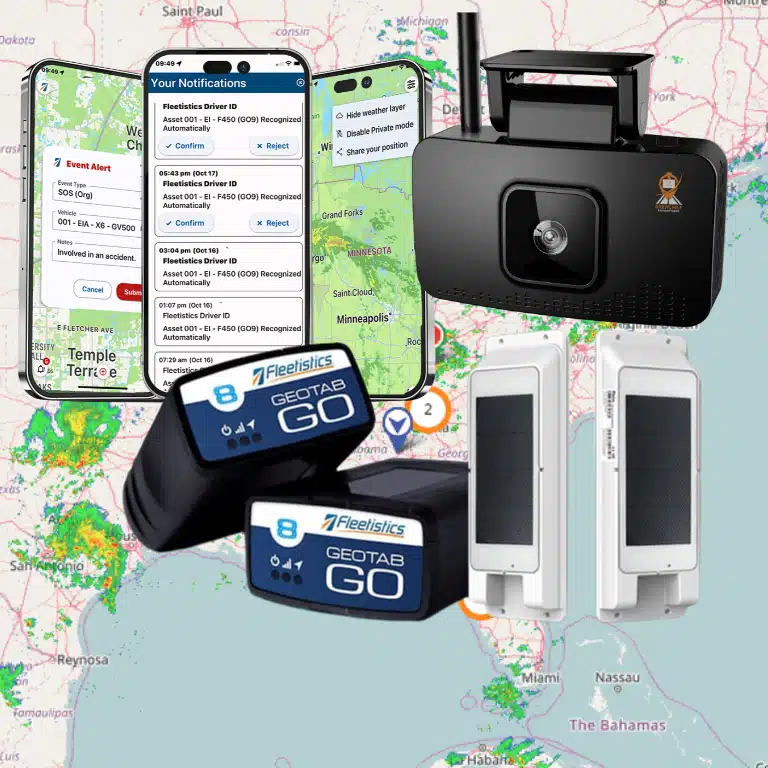

To understand how to track fleet assets, begin with the operational question you need to answer: where is a particular vehicle or piece of equipment, who is responsible for it, or is it ready for its next assignment? Build the process around that decision, then choose an identifier, a tracking method, and an owner for keeping the record current. A truck, an unpowered trailer, and a seldom-moved generator may need different levels of visibility.

Discuss your fleet asset-tracking needs
What does it mean to track fleet assets?
Tracking an asset means maintaining useful information about its identity, location or last known status, assignment, and availability. A dot on a map is only one part of that record. A fleet manager also needs to know which physical item the dot represents, whether the report is recent enough to act on, and what to do if the asset is somewhere unexpected.
Set an explicit boundary for the word asset. For one operation, it may mean road vehicles and trailers. For another, it may also include generators, containers, boats, attachments, or equipment that travels between work sites. Include an item when knowing its location, condition, handoff, or availability can change a decision. Avoid expanding the inventory simply because a record can be created; each additional record needs a purpose and an owner.
GPS.gov describes GPS as a satellite-based positioning, navigation, and timing system. That is useful context for understanding a location report, but a fleet’s asset record still depends on the device, communications, configuration, and operating process used to associate a report with a specific item. See GPS.gov’s overview of GPS for the underlying system.
Which assets should you track first?
Prioritize assets by the decisions and consequences attached to them, not only by purchase price. Ask what a delay, loss, mistaken assignment, or unavailable asset would mean to the workday. Then sort assets into a few practical groups so the team can start with the highest-value use cases instead of trying to solve everything at once.
- Assets in frequent movement: Vehicles and trailers that move among crews or locations may need timely location reports to support dispatch and coordination.
- Shared assets: Motor pool vehicles and tools or equipment passed between teams need reliable checkout and return records. Location visibility alone may not identify who took responsibility.
- High-impact equipment: If losing an item would delay a job or create a costly search, consider movement alerts and a clear escalation process.
- Standby or seasonal items: Equipment that stays parked for long periods may need periodic confirmation rather than frequent reporting.
- Remote or difficult-to-access assets: Consider power, communication coverage, weather exposure, mounting, and the effort required to inspect them.
Write a specific question for each group. For example: “Which trailer is available at the north yard?”, “Did the generator reach the assigned site?”, or “Which crew has this shared unit?” If no one can name the decision a report will support, defer tracking that item or collect a simpler record.
How do you create a reliable asset inventory?
Start with the records you already trust, such as a fleet list, equipment register, or dispatch system, and identify gaps before adding devices. Create one durable identifier for each physical asset. Record existing identifiers, such as a serial number or vehicle identification number, as reference fields rather than treating a changing description or license plate as the only key.
A useful inventory can include an asset ID, plain-language name, asset class, home location, current operating group, status, and the date the record was last checked. Add details only when they support a real task, such as matching a tracker to its device record or finding the correct equipment during a handoff. Decide which fields are mandatory and who may update them.
Use consistent naming rules. “Trailer 12” is more useful when the record also contains its permanent ID and relevant identifying details. Avoid duplicate IDs and informal names that change when a unit moves to a different crew. If a QR label or barcode is appropriate for equipment, connect it to the permanent record rather than using the label as a substitute for an inventory owner.
Before deployment, reconcile the list against the physical fleet. Confirm that each item exists, that its identifier matches the record, and that inactive, sold, or transferred items are marked correctly. A short verification now prevents stale or duplicate records from undermining alerts later. For teams coordinating information across systems, review the principles of fleet data integration when deciding where the master asset record should live.
Which tracking method fits each asset?
Choose a method to fit the asset’s power, movement, environment, reporting needs, and the consequences of a delayed update. Some items can use vehicle telematics; others may need a dedicated tracker, a proximity-based tag, or a controlled manual process. Fleet tracking and telematics platforms can help organize information, but the device and workflow still need to suit the individual asset.
| Method | Potential fit | Questions to resolve | Example use |
|---|---|---|---|
| Vehicle telematics | Powered vehicles with regular use | How will it be installed and powered? What reporting interval and coverage are needed? | Locating a service vehicle for dispatch |
| Dedicated asset tracker | Trailers or equipment moving independently | What battery or power arrangement, mounting, coverage, and alert timing fit? | Checking a trailer’s last reported location |
| Short-range tag or beacon | Items expected to pass a compatible receiver | Where are receivers placed, and how often will an item encounter one? | Confirming equipment near a yard or facility |
| Barcode, QR code, or manual log | Low-movement assets with controlled handoffs | Who scans or records each issue and return, and how are missed entries corrected? | Recording a shared tool’s checkout |
The table is a starting point for evaluation, not a promise that a method will work in every setting. Confirm mounting constraints, power source, update timing, communications, weather exposure, and what users see when a device stops reporting. For powered vehicles, compare GPS tracking hardware with the reporting and installation requirements you have defined. A vehicle tracking device is worth considering only where the device’s capabilities and installation fit that vehicle and use case.
Trailers and non-powered equipment often have different needs from a vehicle that supplies power and travels regularly. Compare the specific considerations for trailer tracking units and IoT asset tracking. The right comparison is not “Which device has the most features?” It is “What data will this asset produce, how dependable will it be in its operating conditions, and who will use it?”
How should you set location and update expectations?
Define how quickly the information must be available before comparing reporting intervals. A dispatcher coordinating a moving vehicle may need more current information than a supervisor checking whether equipment remains at a storage site. “Real time” is not a complete requirement: specify the age of a location report that is still useful for the decision at hand.
Consider a simple example. A service team needs to know which of several vehicles can respond to an urgent call. The manager may need recent vehicle locations and current assignment information. A generator stored between projects may only need a last-known location and an alert or inspection when it is moved. Applying one reporting schedule to both assets could create needless data for one and inadequate visibility for the other.
Write down the expected behavior for normal and exceptional conditions. Define what the system should show when an asset is offline, outside coverage, parked, or moved after hours. Record how old a report can be before users should treat it as historical rather than current. Clear expectations reduce the risk of acting on a stale position as if it were live.
How do you build a repeatable tracking workflow?
A reliable workflow connects the asset, its identifier, the device or record, and the person responsible for the next action. Use the same sequence for onboarding, reassignment, exceptions, and retirement so that the process does not depend on one employee remembering informal steps.
- Register the asset. Assign its permanent ID, verify its description, and document the group or location responsible for it.
- Match the method to the use case. Record why the asset needs tracking, the needed update timing, and the environmental or power constraints.
- Install, label, or activate it consistently. Connect the tracker or tag identifier to the correct asset record. Note the installation date and any maintenance or battery-check responsibility.
- Test before relying on the record. Confirm that the expected asset appears under the right identity, the report time is visible, and the intended user can find it.
- Record assignments and handoffs. Set a simple point of responsibility for checkout, return, crew changes, and location updates.
- Route exceptions to an owner. Decide who reviews a movement alert or offline status, what they check first, and when to escalate.
- Close the lifecycle. When an asset is sold, scrapped, or transferred, remove it from active views, update assignments, and retain records under the organization’s policy.
For a handoff, keep the record short enough to use in practice: asset ID, person or crew accepting responsibility, date and time, originating and destination locations when relevant, and any condition or missing-item note that affects the next assignment. Set a deadline for entry, such as at the time of exchange, rather than allowing end-of-week memory to substitute for a record.
Geofences can represent a yard, depot, or job site and provide a prompt when an asset enters or leaves a defined area. They do not, by themselves, establish who moved the asset or why. Decide what should happen after a notification, and review fleet geofencing considerations in the context of the locations and actions that matter to your team.
How do you manage handoffs, alerts, and exceptions?
Design for ordinary mistakes and interruptions, not only ideal operation. A device may stop reporting; a crew may forget to scan an item; a trailer may move with a different vehicle; or a record may retain the previous assignment. A useful process makes these exceptions visible and gives staff a practical way to correct them.
Start with a small alert set. Examples include unexpected movement during a defined time window, entry or exit from a relevant work area, or a device that has not reported within the period your operation considers meaningful. For every alert, name a role that reviews it, define the first verification step, and decide what merits escalation. If an alert is repeatedly ignored because it causes no action, adjust its threshold or remove it.
When a record looks wrong, check the last report time, asset and device IDs, power or battery status, coverage, and recent handoff before assuming that the asset moved. Log the correction and its cause when practical. Recurring errors may reveal a weak installation procedure or missing checkout step rather than a technology problem.
Make an offline procedure explicit. For example, a dispatcher might check the last report time, contact the assigned crew, compare the handoff record, and then request a physical check if the asset remains unaccounted for. The order matters: an old location can be useful as a lead, but it should not be presented as a confirmed current position.
How should you communicate about employee-related location data?
When asset tracking can be associated with employees’ work, explain the purpose and operating boundaries before rollout. Tell affected staff what information is collected, when devices are active, which roles can access it, and how exceptions or errors can be raised. Avoid implying that an asset’s location alone identifies its operator or proves why it moved.
Use role-based access where available and set retention practices consistent with organizational policy and applicable requirements. Separate asset availability questions from employee performance decisions unless the organization has a clear, communicated policy for that use. For practical preparation, review Fleetistics’ guidance on introducing GPS tracking to employees and its resource on a written driver policy. The process should fit the actual work and be understood by the people expected to follow it.
Provide a way to correct assignments and report problems without making staff guess which person owns the record. Training resources can help teams align on routine use; see Fleetistics training resources when planning how users will learn the workflow.
How can you tell whether the tracking process is useful?
Choose a few measures that correspond to the questions you started with. Avoid treating the volume of location reports as proof of value. Depending on your operation, consider:
- Inventory accuracy: What share of sampled records has a verified identity, current assignment, and correct active status?
- Time to locate: How long does it take staff to identify an asset’s last known location and responsible group when requested?
- Handoff completeness: How often are checkout, return, or reassignment records completed at the agreed time?
- Exception resolution: How long do meaningful offline or unexpected-movement alerts remain unresolved?
- Operational fit: Did the information support a dispatch, site-readiness, or availability decision that would otherwise have required a search or call?
Define the measurement method before comparing periods. For instance, “time to locate” could begin when a manager requests an asset and end when the assigned crew or a verified location is confirmed. Keep a short note of cases where location data was stale or the record was inaccurate; otherwise, an average may hide precisely the failures the process should fix.
Use results to adjust the process, not just the device settings. If location is current but responsibility is unclear, strengthen handoffs. If assignments are accurate but alerts are noisy, revisit the boundary or escalation rule. If assets appear under duplicate names, fix the inventory. Fleet management and tracking tools can organize relevant information, but meaningful review depends on definitions that match daily work. Learn more about fleet tracking and telematics solutions and how mobile fleet apps may fit users’ operating workflows.
How can you run a practical pilot?
A small pilot can test assumptions before you extend the process to every asset class. Select a manageable group that represents the differences that matter: for example, several powered vehicles, a trailer that moves independently, and one low-movement piece of equipment. Choose the group because it tests a question, not because it is the easiest set of devices to install.
Before the pilot, write down the desired outcome, responsible users, records to capture, acceptable report age, and exception steps. Verify identifiers in the inventory, train the people who will make handoffs, and check that users can access the information they need. Define a review date and decide how feedback will be collected.
During the pilot, test normal operation and realistic exceptions. Check whether reports appear under the correct asset, whether users can interpret timestamps, and whether an offline device or unrecorded handoff is noticed. Ask users what decisions became easier and where they still had to call, search, or guess. Record installation or workflow friction as carefully as positive results.
At the review, compare observed results with the original success criteria. Decide whether to adjust the method, revise the handoff, change alert ownership, or extend testing to another asset type. Do not scale a configuration merely because it produced data; scale it when the data and process reliably support the intended decision.
What should you ask when evaluating a solution to track fleet assets?
Bring specific use cases to a provider or internal evaluation team. Questions grounded in your inventory and workflow are more useful than comparing feature lists in isolation.
- Which asset types and operating conditions does the proposed method support?
- How is a tracker powered, installed, checked, and matched to the correct inventory record?
- What does a user see when an asset is outside coverage or has not reported recently?
- Can update intervals and alert rules be matched to different asset groups?
- How can assignment changes, handoffs, and inactive assets be reflected in the records?
- What roles can view location or status data, and what controls are available?
- Can relevant information connect with existing fleet systems and reporting processes?
- What training and support will users need to keep the process consistent?
Fleetistics works with Geotab technology and offers modular fleet management options. The appropriate arrangement depends on the vehicles, equipment, and decisions involved, rather than a single assumed configuration. When weighing options, compare how a platform would support your defined workflow and what additional process or integration work your team would need.
Frequently asked questions
Can one platform track vehicles and equipment?
A platform may present different asset records in a shared view, but each class can use a different device or source of information. Confirm the supported asset types, installation or tagging requirements, update behavior, and whether users can distinguish last-known data from current reports.
How often should fleet assets report a location?
Set the interval according to the decision. Moving vehicles used for dispatch may call for more timely reports than equipment that stays at a storage site. Consider coverage, power, alert volume, and how old a report can be before a user should verify it another way.
Does an asset’s location identify the person using it?
No. A location report describes an asset’s reported position; it does not necessarily identify an operator or explain a move. Use assignment records and transparent handoff procedures when responsibility needs to be associated with a person or crew.
What should you do when an asset appears offline?
Check the timestamp, expected coverage, device power or condition, and recent assignment changes. Treat the last report as historical until verified, then follow the established contact or physical-check procedure and record any correction.
Ready to improve your asset-tracking workflow?
Start with a verified inventory and a short list of decisions your team needs to make. Then compare methods asset by asset, pilot the handoff and exception process, and review whether the resulting information is current and actionable.
Talk with Fleetistics about your fleet-tracking requirements
With clear identifiers, responsible users, and sensible reporting expectations, your team can make location and status information more dependable without treating every asset as if it needs the same solution.