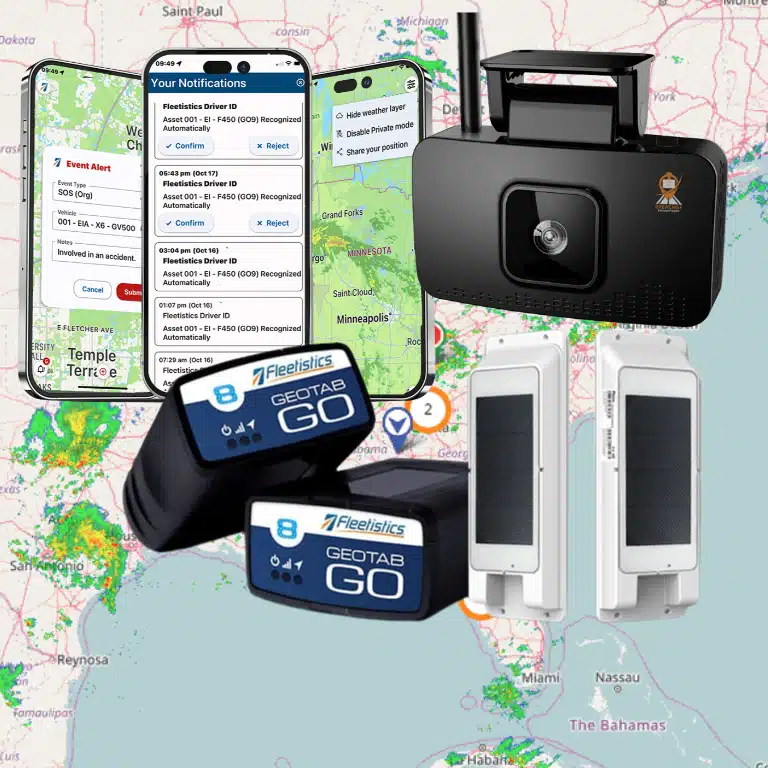
On a construction project, knowing where a truck is only answers one operational question. You also need to know which equipment is working, what is sitting idle. Whether a crew can reach the next jobsite, and which maintenance issue could interrupt the schedule. Construction fleet telematics connects location, equipment, vehicle, and operational data so you can coordinate mixed fleets across roads and jobsites. Depending on the asset and device, that may include GPS position, diagnostics, utilization, alerts, and maintenance information.
Talk with Fleetistics about a construction telematics evaluation.
The value comes from matching the right data to the decision you need to make. A construction fleet may require different approaches for on-road vehicles, heavy equipment, trailers, and portable assets, especially when conditions and connectivity vary between jobsites. Start by understanding what your telematics system should connect, and which information will help your team act faster.
What does construction fleet telematics actually connect?
Construction fleet telematics connects more than a truck to a map. It creates a data layer across the vehicles, machinery, assets, people, and jobsites that keep a project moving. A practical construction fleet telematics program may combine GPS location, available vehicle diagnostics, equipment activity, jobsite boundaries, maintenance events, and safety signals in one operational view.
At the device level, telematics systems can collect GPS location and diagnostics through onboard ports, then transmit that information over a cellular network to a cloud platform. The exact data available depends on the asset and the selected device. A road vehicle may provide different diagnostics than an excavator, generator, trailer, or other non-vehicle asset. Some machines may expose useful engine or PTO information, while others may primarily provide location, movement, or usage signals.
That mixed-fleet distinction matters because construction operations rarely manage one standardized asset class. A single project may involve service trucks traveling between sites, heavy equipment working off-road, trailers holding materials, and portable assets that move between crews. The architecture should let managers choose a suitable configuration for each asset instead of forcing every machine into the same installation model.
From location data to jobsite decisions
Location is the starting point, not the complete outcome. Virtual boundaries can help teams understand when vehicles or equipment enter and leave a jobsite. Movement and utilization data can help identify assets that are sitting idle, assigned to the wrong project, or needed at another location. When supported by the asset and device, engine, PTO, or diagnostic data can add context to that activity.
This visibility supports practical workflows: coordinating deliveries, locating equipment for a crew, reviewing utilization before renting or redeploying an asset, and planning service around actual use. It also gives operations leaders a more consistent way to compare what is happening across multiple jobsites. The goal is not to collect every possible signal. It is to collect the signals that answer the decisions your team makes every day.
For a focused look at equipment outside the standard vehicle category, see tracking specialty construction equipment and tracking non-vehicle jobsite assets. Those resources address equipment-specific tracking, while this broader architecture connects those assets with vehicle operations, maintenance planning, and safety workflows.
Why modular deployment is important
A modular approach lets a contractor begin with the assets and decisions that matter most, then expand as the operating model becomes clearer. Fleetistics combines telematics, hardware, implementation, support, APIs, and integrations for fleets across the USA, Canada, and Mexico.
As a Geotab reseller and implementation partner, Fleetistics can help evaluate vehicle types, equipment conditions, connectivity needs, and the operational data each jobsite actually requires. That keeps the system useful as the fleet changes without assuming that every asset needs the same device or produces the same information.
How do you choose devices for trucks, machinery, and assets?
The right device depends on what the asset can expose, how it operates, and what your team needs to see. A highway truck may provide useful vehicle data through an onboard port, while an excavator, trailer, or portable generator may require a different installation approach. Device and data compatibility varies by asset, make, model, power system, operating environment, and device configuration.
Start with an asset inventory rather than choosing one device for the entire fleet. Identify which units are road vehicles, off-road machinery, trailers, or non-vehicle jobsite assets. Then define the decision each device should support: location, movement, utilization, diagnostics, maintenance planning, theft response, or assignment between jobsites. That process keeps construction fleet telematics practical and avoids paying for data an asset cannot reliably provide.
Construction telematics device approaches and their tradeoffs
| Approach | Where it may fit | What to evaluate |
|---|---|---|
| OEM or embedded | Newer trucks or machinery with connected systems already built into the asset | Available data, platform access, customization, and compatibility across different makes and models |
| OBD or onboard-port device | Compatible road vehicles where installation through an onboard diagnostic port is practical | Port compatibility, data availability, installation security, and whether the device remains connected in daily use |
| Hardwired device | Vehicles or equipment where a more permanent installation is appropriate | Power source, installation access, service requirements, removal plans, and the data the specific asset supports |
| Rugged or portable asset device | Trailers, attachments, containers, generators, and other equipment that may move between jobsites | Mounting, environmental exposure, battery or power needs, movement detection, and the required location reporting workflow |
OEM or embedded systems can integrate closely with the original equipment, but they may offer less customization or fail to work consistently across a mixed fleet. An OBD approach can be efficient for compatible trucks, but the port and available diagnostics should be confirmed before deployment. These options are not interchangeable simply because both are associated with vehicle tracking.
Hardwired options can make sense when a permanent installation suits the asset and operating conditions. They are not automatically an upgrade. Installation access, serviceability, power behavior, and the information available from that machine all matter. For off-road equipment, confirm whether the proposed solution can support the location, utilization, or PTO-related information your operation actually needs. Do not assume every machine exposes identical engine or PTO data.
Portable devices can extend visibility to equipment that does not have a conventional vehicle data connection. Rugged devices can be used where environmental exposure is a concern. They may be appropriate for trailers, attachments, containers, and other equipment shared across jobsites. Review how the device will be mounted, powered, maintained, and reassigned when equipment moves. For a deeper look at tracking specialty construction equipment, match the device to the equipment’s working environment instead of treating it like a passenger vehicle.
Non-vehicle assets need the same discipline. Location alone may not answer whether a generator, compressor, or attachment is available, idle, assigned, or overdue for service. Define the operational event you need to detect and select the device accordingly. Fleetistics also provides guidance on tracking non-vehicle jobsite assets.
Finally, pilot each major asset category before standardizing. Compare the data received with the decisions your supervisors and maintenance team make every day. A modular design may use several device approaches within one platform. Giving your construction operation useful visibility without forcing every truck, machine, trailer, and asset into the same hardware model.
Which jobsite visibility and utilization signals matter?
Construction telematics becomes useful when location data answers an operational question. A map showing where an asset is can help a dispatcher decide whether a truck can support another crew, whether equipment is still at the expected jobsite, or whether a delivery is likely to miss its window. The value comes from connecting that signal to the next decision, not from collecting data for its own sake.
Location and geofences establish the basic operating picture. A live or recent location view can show which vehicles, trailers, and machines are available, moving, or assigned to a site. Virtual boundaries around jobsites can help teams identify arrivals, departures, and assets that remain outside the expected area. For companies coordinating multiple crews, this reduces the need to rely on calls, memory, or scattered check-ins when plans change.
Movement and dwell time add context to the map. Movement history can reveal whether a machine is traveling between sites, sitting unused, or making repeated trips that deserve review. Dwell data can help distinguish a normal staging period from equipment that has remained parked longer than planned. These signals do not automatically explain why an asset is idle, so managers should review the job schedule, weather, crew activity, and operating conditions before changing an allocation.
Utilization and runtime data can show whether equipment is being deployed as intended. Depending on the asset and tracking device, this may include engine activity, operating hours, idle time, or PTO-related information. Not every machine exposes the same diagnostic or PTO data, particularly across mixed fleets, so confirm compatibility before defining a measurement standard. When the data is available, compare use by asset, jobsite, and time period to identify underused equipment. Overloaded resources, or opportunities to move the right machine to the right crew.
Allocation signals turn those observations into planning. A fleet manager can use recent utilization to support rental-versus-owned discussions, schedule transfers between jobsites, and avoid sending a second machine when an existing one is available nearby. Reviewing fleet analytics metrics can also help establish a consistent view of utilization, movement, idle activity, and maintenance-related indicators across vehicle and equipment types.
Safety events provide another layer of jobsite and road visibility. Speeding, harsh braking, rapid acceleration, or other configured alerts can identify situations for coaching and follow-up. Treat these events as prompts for a fair review, not automatic judgments. Combine the event with location, route, traffic, site conditions, and driver context, then use the pattern to guide training or operational changes.
Start with the decisions your team makes every day: dispatching a crew, locating an asset, confirming site activity, balancing equipment, or reviewing a safety concern. Select the signals that make those decisions clearer, then define who owns the response and how the result will be recorded.
How can telematics improve maintenance and safety workflows?
Construction fleets rarely fail in a neat sequence. A truck may be moving materials between jobsites while a skid steer sits unused. And a service vehicle may accumulate demanding operating hours that are not obvious from mileage alone. Construction fleet telematics helps connect those operating conditions to maintenance and safety decisions, provided each asset is equipped for the data it can actually produce.
Plan service around actual use
Where a vehicle or machine provides compatible diagnostic or engine data, managers can use alerts and fault information to identify assets that need attention. Usage data can also support service planning based on operating hours, movement, mileage, or other available measures. That gives the maintenance team a more useful starting point than relying only on a calendar reminder or waiting for a driver to report a problem.
The workflow should be practical: review the alert, confirm the asset and operating context, assign a work order, and record the outcome. A telematics alert is not a diagnosis or a guarantee that a component will fail. It is a signal for a qualified person to investigate. Equipment compatibility varies, and not every machine exposes identical engine, diagnostic, or PTO information. For that reason, evaluate each device and asset combination before standardizing a maintenance rule.
Usage and location records can also help maintenance teams prioritize work. An asset scheduled to return from a jobsite can be routed for inspection, while an underused machine may not need the same service timing as equipment operating continuously. Fleet managers looking to formalize this process can review telematics-informed fleet maintenance and connect the data to existing maintenance reporting practices.
Turn safety signals into coaching
Safety programs work better when they move beyond collecting events. Depending on the selected hardware and configuration, a fleet may use location, speed, braking, acceleration, trip, or other available signals to identify a coaching opportunity. Managers can review the context, discuss the behavior with the driver, and document a specific improvement goal. Repeated patterns may also reveal a route, schedule, site-access, or training issue rather than a problem caused by one person.
Dashcams can add visual context to selected driving events, but their capabilities depend on the installed system and configuration. Do not think of telematics as automatically detecting every distraction, collision, fall, tilt, or unsafe condition. Use only the events the system is designed and configured to capture, then have a person review important footage or alerts before taking action. Fleetistics’ fleet safety and telematics program can help teams structure that process.
Set governance before monitoring people
Employees and subcontractors should understand what information is collected, why it is collected, who can access it, and how long it is retained. Define consistent rules for coaching, incident review, data access, and escalation before turning on broad monitoring. Transparent notice and employee buy-in reduce confusion, while documented governance helps managers use telematics as an operational tool rather than a source of unstructured surveillance.
How should construction telematics connect to business systems?
Construction telematics becomes more valuable when its data supports the workflows your team already uses. A location event should help dispatch assign the right asset. An engine or utilization signal should inform maintenance planning. Time and activity records should support payroll review, while equipment and vehicle data should contribute to accounting and operational reporting. The goal is not to create another isolated dashboard. It is to give each team reliable information in the system where decisions are made.
Start by mapping the handoffs. Dispatch may need current locations, jobsite arrival and departure events, geofence activity, and asset status. Maintenance may need mileage, engine hours, diagnostic information, utilization, and service alerts. Payroll or timekeeping workflows may need approved movement or jobsite activity records, with a clear review step before anything affects pay. Accounting and project teams may need summarized usage, assignment, or cost data rather than every raw GPS event.
Use APIs and integrations to keep ownership clear
Fleetistics provides free API access and more than 300 integrations, giving construction companies options for connecting telematics with other business systems. The right connection depends on the workflow, the receiving platform, and the data that platform can use. An API may support scheduled or on-demand data requests. Webhooks may notify another system when a defined event occurs. A prebuilt integration may reduce implementation effort when it matches the required fields and approval process.
Before connecting anything, define data ownership and permissions. Decide which team owns the asset roster, who can create or change geofences. Who may view employee-related location data, and who approves records used for payroll, customer billing, or project reporting. Limit access by role, document retention expectations, and avoid sending more information than the receiving system needs. Employee and contractor tracking should be explained transparently, with governance that matches the purpose of the program.
Validate the workflow with a practical test
Do not approve an integration because a connector exists on paper. Choose one vehicle, one piece of equipment, one jobsite, and one receiving system for a controlled test. Confirm that the asset identity matches across systems, timestamps use the expected time zone. Location and status events arrive when expected, and duplicate or delayed records are handled sensibly. Then have a dispatcher, maintenance coordinator, and payroll or accounting reviewer complete the task using the connected data.
Record what each person can see, what action the data triggers, and where human approval is still required. Expand the connection only after the test produces a usable record from the field through the final business workflow. That approach keeps construction fleet telematics aligned with operations instead of adding another stream of data no one trusts.
What is a practical construction telematics rollout checklist?
A successful rollout starts with operational decisions, not device installation. Use the following sequence to connect trucks, machinery, trailers, and other jobsite assets without creating a dashboard that no one uses.
- Inventory the fleet and operating environment. List every vehicle, machine, trailer, generator, and high-value asset you want to monitor. Record make, model, age, power source, normal operating location, road or off-road use, and the people responsible for it. Note which assets move between jobsites and which remain stationary. This inventory helps identify where vehicle diagnostics, rugged equipment tracking, portable devices, or hardwired options may fit. Available engine, utilization, or PTO data will depend on the asset and selected device, so do not assume every machine will provide identical information.
- Define the decisions the data must support. Select a small group of measurable operational goals, such as locating equipment between jobsites. Identifying underused assets, improving dispatch coordination, planning maintenance from actual use, or reviewing safety events. Establish a baseline for each goal and decide who will act on an alert or report. A goal such as “improve visibility” is too broad unless the team defines what action better visibility should enable.
- Pilot devices on representative assets. Choose a mix of road vehicles, heavy equipment, and non-vehicle assets that reflects the real fleet. Test connectivity, installation durability, location accuracy for the operating environment, battery or power requirements, and the usefulness of available data. Include equipment that works away from paved roads or spends time at changing jobsites. A pilot should also test whether supervisors can find an asset and answer a practical question without help from an administrator.
- Set data, access, and governance rules. Decide which teams can view location, diagnostics, utilization, and safety information. Define alert ownership, retention expectations, escalation paths, and procedures for correcting asset records. If employee activity is visible, explain what is collected, why it is collected, and how it will be used. Transparent notice and consistent governance support employee understanding and make the program easier to operate responsibly.
- Communicate the rollout before launch. Tell drivers, equipment operators, mechanics, dispatchers, and project managers what will change in their daily workflow. Demonstrate how the system supports equipment allocation, maintenance planning, and safety coaching. Invite questions about privacy and data quality. Communication should be specific to each role, rather than treating telematics as an abstract technology project.
- Launch with defined workflows, not just logins. Assign an owner for daily alerts, weekly utilization review, maintenance follow-up, and asset-data cleanup. Connect relevant information to dispatch, maintenance, accounting, or other business workflows where practical. Fleetistics offers an open ecosystem with APIs and integrations, but each connection should be validated against the team’s actual process before it becomes part of the operating standard.
- Review adoption and optimize in cycles. After launch, check whether users are taking the intended actions, whether alerts are useful, and whether the selected devices provide enough information for each asset type. Remove noisy alerts, refine geofences, and add dashboards only when they answer a recurring business question. Review fleet utilization and maintenance metrics to keep the program tied to decisions rather than page views.
Choose an implementation partner that can support both the technology and the operating change. Fleetistics has served fleets since 2001 and provides 24/7 support. For a construction operation, the right rollout remains the one matched to its assets, jobsites, workflows, and people.
Frequently Asked Questions
What is construction fleet telematics?
Construction fleet telematics combines location, equipment, vehicle, and usage data in a connected platform. It can help teams see where assets are working, review movement and utilization, monitor available diagnostics, plan maintenance, and coordinate vehicles and equipment across jobsites. The right setup depends on the asset types, operating conditions, and decisions your team needs to make.
Can telematics track off-road construction equipment?
Yes, many construction operations use purpose-selected devices for equipment working away from paved roads. Device choice should account for the machine, installation environment, connectivity, power, and the data the asset can provide. Not every machine exposes the same engine or PTO information, so confirm compatibility and available data before deployment.
How does telematics improve jobsite visibility?
Geofences and live location views can show whether vehicles and equipment are at the expected jobsite, moving between locations, or sitting unused. Utilization and movement reports can help identify underused assets, improve dispatch decisions, and support coordination when schedules or jobsite plans change. Alerts should be tied to a specific operational response rather than enabled without a workflow.
Can construction telematics integrate with other systems?
Integration options may include APIs and connections to maintenance, dispatch, safety, or business systems. Before connecting data, define which team owns each workflow, what information must move between systems, and how records will be validated. An open ecosystem can reduce duplicate entry, but compatibility and implementation details still need to be confirmed for your software stack.
How should employers address employee privacy when using telematics?
Introduce tracking openly, explain its operational purpose, limit access by role, and document how location and safety data will be used. Give employees a way to ask questions and separate coaching and safety workflows from unnecessary monitoring. Requirements can vary by location and situation, so confirm the applicable rules with qualified local counsel before rollout.
Choose a construction telematics partner that fits your operation
Construction fleets often combine road vehicles, machinery, and changing jobsite demands. A consultative review can help you match telematics capabilities to your vehicles, equipment, workflows, visibility goals, maintenance priorities, and safety needs. Contact Fleetistics to request an evaluation and discuss a practical path forward for your mixed fleet.