

If you are comparing a Geotab reseller in Florida, look beyond the device and monthly plan. Choose a partner that can help you match hardware and software to your vehicles, explain the setup, support your team after launch, and keep the solution flexible as your operation changes. Fleetistics has served fleets since 2001 and is the longest-running Geotab partner in the United States.
What should a Florida fleet expect from a Geotab reseller?
A reseller should do more than help you order tracking devices. The right partner helps you work through the operational questions behind the purchase: which vehicles or assets need visibility, what information managers need, how drivers will use the system, and how the data should fit existing workflows.
That matters whether you run service vans in several Florida counties, trucks that travel across state lines, a construction fleet with equipment and pickups, or a mixed operation with vehicles and trailers. A small local team and a large multi-site organization may use the same underlying platform in very different ways. Your configuration should reflect your actual work, not a generic feature list.
Fleetistics is a Geotab reseller and technology partner. Its role is to help you select the right hardware and configure the platform, with access to Geotab technical and development staff when needed. Fleetistics remains your advocate and implementation partner. To understand how that relationship differs from buying without a reseller, see this geotab reseller florida.
How do you check whether the reseller understands your fleet?
Start with the work your vehicles and equipment do every day. Ask the reseller to discuss your routes, dispatch process, shift patterns, maintenance responsibilities, and the questions managers cannot answer today. A useful conversation should connect those details to a practical setup rather than jump straight to device counts.
- Vehicle mix: List light-duty vehicles, heavy trucks, trailers, off-road equipment, and any watercraft that need tracking. Different assets can require different hardware and reporting.
- Operating area: Note whether vehicles stay within one metro area, cross Florida regularly, or travel into other states or countries. This helps clarify coverage and compliance needs.
- People and workflows: Identify who dispatches, reviews exceptions, handles maintenance, and communicates with drivers. Decide what each role should see and do.
- Business systems: Name the systems that hold dispatch, payroll, maintenance, fuel, or customer information. Ask how fleet data could support those workflows.
- Success measures: Choose a small set of results to review, such as vehicle utilization, idle time, maintenance follow-through, or safety-event review time.
Ask for examples of how the partner will translate your answers into configuration choices. For instance, if you need to locate a vehicle and review trip history, that is different from needing engine diagnostics, driver coaching, or asset movement alerts. The best-fit solution may use several modules, but each should have a clear job.
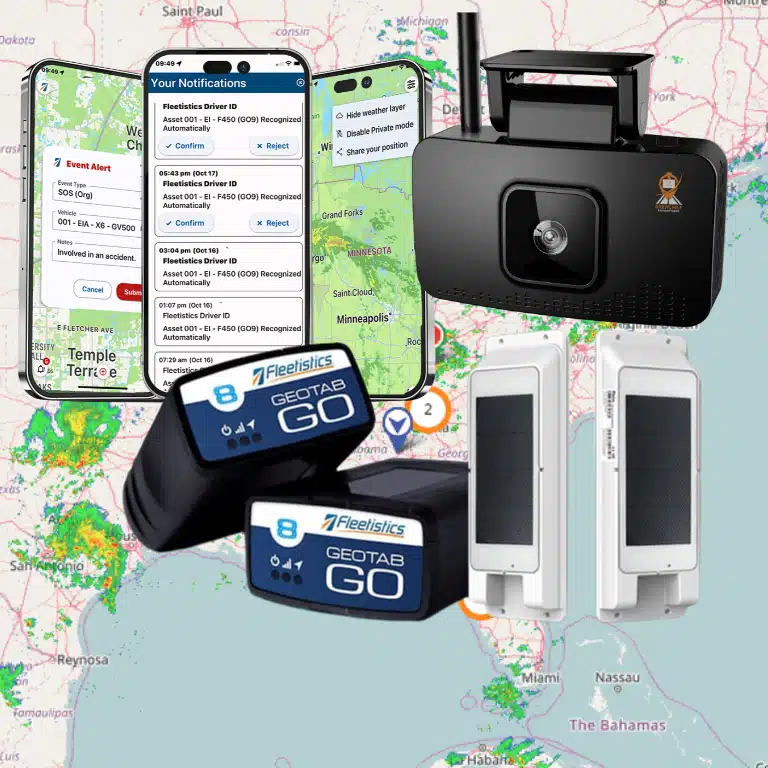
For an overview of the core tracking options, explore Fleetistics’ fleet tracking solutions. If your needs include dedicated GPS hardware, review the available Geotab GO10 device information with a consultant to confirm suitability for your vehicles and requirements.
Which questions reveal the right platform and hardware fit?
Geotab technology can support a range of fleet needs, but you still need to select the right combination. Ask the reseller to explain what each proposed device captures, what the platform will display, and what additional equipment or subscriptions may be needed. Have the answers documented so the people approving the project and the people managing it share the same expectations.
| Area to compare | Questions to ask | What a useful answer includes |
|---|---|---|
| Vehicle tracking | Which locations, trips, and vehicle details will we see? | Specific data and reporting tied to your operating questions. |
| Diagnostics | What vehicle data is available for our makes and models? | Clear explanation of compatibility and any limits by vehicle. |
| Driver safety | Do we need video, alerts, or coaching workflows? | A defined purpose, review process, and transparent driver communication plan. |
| Non-vehicle assets | How will trailers or equipment be tracked? | Hardware and update-frequency choices appropriate to how the asset is used. |
| Software fit | Can we begin with core needs and add capabilities later? | A modular plan with clear functions and room to scale. |
Avoid treating a longer feature list as proof of better fit. Some fleets need detailed diagnostics and integrations; others first need dependable location visibility and a simple process for finding vehicles. Hardwired options can involve tradeoffs in installation and available data, so ask what each configuration does and does not provide instead of assuming one type is always superior.
Fleetistics offers different platform options rather than a one-size-fits-all package. Its platform comparison can help frame the discussion. Ask which tier addresses your current use case, which features are optional, and what would trigger a change later. If your fleet is small, confirm that the solution will not create unnecessary administrative work. If it is large or spread across locations, ask how permissions, reports, and rollout responsibilities can be organized.
How should support and rollout be evaluated?
The first week after devices arrive is only one part of implementation. Ask who helps plan installation, how users are introduced to the platform, what training is available, and where your team should take questions. Clarify whether your internal staff or a third party will handle any installation work and how the configuration will be checked before broad deployment.
A practical rollout often begins with a defined group of vehicles or one operating unit. Use that stage to confirm device fit, data quality, alerts, user access, and the daily management routine. Capture what is working and what needs adjustment before expanding to the rest of the fleet. Your evaluation should have agreed objectives and a decision date, not just a general impression that the software looks useful.
Fleetistics uses a 30-day Solution Evaluation Process for ordinary fleet contexts. A different, longer evaluation may be appropriate for verified government or extremely large fleet contexts; do not assume that timeframe applies to every business. Ask the consultant to confirm which process fits your organization and what milestones, training, and review criteria it includes.
Also ask what ongoing help looks like after launch. Fleetistics documents 24/7 support. Confirm the channels available to your team, how to report a technical issue, and how configuration questions are handled. The company’s background and approach offer useful context, but your own discussion should establish the support expectations for your project.
What should you consider for integrations and future changes?
Fleet data is more valuable when it fits the way your business works. If managers move between a fleet platform and dispatch, maintenance, or business software, ask whether information can be shared and what setup that requires. Get specific about which records need to move, how often they should update, and which system remains the source of truth.
Fleetistics describes an open ecosystem with free APIs and more than 300 integrations. That does not mean every integration will fit every workflow without configuration. Ask for a walkthrough using your use case, including what data is available, whether a third-party integration has its own costs or requirements, and who supports it if something changes.
For a deeper discussion, review Fleetistics’ data integration options. Consider how your needs may evolve, too. A company may add vehicles, start tracking trailers, introduce video, or build a more structured maintenance process over time. A modular setup lets you consider those additions as they become useful instead of paying for complexity before you need it.
How can a Florida fleet compare reseller proposals fairly?
Ask every provider to respond to the same requirements. A short written scorecard makes it easier to compare hardware, platform functions, setup, support, and future flexibility without focusing only on a headline price. Include both the people who approve spending and the managers who will use the system.
Separate the initial purchase and setup questions from the ongoing operating questions. For the initial phase, clarify hardware compatibility, installation assumptions, configuration, onboarding, and any work your own IT or operations team must complete. For ongoing use, ask how subscriptions are structured, which platform functions are included, what support covers, and whether an integration has separate costs or maintenance needs. Get the details in writing so you can compare like with like.
Ask the reseller to walk through a realistic example from your operation. For a service fleet, that might be how a dispatcher finds an available vehicle and reviews a missed appointment. For a truck fleet, it might be how a manager identifies a maintenance concern and assigns follow-up. For a construction operation, it could be confirming where a trailer or piece of equipment is located at the start of a shift. A demonstration connected to your workflow is more useful than a tour of every menu.
Finally, identify what is outside the proposal. Do you need to supply phones or tablets? Who assigns user permissions? Does your organization have a policy for driver notices and data access? Are there legacy devices to remove? These details are easy to miss when a proposal focuses on the tracking unit alone, but they can affect how smoothly the system is adopted.
- Fit: Does the proposal address the fleet’s specific vehicles, assets, routes, and operating questions?
- Clarity: Are device capabilities, platform functions, and limitations explained plainly?
- Deployment: Is there a workable sequence for installation, configuration, training, and review?
- Support: Do you know who to contact and what support is available after launch?
- Adaptability: Can you add capabilities or connect systems without replacing the whole approach?
- Measurement: Are the proposed outcomes measurable with a baseline and a responsible owner?
Then check the economics using your own operating data. Record current fuel use, maintenance events, vehicle utilization, administrative time, or safety processes—whichever measures connect to your goals. Estimate possible value using assumptions you can explain, and separate verified facts from estimates. Results depend on implementation, driver practices, vehicle mix, and management follow-through; no technology can guarantee a particular savings level.
For example, if your goal is to reduce unnecessary vehicle use, first define how you will identify avoidable trips and who can act on the information. If the goal is fewer missed maintenance tasks, document the current process and decide how reminders will be assigned and completed. These steps turn an abstract ROI claim into a reviewable business case.
Use a simple baseline-and-review routine during the evaluation. Before activation, record how you currently answer the question the system is meant to solve: how long it takes to find a vehicle, how often a particular maintenance task is missed, or how managers review incidents. During the evaluation, use the same definition and reporting window. If the measure changes, note the reason, such as a seasonal workload shift or a change in staffing, rather than attributing every difference to the technology.
Decide who owns each result. A manager may review weekly exceptions, a maintenance lead may close service actions, and a safety lead may review events with supervisors. Keep the review cadence manageable. A short weekly check-in during launch can identify configuration problems; a less frequent ongoing review can help determine whether alerts remain useful and whether the team is acting on them. If an alert produces no action, reconsider its threshold, recipient, or purpose.
Do not overlook adoption as a measure. Ask whether managers can find the information they need without extra work, whether drivers understand the process, and whether the people responsible for follow-up have time and authority to act. A technically successful installation is not the same as an operationally useful system. The reseller should be able to discuss training and configuration adjustments as part of an evaluation, not only device activation.
Which Florida-specific operating details should you discuss?
Florida fleets can have very different patterns: urban stop-and-go work, long highway runs, seasonal demand, weather disruptions, and operations that extend beyond the state. Bring those realities into the design conversation. Ask how managers can view the locations, trip activity, alerts, or reports that matter to their own routes and response procedures.
If vehicles cross state lines or drivers perform regulated interstate work, make compliance needs explicit. Do not assume every local or short-haul fleet needs an electronic logging device. Determine which rules apply to your operation and vehicle use, and confirm compliance requirements with the appropriate authority. The Federal Motor Carrier Safety Administration is a starting point for federal commercial motor carrier information; a reseller can help configure tools, but should not replace your compliance review.
Weather and changing road conditions can also affect dispatch and service plans. Ask whether your team needs weather information alongside vehicle locations, and how it would be used to make a decision. Fleetistics provides weather layers for fleet tracking; evaluate whether that capability fits your routes and operational response rather than treating it as a default requirement.
For fleets that need maintenance visibility, establish how vehicle alerts and service records will reach the people responsible for action. Explore the fleet maintenance capabilities and ask how they complement your current system. The goal is a dependable workflow: identify what needs attention, assign an owner, and confirm completion.
How should you handle driver communication and data access?
Technology works better when employees understand what is collected and why. Before rollout, explain what the fleet will monitor, who can access information, how it will be used, and how drivers can ask questions. Be clear about work-related tracking and establish appropriate governance for access, retention, and review.
Invite supervisors and drivers to identify practical concerns early. They may spot installation issues, confusing alerts, or a mismatch between reports and the way work is actually assigned. A transparent policy and a consistent explanation help build understanding and make it easier to use information constructively. Review your procedures with qualified counsel or HR professionals where needed, especially if your organization operates in more than one jurisdiction.
When considering video, define the specific safety or incident-review purpose and the process for handling footage. Fleetistics’ fleet dashcam options can be evaluated alongside your safety program, driver communication, and privacy practices. Add cameras only when the intended workflow and internal responsibilities are clear.
Book a Demo to discuss your fleet requirements
Frequently asked questions
Does a Geotab reseller change the underlying platform?
Geotab provides the platform technology. A reseller such as Fleetistics helps you select hardware, configure the platform, and plan implementation and support. Ask what responsibilities belong to the reseller and what may involve Geotab technical or development resources.
Can a small Florida fleet use a modular Geotab solution?
Fleetistics supports businesses from small operations, including very small fleets, through large enterprise organizations with graduated or modular platform tiers. Discuss the tasks you need to solve first and confirm which functions are appropriate for your fleet size and workflow.
Should every fleet add cameras, ELDs, and integrations at launch?
No. Begin with your operating needs and applicable requirements. Some fleets may need video or electronic logging tools; others may first need location visibility, maintenance workflows, or asset tracking. Add capabilities when there is a clear purpose and an owner for using them.
How can I tell whether the evaluation is working?
Agree on a baseline, a small set of measurable goals, and review dates before deployment. Check whether the system provides reliable information, whether users can follow the workflow, and whether managers can act on the results. Use the findings to decide what to adjust or whether to proceed.
Where should you start when choosing a Geotab reseller in Florida?
Prepare a concise fleet profile: vehicle and asset types, operating areas, current systems, key management questions, and the outcomes you want to measure. Use it to ask each potential partner the same questions about fit, configuration, support, integrations, and rollout. A consultative review can help you separate essential capabilities from additions that can wait.
Fleetistics combines Geotab technology with flexible platform options and support for fleets across the USA, Canada, and Mexico. Speak with a fleet consultant to review your requirements and discuss a practical next step for your operation.
With clear requirements and a measured evaluation, you can choose a solution that fits how your Florida fleet works today and can adapt as its needs change.