


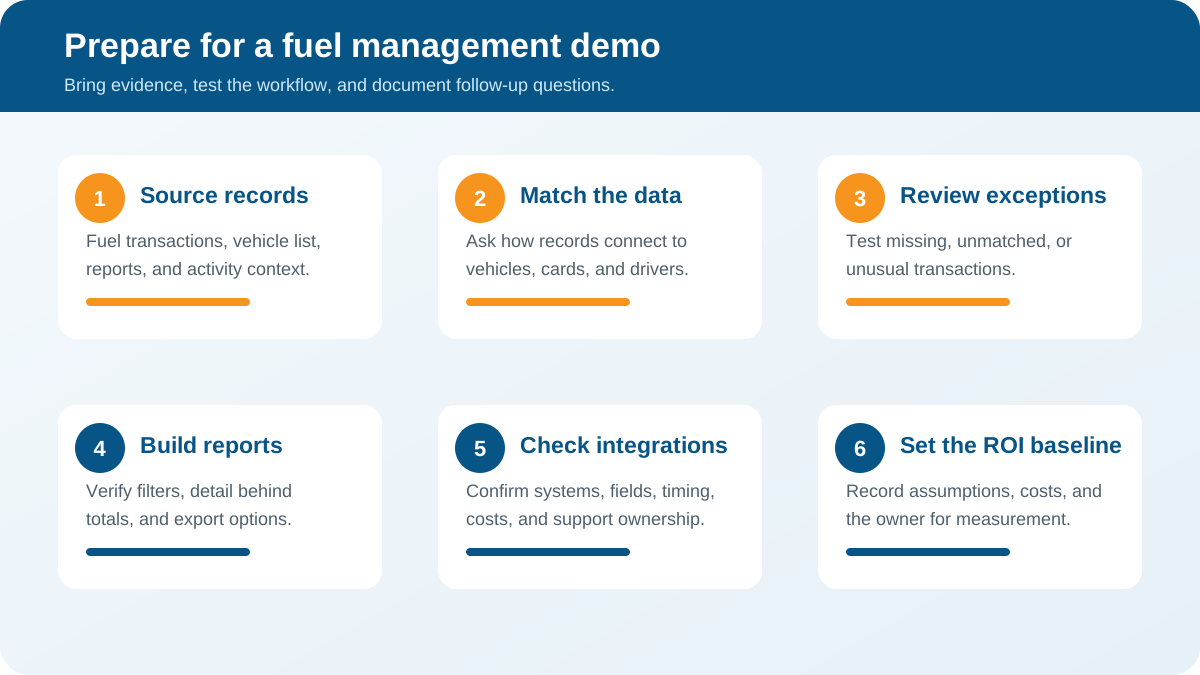
A fleet fuel management software demo is most useful when it answers questions about your actual fuel workflows, not just when it displays a dashboard. Before you meet with a provider, gather a few representative records and decide what you need to improve. Prepare to test how fuel transactions, vehicle activity, and reporting fit together.
Talk with a fleet consultant about your demo
What should you prepare before the demo?
Write down the problems that prompted your search. Examples include unexplained fuel spend, limited visibility into fuel use by vehicle, time-consuming reconciliation, excessive idling, or separate systems that do not share useful information. Rank those problems so the demonstration can spend time on the issues that matter most.
Bring a small, representative sample rather than trying to assemble a perfect data set. A few weeks of fuel transactions, a vehicle list, and examples of the reports your team produces can reveal whether a system’s workflow matches your operation. Remove or mask personal and payment details that are not needed for the discussion.
- Vehicle and asset list: Include unit identifiers, vehicle types, departments, and locations where relevant.
- Fuel records: Gather sample transaction details such as date, volume, price, fuel type, and the vehicle or card identifier, if available.
- Activity context: Note how you currently review mileage, engine hours, routes, or idle time.
- Existing reports: Bring a fuel-spend report, reconciliation spreadsheet, or exception list your team uses today.
- Stakeholders: Identify who reviews transactions, manages vehicles, approves budgets, and uses the reports.
Also clarify what is in scope. Fuel management may involve transaction review, vehicle data, driver processes, fuel cards, exception handling, or integrations with accounting and maintenance tools. Do not assume every demo covers all of these. Ask the provider to confirm what will be demonstrated and what information they need from you.
Fleet Forum’s fleet-acquisition planning material similarly emphasizes determining operational needs and budget before deciding what kind of fleet solution fits. Use that same discipline here: define the problem and constraints before comparing screens or feature lists. Review the fleet-planning questions.
Which data sources should the demo cover?
Fuel decisions are only as useful as the records behind them. Ask the presenter to explain where each data point comes from, how it is matched to a vehicle, and what happens when a record is missing or inconsistent. A polished chart can hide gaps in vehicle identifiers, dates, odometer readings, or transaction details.
Ask the provider to walk through the path from a source record to a report. For example, a fuel purchase enters the system and is associated with an asset or card. A reviewer checks an exception, and the updated information appears in a report. Confirm which steps are automated, which require a person, and which depend on another system or data feed.
- Can the system show the transaction fields available to a reviewer?
- How are vehicles matched when identifiers differ between fuel, telematics, and accounting records?
- Can your team identify missing, duplicated, delayed, or unmatched records?
- Can mileage or engine-hour context be shown alongside a purchase when that data is available?
- How are corrections documented, and can a reviewer see the reason for a change?
Ask for a clear distinction between data that is available now and data that requires a new device, integration, configuration, or process change. If a capability depends on vehicle compatibility or a particular data source, ask how that dependency will be checked for your vehicles. Fleet fuel reporting is more credible when the presenter identifies limitations instead of treating every record as complete.
If your team is still aligning on the basic location and movement data behind these workflows, review how GPS fleet tracking works. Then look at the factors that shape fleet fuel economy.
How should you evaluate idling and vehicle activity?
Idling can be a useful coaching and operating indicator, but a demo should show how your team will interpret it, not simply display a total. Ask how the system defines an idle event, what time period it uses, whether thresholds can be configured, and how the team can separate actionable patterns from expected operating conditions.
Request a practical example based on a vehicle type and work pattern similar to yours. A service vehicle waiting for a customer, a truck powering equipment, and a vehicle left running unnecessarily may look similar in a simple summary. The operational context and a consistent review policy matter. Ask whether users can examine an event’s time, duration, location, and related vehicle activity before deciding what action to take.
Also ask how managers share findings with drivers. A useful process sets clear expectations, checks context, and gives employees a chance to understand or explain an event. Transparent notice, appropriate governance, and driver buy-in can make monitoring more constructive. Fleetistics has resources on introducing GPS tracking to employees and developing a sample driver policy.
In the demo, test whether a manager can move from a fleet-level summary to a specific vehicle and time period. Then export or share the finding using the process your company already follows. Ask how the system handles exceptions such as maintenance activity, jobsite work, or other operating needs. Do not treat an idle-time number as a complete explanation of driver performance or fuel savings.
What should you ask about fuel transactions?
Transaction review is often where a fuel-management workflow becomes tangible. Ask the presenter to show a purchase from its original record through review, exception handling, and reporting. Confirm how your team can examine transaction date, gallons or liters, price, fuel type, card or vehicle assignment, and any available mileage or engine-hour information.
Then ask what the system can flag and how those rules work. Examples for discussion might include an unusually large purchase, a purchase that cannot be matched to a vehicle, or transaction timing that merits a closer look. These are review prompts, not proof of misuse. Ask whether a reviewer can see why an item was flagged, mark it as explained, and retain a note or audit trail.
Important questions include:
- Can the team filter transactions by date, vehicle, department, location, or fuel type?
- What happens when a driver, vehicle, or card identifier is not recognized?
- Can authorized users add context and record how an exception was resolved?
- Which transaction sources are supported, and are there additional fees or setup steps?
- Can the system compare fuel purchases with available vehicle activity without implying that every mismatch is fraud?
Ask the presenter to use a realistic example and explain each step in plain language. If the demonstration uses sample data, ask how your organization’s records would be mapped and validated. Your team should leave knowing what data is required, how often it arrives, who reviews exceptions, and what the review process cannot establish on its own.
Which reports and metrics will help you make decisions?
Start with the decisions your reports need to support. A fleet manager may want to identify a pattern by vehicle or department. A finance team may need consistent transaction totals. An operations leader may want to see whether a change in routing or work practices coincides with different fuel use. These needs can call for different views of the same underlying data.
Ask the presenter to build or open a report and then answer a real question with it. Can you compare periods using a consistent basis? Can you filter by asset group? Can you find the records behind a total? Can the right users access the report without unnecessary data exposure? If the report is exported, do column names and identifiers make sense to the people who will use it?
Agree on a short list of measures before the demo. Depending on the data available, these may include fuel spend by vehicle or department and transaction exceptions reviewed. They may also include fuel use relative to distance or engine hours, plus idle time over a defined period. Define units, time periods, and exclusions before comparing results. Avoid treating a change in a metric as proof of savings until you understand the operating conditions and baseline.
Compare report needs against current tools. A system may have a broad library of dashboards, but the useful test is whether your team can answer its priority questions accurately and repeatably. See fleet analytics metrics to consider and practical fleet fuel-saving workflows for related evaluation ideas.
How do integrations fit into the fuel workflow?
List the systems that already hold relevant information: fuel-card or transaction sources, telematics, accounting, maintenance, dispatch, and business intelligence tools. The list will vary by fleet. For each one, ask whether the integration is available, what fields move between systems, how often data updates, and who is responsible for setup and support.
Do not stop at the word “integrates.” Ask the presenter to show the actual workflow or provide a clear explanation of the data exchange. Does information flow one way or both ways? How are errors surfaced? Can your IT team review the integration requirements? Are there access controls, API limits, or additional costs to consider? If an integration is not part of the standard configuration, ask what alternative process is proposed.
When a platform offers an open ecosystem, verify what that means for the specific systems you use. Fleetistics describes an open approach that includes free API access and integrations through the Geotab ecosystem. Ask how a particular connection would apply to your use case rather than assuming every connection is included or turnkey. Fleetistics’ Geotab Fleet Card can help frame the discussion.
What should the demo show about implementation?
A convincing demo should make the first weeks of use understandable. Ask who will help map vehicles and identifiers, configure users and permissions, confirm data sources, and train the people who review fuel activity. Clarify what your team must provide and who owns each step. A practical implementation plan identifies dependencies and decision points before a launch date is promised.
Ask how configuration will reflect your fleet’s mix of vehicles, equipment, departments, and operating practices. Fleet management needs differ, so ask which elements are modular and how you can begin with the workflows that matter most. Fleetistics has worked with Geotab technology for many years. Discuss what platform capabilities and support are relevant to your specific operation rather than assuming a standard package fits every fleet.
Consider how users will learn the system. A person responsible for transaction review may need different training from a department manager who checks a monthly summary. Ask whether training is remote or on site, what reference materials are available, how questions are handled after launch, and how changes to vehicles or roles are maintained. Fleetistics’ training resources offer a starting point for the conversation.
Before choosing a solution, request a written outline of scope, responsibilities, required hardware or data, implementation steps, recurring costs, and any assumptions. If the demonstration reveals a missing data source or an unconfirmed integration, record it as an open item rather than treating it as settled.
How can you evaluate ROI without assuming a savings promise?
Set a baseline before interpreting projected value. Choose a time period that represents normal operations, document the sources used, and note unusual conditions such as changes in routes, fuel prices, fleet size, or workload. Decide which costs and outcomes belong in the calculation. A fuel-related business case may consider fuel spend, administrative time spent reconciling transactions, and the effort needed to review exceptions, but avoid counting the same benefit twice.
Ask the provider to distinguish measured results from estimates. If a savings scenario is presented, request the assumptions behind it: baseline period, vehicles included, expected behavior change, implementation costs, and the time needed for the outcome to appear. A demo can show how a platform may support a workflow; it cannot by itself guarantee a particular reduction in fuel use.
Use the worksheet below to keep the conversation focused. Fill it in during or immediately after the meeting, and assign an owner to verify each unresolved item.
Evaluation worksheet
Data sources
What to verify in the demo: Required records, identifiers, update frequency, and missing-data handling.
Evidence or follow-up: Sample data map and named owner.
Idling and activity
What to verify in the demo: Event definition, context, filters, thresholds, and review process.
Evidence or follow-up: Example workflow and draft policy questions.
Transactions
What to verify in the demo: Fields shown, matching rules, exceptions, notes, and audit history.
Evidence or follow-up: Representative transaction walkthrough.
Reporting
What to verify in the demo: Priority measures, filters, detail behind totals, and export options.
Evidence or follow-up: Sample report using agreed definitions.
Integrations
What to verify in the demo: Supported systems, fields exchanged, direction, timing, cost, and support.
Evidence or follow-up: Technical confirmation for each required connection.
Implementation
What to verify in the demo: Setup tasks, fleet data needed, training, responsibilities, and timeline dependencies.
Evidence or follow-up: Written scope and responsibility list.
ROI
What to verify in the demo: Baseline, assumptions, costs, expected review period, and measurement owner.
Evidence or follow-up: Documented calculation with estimates labeled.
How should you compare demo options?
Use a consistent scorecard for every provider. Rate each item against your actual requirements, not against how polished the presentation felt. A simple scale such as “meets,” “partly meets,” “does not meet,” and “not yet verified” helps expose open questions without pretending that all capabilities have equal importance.
For each item, record the evidence shown and the person who will confirm it. Mark whether a function is available now, needs configuration, depends on an integration, or requires a separate process. Then compare the total cost and ongoing effort alongside capability. A lower price may not represent a better fit if it leaves your team with extensive manual reconciliation. A larger feature set may not be worth paying for if it does not support your priority workflows.
Fleetistics offers modular fleet-management solutions using Geotab technology. In your discussion, ask how a configuration can be matched to the fleet’s needs and expanded or adjusted over time. The right evaluation is not a contest to count features. It is a check that the data, people, and procedures needed for your fuel workflow can work together.
What should you do after the demo?
Within a day, send a short recap of the requirements you tested, what the presenter showed, and what remains unverified. Separate confirmed capabilities from statements that need technical or commercial confirmation. Give each open item an owner and a date. Ask for a second session only when it can resolve a specific question, such as a data mapping, an integration, or a report built around your sample workflow.
Before making a decision, review the proposed scope with the people who will use and support the system. Confirm data access, permissions, training, cost assumptions, and the measures you will use to evaluate progress. If a demo cannot answer a core requirement, ask for a direct answer in writing rather than relying on an optimistic interpretation.
Book a demo-planning conversation
Frequently asked questions
How long should a fleet fuel management software demo take?
There is no single ideal duration. Set aside enough time to test your priority workflows, ask questions about data and implementation, and agree on follow-ups. A focused agenda and representative examples are more valuable than a long tour of features your team may not use.
Should we bring real fuel transaction data?
Bring a small sample if your organization permits it, and remove sensitive information that is not needed. If sharing real records is not appropriate, ask the provider to demonstrate with sample data and explain how your fields and identifiers would be mapped.
Can a demo prove how much fuel our fleet will save?
No. A demo can show reporting and workflows that may help your team manage fuel use, but actual outcomes depend on data quality, operating conditions, decisions, and follow-through. Validate any projection against a documented baseline and clearly stated assumptions.
What if we do not have a fuel card program?
Ask which transaction sources the system can use and what records your team would need to provide. Focus the demo on available sources, matching fields, reporting needs, and any manual steps so you can judge whether the workflow is practical for your operation.
Ready to prepare your fleet fuel management software demo?
A strong evaluation connects your data and daily processes to clear requirements, then tests those requirements with realistic examples. Fleetistics can help you discuss fleet technology options and identify the questions your team should resolve before moving forward.
Contact Fleetistics to plan your evaluation
With a defined baseline, documented questions, and clear owners for follow-up, your team can compare options on operational fit instead of presentation alone.



