
A fleet telematics system combines vehicle or asset devices with software and workflows that help you understand fleet activity and act on it. Before deployment, define which decisions you need to improve, then verify device fit, data quality, safety and maintenance workflows, compliance needs, integrations, support, and the cost and effort of scaling. A short, structured pilot can reveal gaps before they affect the wider fleet.
What should you decide before comparing systems?
Start with the operational problem, not a feature list. A system can collect a large amount of data and still be a poor fit if managers cannot turn it into an action. Write down the decisions the team needs to make more reliably: where vehicles are, whether a service vehicle reached a job, which assets are underused, when maintenance is due, or what safety event needs review.
For each decision, identify the user, the information they need, and the next step they should take. A dispatcher may need a current vehicle location and an estimated arrival. A maintenance lead may need fault-code context and an odometer reading. A safety manager may need an event clip and a consistent review process. These are different workflows, even if they draw from the same platform.
- Define the fleet: List vehicle types, equipment, operating areas, hours, and any seasonal or cross-border use.
- Set a baseline: Record the current process, its time burden, known gaps, and a few measures you can compare during a pilot.
- Prioritize: Separate must-have requirements from features that would be useful later.
- Name an owner: Assign a person to each workflow, including device installation, data review, and follow-up.
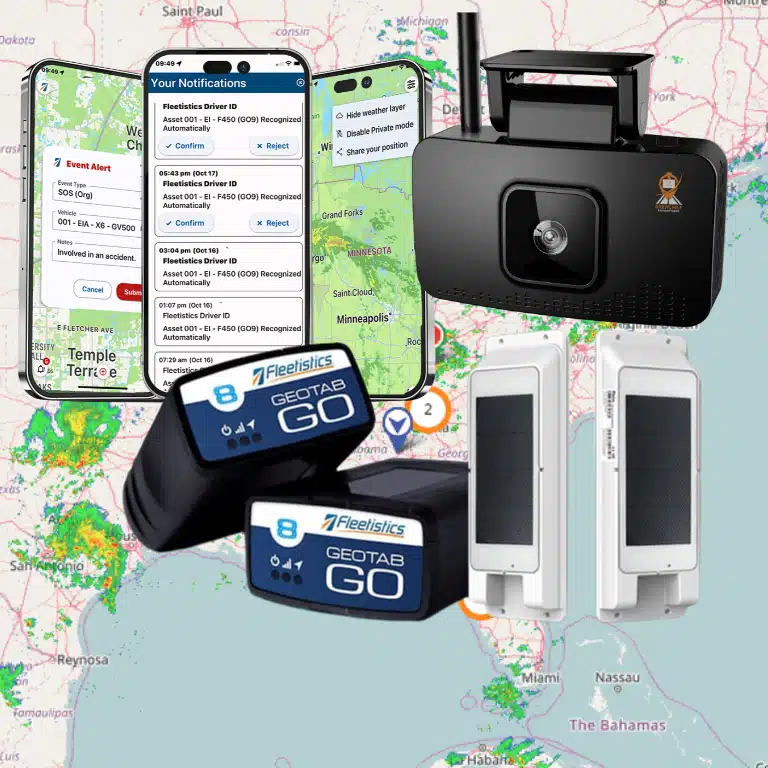
This scoping work helps you avoid buying too much capability for a narrow need—or choosing a basic configuration that cannot support a later use case. Fleet telematics platforms can cover tracking, vehicle diagnostics, driver-facing workflows, safety tools, and asset monitoring, but not every fleet needs every component at once. Fleetistics works with Geotab technology and offers modular solutions that can be matched to fleet type, size, and intended workflows.
Which hardware and installation details should you check?
Match hardware to the vehicle, asset, and data requirement. A device that connects through a vehicle diagnostic port may suit many vehicles, while other applications may call for hardwired options or a separate asset tracker. Ask what data each configuration can provide and what it cannot. Do not assume that two devices with similar names capture the same signals.
Make a unit-by-unit inventory before ordering. Record make, model, year, vehicle class, power access, and any special equipment that might affect installation. Include trailers, powered equipment, and non-powered assets if they are in scope. For asset deployments, check mounting, battery or power needs, environmental exposure, and expected reporting behavior. Location reporting depends on where a device operates and the communications available, so your coverage plan should account for routes and sites where connectivity may be limited.
Ask the provider to explain installation choices in plain language. Confirm whether the installation is plug-in, hardwired, or another type; whether your team can complete it or an installer is needed; and what vehicle downtime to plan for. Clarify what happens when equipment is moved, replaced, or sold. Get a documented device-to-vehicle assignment process so location and vehicle records do not drift apart.
Review device-health visibility as well. Can an administrator spot a device that has stopped reporting? What diagnostic details are available, and who receives an alert? Decide who checks health status and how quickly the team should investigate. If GPS tracking hardware is part of your plan, compare device requirements with your inventory rather than selecting from a generic product list. Review Fleetistics information about GPS tracking hardware and the Geotab GO10 device.
How can you test the data before relying on it?
Ask for a live demonstration using the kinds of vehicles, routes, and operational questions your team actually has. A map view alone does not tell you whether the data is complete enough to support dispatch, billing review, maintenance planning, or an investigation. Check both the information shown and the process for interpreting it.
- Location and timestamps: Confirm how the system presents the last report, time zone, and reporting interval. Test vehicles in a yard, on a regular route, and in a known coverage-challenge area.
- Vehicle details: Verify which odometer, engine, and diagnostic information is available for the specific vehicle and device combination.
- Exceptions: See how the platform handles missing reports, disconnected devices, duplicate records, and unexpected readings.
- History and access: Check how users find past trips or events, what export options exist, and which roles can view or change records.
- Meaning: Ask what each field represents and where it comes from. Similar labels can conceal differences in calculation or update timing.
Set simple acceptance tests in advance. Select a sample of vehicles, compare system records with an operational log, and note whether information arrives when users need it. The goal is not to declare every data point perfect. It is to learn which information is dependable for which decisions and where a manual check remains necessary.
GPS is one part of the location picture. The U.S. government’s GPS.gov overview explains the system and its uses. For fleet deployment, validate actual device behavior in your own environment rather than treating a map demonstration as proof of route-level coverage or reporting performance.
What safety workflows should the system support?
Safety tools are useful when they connect evidence to a fair and repeatable process. Decide whether your priority is speeding or harsh-event visibility, coaching, collision review, camera coverage, or a combination. Then define who reviews events, how a driver can provide context, what follow-up is appropriate, and how the team will assess whether the workflow is helping.
If you are evaluating video, check camera views, event triggers, clip availability, storage and access controls, and how managers share or retain footage. Ask to see the steps from event notification through review and coaching—not just a sample recording. Consider installation and driver experience, too. A system that is difficult to use or poorly explained can undermine adoption.
Tell employees what information is collected, why it is collected, who may see it, and how it will be used. Put expectations in a written policy, set appropriate access, and give drivers a way to ask questions or correct a misunderstanding. Transparent notice and consistent governance make monitoring easier to explain and can improve buy-in. Fleet managers can use Fleetistics resources on introducing GPS tracking to employees and creating a written driver policy as planning references.
For fleets comparing camera options, make the process concrete: test a representative installation, review an event with the intended users, and verify that the workflow fits your policy. Fleetistics’ guide to AI dashcams for fleets describes considerations to include in that evaluation.
How should maintenance fit into the evaluation?
Fleet telematics can support maintenance planning when vehicle data is connected to a clear work process. Decide which signals or reminders matter to your team: mileage or engine-hour intervals, fault information, inspection findings, or vehicle availability. Then establish who reviews each item, how it becomes a work order, and how completion is recorded.
Ask whether the platform can connect relevant vehicle data to your current maintenance system or whether staff will need to enter information manually. Test a complete example: a vehicle reaches a service threshold, the right person receives a notice, the vehicle is scheduled, and the maintenance record is updated. Identify how the workflow handles vehicles with incomplete data or different service schedules.
Do not assume alerts replace inspection or technician judgment. Use them as a prompt for a defined response, and verify the source and limits of the data. A useful pilot may compare how quickly the team identifies a maintenance need, whether records are easier to reconcile, and how often alerts require clarification. Fleetistics’ fleet maintenance software information can help you frame maintenance requirements.
Which compliance requirements belong in the scope?
Compliance needs depend on the vehicles, operation, jurisdiction, and type of work. List applicable requirements before evaluating features. A local service fleet, a mixed equipment operation, and an interstate trucking fleet do not necessarily need the same tools. Avoid treating a compliance label as proof that a configuration meets your particular obligations.
For trucking operations where electronic logging requirements apply, confirm the device and workflow against relevant rules and operating conditions. Ask how drivers handle records, supporting documents, inspections, and a device or connectivity issue. Fleetistics’ ELD compliance resources and DOT fleet compliance guide are starting points for those use cases. If your fleet does not have that requirement, do not let an unrelated feature drive the decision.
For every compliance use case, document the requirement, the evidence the system provides, the person responsible, and the fallback process. Ask the provider to demonstrate the workflow with a realistic scenario. For federal motor-carrier requirements, verify current information with the Federal Motor Carrier Safety Administration and your compliance adviser; a product demonstration is not a substitute for that review.
How do integrations affect deployment?
List systems that need to exchange data with telematics: dispatch or transportation management, maintenance, fuel, payroll, customer service, safety, and reporting tools. For each connection, state which system owns the source data, what fields must move, how often updates are needed, and who will resolve errors. “Integrates with” is not specific enough to plan a deployment.
Ask to see the actual data flow. Confirm whether the connection is available today, whether it is one-way or two-way, what setup or mapping work is required, and how failures are surfaced. Check whether identifiers such as vehicle, driver, location, and work order match across systems. If a workflow depends on an integration, include it in the pilot and test exceptions as well as the successful path.
Also clarify data access and portability. Ask what reports or exports are available, who can use an application programming interface, what documentation and support accompany it, and what happens to data if your needs change. Fleetistics describes its open ecosystem and data connection options on its data integration page. Keep the evaluation focused on the specific interface and fields your use case needs, rather than counting integrations as a goal by itself.
What should you ask about service and support?
Support is part of the operating model, not an item to check after purchase. Establish how drivers and administrators get help, which issues the provider handles, how an urgent outage is escalated, and what your own team must manage. Ask who assists with configuration, user training, device troubleshooting, and system changes as the fleet evolves.
Request a clear implementation plan with responsibilities and decision points. It should cover vehicle and user lists, installation coordination, configuration, data checks, training, launch readiness, and follow-up. Ask what information the provider needs from you and when. A plan that identifies owners on both sides can uncover resource constraints before they delay deployment.
Evaluate the support experience using realistic questions, not only a sales presentation. Who is the point of contact after launch? How are requests submitted and tracked? What training materials are available? How are changes communicated? Fleetistics has provided fleet solutions since 2001 and offers 24/7 support according to its company information; confirm the support channels and service expectations that apply to your selected solution.
How can you compare options consistently?
Use the same questions for each option and record evidence, open issues, and assumptions. A simple scorecard can help a team avoid letting one impressive feature overshadow gaps in installation, data quality, or adoption. The table below is a starting point; adapt it to your fleet and verify each row in a demonstration or pilot.
| Area | What to verify | Evidence to request |
|---|---|---|
| Hardware | Vehicle and asset compatibility, installation type, power, and reporting limits | Configuration list, installation plan, and sample device-health view |
| Data | Required fields, timestamps, history, exceptions, and access | Live workflow using representative vehicles and acceptance tests |
| Safety | Events, camera needs, review roles, driver context, and policy | Example event from notification through documented follow-up |
| Maintenance | Signals, reminders, work orders, and completion records | End-to-end maintenance scenario and exception handling |
| Compliance | Applicable rules, user steps, records, and fallback procedures | Requirement-to-feature mapping validated for your operation |
| Integrations | Systems, fields, direction, timing, ownership, and error handling | Data-flow diagram and tested connection for a priority workflow |
| Support | Training, escalation, configuration help, and ongoing ownership | Implementation plan, support channels, and responsibility matrix |
| Scalability | New vehicle types, users, locations, and use cases | Expansion scenario with configuration and operating impacts |
Compare the complete operating fit, not just monthly subscription or device cost. Include installation, internal staff time, training, connectivity where applicable, integration work, and the effort to maintain data and policies. Ask which capabilities can be added later and which choices are difficult to change. A modular platform can let a fleet begin with priority workflows and expand as requirements develop, but confirm exactly what is included in the tier and configuration you are considering.
How should you run a useful pilot?
A pilot should answer a decision, not merely show that devices can be installed. Choose a sample that represents your operational variety: different vehicle classes, routes, job types, and users. Keep the scope manageable enough to support close review. Set the start and end dates, named owners, baseline, acceptance criteria, and a process for collecting feedback.
- State the question. For example, can dispatch use location data to make a defined handoff easier, or can maintenance staff find a particular vehicle signal without manual record searching?
- Choose measures. Use a small number of indicators tied to the question, such as completion time, missing information, exception volume, or user-reported effort. Define how each will be recorded before starting.
- Test ordinary and unusual cases. Include a normal workday and relevant edge cases such as a vehicle change, a missed report, or a maintenance exception.
- Involve the people doing the work. Train managers and drivers on the pilot’s scope, explain collection and access policies, and provide a way to report confusion or problems.
- Review and decide. Compare results with the baseline, list unresolved issues, and decide whether to proceed, adjust the configuration, run another test, or stop.
For example, a service fleet could choose a small set of vehicles on different routes and test whether dispatch can confirm job arrival without relying on repeated calls. Record how the team currently verifies arrival, what location data appears, when it appears, and what happens when a report is delayed. Ask dispatchers to note cases where the system changed a decision and cases where they still needed another source. That record will show whether the tool supports this specific workflow, without claiming it proves every benefit across the whole fleet.
Do not expand just because the dashboard looks complete. Close gaps that could change the outcome: uncertain device fit, unclear data meaning, an untested integration, a workload no one owns, or a safety process that has not been explained. Record what the pilot did not test so decision-makers do not mistake a limited trial for proof of every proposed use.
How do you plan for growth without overbuying?
Scalability means the system can accommodate likely next needs without forcing you to deploy every feature on day one. Describe plausible changes: adding vehicles or locations, bringing equipment into scope, introducing camera workflows, connecting another business system, or changing reporting responsibilities. Ask how each change affects devices, licenses, setup, training, and support.
Look for a configuration that fits current needs while leaving a practical route to expand. Fleetistics works with Geotab technology and offers modular fleet management solutions; the right setup depends on fleet type, size, and intended workflows. As a Geotab reseller, Fleetistics can help match hardware and platform configuration to your operation and remain an implementation partner. Verify that any future capability you depend on is available for your planned configuration and is not merely a general platform possibility.
Document a review point after launch. Check whether users follow the intended workflows, whether data quality is adequate, whether the system creates manageable follow-up work, and whether planned outcomes are visible. Use those observations to decide whether to adjust configuration or add a capability. This keeps the solution tied to operational needs instead of letting the feature list define the roadmap.
Schedule a deployment discussion
Frequently asked questions
What is the first thing to evaluate in a fleet telematics system?
Start with the operational decision you want to improve and the people who will act on the information. Then test whether the proposed devices and data support that workflow for your vehicles and routes. This keeps a comparison focused on usefulness rather than a long list of features.
How many vehicles should be included in a pilot?
There is no universal number. Include enough vehicles and work situations to represent the fleet’s meaningful variation, while keeping the trial small enough for managers to review data and gather feedback closely. A sample that excludes a key vehicle class or route may not answer the deployment question.
Does every fleet need cameras or compliance tools?
No. Choose tools based on the fleet’s safety objectives, operating model, and applicable obligations. Define the need first, then confirm the right device, policy, and workflow. Features that are not relevant can add complexity without improving the process you set out to fix.
What should be documented before rollout?
Document vehicle and asset assignments, user roles, installation and support owners, data definitions, policies, training, acceptance criteria, escalation steps, and the process for reviewing results. Also record unresolved limitations and assumptions so staff know where a manual check or alternative process is still required.
Ready to evaluate your fleet’s needs?
A careful checklist helps you compare system fit, uncover deployment risks, and choose a configuration that can evolve with your operation. If you want to discuss hardware, data, workflows, integrations, and rollout planning, contact Fleetistics to talk through your requirements.
Bring your vehicle inventory, priority workflows, compliance questions, and pilot goals to the conversation so the evaluation can focus on the decisions your team needs to make.