When dispatchers rely on phone calls, spreadsheets, and stale location updates, a small schedule change can create late arrivals, extra miles, and frustrated customers. The right system brings those decisions into one operational view. Your team can act on what is happening now instead of reconstructing what happened later.
Fleet dispatch software connects work assignment, live vehicle locations, route decisions, driver communication, and performance reporting in a shared workflow. For a five-vehicle service fleet or a large multi-region operation, the best fit is not the platform with the longest feature list. It is the one that matches your fleet type, integrates with the systems you already use, and gives dispatchers information they can turn into faster, safer decisions.

Book a Demo to see how a modular dispatch workflow could fit your fleet.
That makes the buying decision more practical than comparing dashboards. Start by understanding how dispatch technology supports the work from the first assignment through completion, then evaluate which capabilities will improve visibility, coordination, and measurable operating results.
What does fleet dispatch software do?
Fleet dispatch software coordinates the daily movement of people, vehicles, equipment, and customer work. It gives your team a shared workflow for turning a service request or work order into an assignment. A route, driver updates, a completed job, and an operational record. Instead of relying on separate spreadsheets, calls, texts, and disconnected tracking screens, dispatchers can manage the work in a sequence that reflects how the fleet actually operates.
The exact workflow varies by industry. A plumbing company may assign the nearest qualified technician to an appointment. A delivery operation may organize stops, monitor progress, and communicate schedule changes. A government or construction fleet may coordinate vehicles and equipment across multiple locations. The right system should be configurable enough to support those differences without forcing every fleet into the same process.
How does the dispatch workflow work?
- Capture the work. A request, job, delivery, inspection, or scheduled task enters the dispatch queue with the relevant customer, location, timing, and service requirements.
- Assign the right resource. The dispatcher considers availability, location, vehicle or equipment suitability, driver skills, and the existing schedule. Live location data can provide useful context for assigning work, but the nearest vehicle is not always the best choice.
- Plan and communicate the route. The system can help sequence stops, provide estimated arrival information, and send the driver the details needed to complete the assignment. Depending on the configuration, a mobile workflow may support digital manifests, proof of delivery, or schedule updates.
- Manage exceptions. Traffic, an urgent request, a delayed job, vehicle trouble, or a maintenance concern can change the plan. Dispatchers need alerts and current information so they can adjust assignments and communicate changes before they become customer problems.
- Confirm completion and review performance. Completion details, arrival times, route activity, and service information create a record for follow-up. Managers can then review measures such as on-time performance, utilization, productivity, fuel use, safety, and customer service.
How is this different from a general fleet portal?
A general fleet portal may provide dashboards, GPS locations, alerts, maintenance records, and reports. Those capabilities are valuable, but dispatch is the operational layer that connects information to a decision and an action. It helps answer who should handle the next job, what needs to change, what the driver needs to know, and whether the assignment was completed as planned.
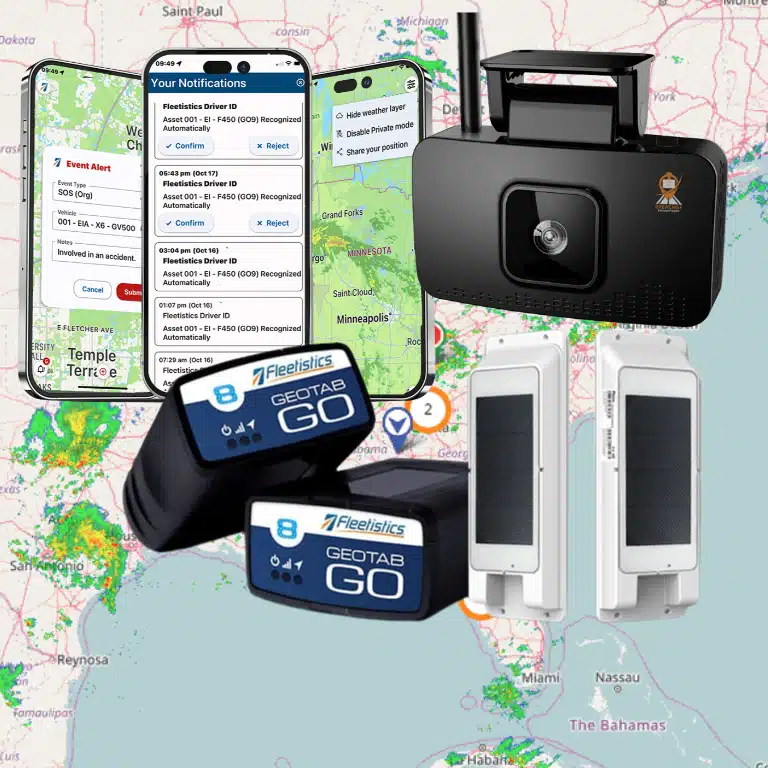
Fleetistics approaches this as a modular decision. Its Geotab-powered solutions combine GPS tracking, telematics, route optimization, alerts, maintenance tools, APIs, and integrations, allowing you to match the system to your fleet type and workflow. A practical evaluation should test the complete process with your own jobs and KPIs, not just review a feature list.
How does real-time visibility improve dispatch decisions?
Dispatchers make better decisions when they can see the fleet as it operates, not only when a driver calls with an update. Live GPS visibility places vehicle location, assignment status, and movement context in one working view. That helps a dispatcher determine which vehicle is genuinely positioned to take the next job. Rather than assigning work based on a stale schedule or a driver’s last check-in.
For example, a dispatcher handling an urgent service request can compare the vehicle’s current location with its existing workload, direction of travel, and expected arrival time. The nearest vehicle is not always the best choice. A vehicle already committed to a time-sensitive stop, carrying specialized equipment, or traveling away from the new destination may create a worse outcome. Real-time data supports a more informed assignment.
Fleetistics documents second-by-second data capture, real-time diagnostics, driver-behavior triggers, and delivery of critical alerts in under 10 seconds as platform capabilities. These figures describe the system’s documented data and alert behavior, not a universal promise about every device, network, configuration, or operational result. During an evaluation, ask how the selected hardware and service plan perform in the locations where your fleet works.
Accurate ETAs also improve the conversation with customers and drivers. A dispatcher can use current location and route progress to identify whether an arrival window is still realistic, communicate a change earlier, and avoid unnecessary status calls. The value is not simply displaying dots on a map. It is replacing assumptions with information that supports a defensible operational decision.
Visibility becomes especially useful when an exception develops. A vehicle may stop longer than expected, deviate from its planned route, show a diagnostic issue, or trigger a safety-related alert. The dispatcher can investigate the event, contact the driver through the appropriate workflow, and decide whether to reassign work, adjust the customer expectation, or escalate maintenance. Route-deviation awareness can also reveal recurring planning problems, unauthorized detours, or conditions that require a route policy change.
When comparing fleet dispatch software, review how location data connects to assignments, ETAs, alerts, diagnostics, and historical reporting. A map that cannot connect a vehicle to a job or customer may be visually impressive but operationally limited. Explore Fleetistics’ real-time vehicle visibility capabilities, then test representative dispatch scenarios with your own fleet data and workflows.
How should dispatchers manage route changes and driver communication?
Route plans are useful only when they remain connected to what is happening in the field. A dispatcher should be able to see the planned route, compare it with actual progress, and understand why a change is necessary before sending new instructions. That process helps prevent avoidable confusion when traffic, customer availability, weather, vehicle issues, or a schedule change affects the day’s work.
Use live ETAs and route-versus-actual review
Route optimization should support decisions, not replace them. Start with the most practical sequence for the fleet’s stops, vehicles, time windows, and operating constraints. Then use live location data and updated ETAs to identify exceptions. A vehicle that is falling behind may need a revised sequence, a reassigned stop, or a customer update. A vehicle that is ahead may be able to absorb an urgent job, but the dispatcher should confirm the driver’s workload and the vehicle’s suitability first.
After the route is complete, review route versus actual performance. Look for recurring detours, missed time windows, excessive waiting, duplicate travel, and changes caused by customer instructions. This review turns one day’s disruption into a better operating process. Fleetistics includes route optimization, live ETAs, customer location sharing, exceptions, and alerts among the capabilities buyers can evaluate in a modular solution.
Maintenance-related changes deserve the same discipline. A maintenance alert or developing vehicle issue may require a stop to be reassigned before the vehicle becomes unavailable. Dispatchers should document the reason for the change, update the affected schedule, and make sure the replacement driver receives the same job details. A connected workflow is more reliable than passing partial information through separate calls, texts, and spreadsheets.
Make every change clear to drivers and customers
When a change is necessary, communicate four things: what changed, why it changed, what the driver should do next, and when the next update will arrive. Mobile schedule updates can deliver revised assignments, digital manifests, proof-of-delivery requirements, and other job information in one workflow. Customers can receive an appropriate location or ETA update without requiring the driver to stop and make repeated status calls.
Driver adoption depends on transparency. Explain what information the system collects, how location data supports safety and service, who can access it, and how it will be used. Invite drivers to identify impractical routes or workflow problems during the rollout. Fleet managers can also use employee introduction and buy-in guidance to set expectations before tracking and mobile updates become part of daily work.
When comparing fleet dispatching solutions, ask to see a complete route-change scenario. The strongest fit should show how a dispatcher edits an assignment, how the driver receives it. How the customer gets an accurate update, and how the final result is recorded for review.
Which dispatch KPIs should you track?
The right KPI set connects dispatch activity to business outcomes. Start by recording a baseline for several normal operating weeks, then compare results after process or technology changes. Avoid judging every route, driver, or fleet type against one blended number. A local service fleet, regional delivery operation, and mixed equipment fleet have different schedules, constraints, and definitions of success.
Measure service performance and responsiveness
Track on-time arrival and on-time completion separately. A crew may reach the first stop on schedule but finish the workday late because of delays between jobs. Pair those measures with response time, dispatch-to-assignment time, and the time required to resolve an exception. These metrics show whether delays begin with planning, assignment, traffic, vehicle availability, or communication.
Also monitor route variance by comparing planned and actual routes, miles, stop sequence, and completion times. A high variance rate can point to unrealistic schedules, repeat detours, unplanned work, or poor address data. Route and telematics data can support actual-versus-plan analysis, while live ETAs help dispatchers identify exceptions before a customer has to ask for an update.
Connect utilization, cost, and productivity
Useful operating metrics include vehicle and crew utilization, productive hours, completed jobs or stops, miles per job, fuel use, idle time, and deadhead miles. Review these together. A vehicle that completes more stops may not be more productive if idle time, overtime, or unnecessary mileage rises at the same time. Segment results by route, region, vehicle class, service type, and shift so the analysis leads to an operational decision.
For safety and compliance-focused operations, add relevant measures such as speeding or harsh-driving events, inspection completion, preventable incidents, and unresolved compliance exceptions. Do not treat an ELD metric as a default requirement for local fleets. Select measures that match the fleet’s actual regulatory obligations and risk profile.
Assign ownership and review the trend
Give each KPI an owner, definition, data source, and review cadence. Dispatch leaders may review exceptions and response time daily, while operations and finance review utilization, fuel, and productivity weekly or monthly. Customer-facing teams should connect on-time performance and exception resolution to complaints, renewals, and retention. A fleet analytics system can bring these views together with dashboards, custom reports, APIs, and exports, making fleet dispatch KPIs easier to act on rather than simply collect.
What features should you compare in fleet dispatch software?
Use a buyer checklist that connects each feature to a dispatch decision. The right platform should help your team see what is happening, act on exceptions, communicate clearly, and measure whether the workflow is improving. It should also fit your fleet today without limiting how you operate tomorrow.
Fleet dispatch software feature checklist
| Capability | What to compare | Buyer question |
|---|---|---|
| Visibility | Live vehicle locations, status, diagnostics, alerts, and reliable ETA data. | Can dispatchers see the vehicle, job status, and exception without a check call? |
| Nearest-vehicle assignment | Location-aware assignment that considers availability, vehicle type, skills, and job requirements. | Can the system support the decision, rather than simply assign the closest dot on a map? |
| Routing | Route optimization, live ETAs, route-versus-actual analysis, and practical handling of changed stops. | Can you compare the planned route with what actually happened? |
| Driver communication | Mobile schedule updates, digital manifests, proof of delivery, and two-way operational messaging. | Can drivers receive and confirm changes in a workflow they will use consistently? |
| KPI reporting | On-time performance, utilization, fuel use, productivity, safety, compliance, and customer-service measures. | Can managers create a baseline and identify the cause of missed performance? |
| Integrations and APIs | REST or streaming APIs, webhooks, SDKs, mapping, custom reports, exports, and connections to business systems. | Can data move into the systems your team already relies on? |
| Scalability | Modular features, user access, fleet-size support, and room for additional vehicles, assets, or workflows. | Can you expand capabilities without replacing the platform? |
| Implementation and training | Workflow mapping, configuration, data migration, role-based training, and a realistic rollout plan. | Who owns adoption, and how will you test the system before broad deployment? |
| Support | Access to knowledgeable support, documented escalation paths, and help beyond initial setup. | What happens when a dispatcher needs help during a busy operating period? |
| Governance | Permissions, data ownership, auditability, retention practices, and transparent driver policies. | Can you explain who sees location data and how employees are informed? |
How do you turn the checklist into a practical comparison?
Start with the dispatch exceptions that cost your team the most time. Test whether a platform identifies the issue, recommends an action, records what happened, and makes the result visible in reporting. A polished map is useful, but it is not enough if assignment rules, mobile workflows, or integrations remain manual.
Fleetistics is a practical modular option for organizations that need to match capabilities to fleet type and size. Its documented offering combines GPS tracking, telematics, route optimization, maintenance tools, alerts, API and SDK access, and 300-plus partner integrations through the Geotab Marketplace. Review the GPS tracking and telematics capabilities alongside the dispatch workflow, not in isolation.
Finally, evaluate the people and rollout model. Fleetistics has served fleets since 2001 and offers 24/7 support. Ask every provider to demonstrate implementation, training, governance, and escalation using your own workflow. You can also prepare employees for tracking with clear notice and practical buy-in guidance before launch.
How do you choose and roll out a dispatch platform?
The strongest implementation starts with your operation, not a feature list. Use the sequence below to connect the platform to measurable improvements in dispatch productivity, driver communication, service, and operating cost.
-
Map the workflow you have today
Document how work enters the business, who assigns it, how drivers receive updates, and how completion is recorded. Include the tools already in use, such as scheduling software, GPS tracking, payroll, maintenance, customer portals, and spreadsheets. Note manual handoffs, duplicate data entry, delayed status updates, and points where dispatchers rely on calls or texts. This baseline gives you a practical test for whether fleet dispatch software will simplify the work or merely add another screen.
-
Choose three to five priorities and establish KPIs
Define the problems the investment must address. Priorities might include on-time performance, utilization, fuel use, dispatcher workload, driver safety, customer communication, or route execution. Record your current baseline and decide how often results will be reviewed. A focused scorecard makes ROI validation more credible than a broad promise to improve everything.
-
Validate integrations, devices, and data flow
Ask the provider to demonstrate how dispatch assignments connect with vehicle locations, driver workflows, reporting, and your existing systems. Confirm API, webhook, export, mapping, and authentication requirements with the people responsible for your technology. Validate hardware compatibility, installation needs, cellular coverage, mobile-device policies, and what happens when a device is offline. Fleetistics offers modular GPS, telematics, route optimization, maintenance, alert, API, and integration capabilities, so the right configuration should be matched to your fleet rather than treated as universal.
-
Run a controlled evaluation
Test representative routes, vehicle types, shifts, exceptions, and customer updates with real users. Compare results against the baseline, including time saved, missed appointments, unnecessary miles, status accuracy, and adoption. Fleetistics’ 30-day Solution Evaluation Process is an available framework for testing the solution, validating ROI, and providing substantial training before commitment. It is an evaluation option, not a guaranteed outcome for every fleet.
-
Train dispatchers and drivers before go-live
Give dispatchers hands-on practice with assignments, route changes, alerts, and reporting. Show drivers exactly how mobile tasks, status updates, and privacy or usage policies work. Explain the operational reason for tracking and invite feedback. Clear communication and practical training reduce resistance while exposing workflow changes that should be corrected before launch.
-
Phase the rollout and review the evidence
Start with one location, team, route type, or vehicle group. Keep a named owner, support path, and rollback plan, then expand after the pilot meets agreed adoption and KPI thresholds. Review results with your implementation partner, adjust alerts and permissions, and add modules only when they solve a demonstrated need. A long-term support relationship matters: Fleetistics has served fleets since 2001 and provides 24/7 support, which can help teams refine the system as operations change.
Speak With a Consultant to review your dispatch workflow and identify the right next step.
Frequently Asked Questions
What is fleet dispatch software?
Fleet dispatch software helps you schedule work, assign drivers and vehicles, monitor field activity, communicate changes, and review operational results in one connected workflow. The right system combines dispatch decisions with location, routing, driver, and reporting data instead of leaving your team to coordinate separate tools.
What should you look for when evaluating dispatch software?
Start with the decisions your dispatchers make every day. Look for live vehicle visibility, practical assignment rules, route planning, driver communication, ETA updates, KPI reporting, integrations, user permissions, implementation support, and room to scale. During a demo, test the workflows your team actually uses rather than judging features in isolation.
How much does dispatch software cost?
Cost depends on fleet size, hardware, selected modules, integrations, users, implementation, and support requirements. Compare the complete cost of ownership with the operational problems you are trying to solve, such as manual coordination, avoidable miles, missed appointments, or limited reporting. A modular evaluation can help you invest in capabilities that fit your current workflow without paying for unnecessary complexity.
Is free dispatch software a good option?
Free tools can be useful for testing a basic scheduling process or organizing a very small operation. They may not provide the live telematics, integrations, driver workflows, analytics, governance, scalability, or support needed for a growing fleet. Before choosing one, confirm whether it can connect to your existing systems and support the accountability your operation requires.
How can you tell whether a dispatch platform is working?
Set a baseline before rollout, then track measures such as on-time performance, vehicle utilization, fuel use, productivity, operating costs, safety, compliance, and customer retention. Review the results on a consistent cadence and separate software impact from changes in staffing, demand, territory, or process. This gives you a more credible basis for judging operational and financial value.
Contact us to evaluate your dispatch workflow
The right fleet dispatch software should fit your fleet, operating model, and reporting priorities rather than force a one-size-fits-all process. A focused conversation can help you compare modular options, identify the integrations you need, and define practical measures for validating ROI before you invest.
Contact Fleetistics to discuss your needs, book a demo, and plan the next step.