Seeing a vehicle on a map does not tell you what it costs to operate. Buyers need to know when location visibility is enough, and when operations require more.
Schedule a platform comparison today.
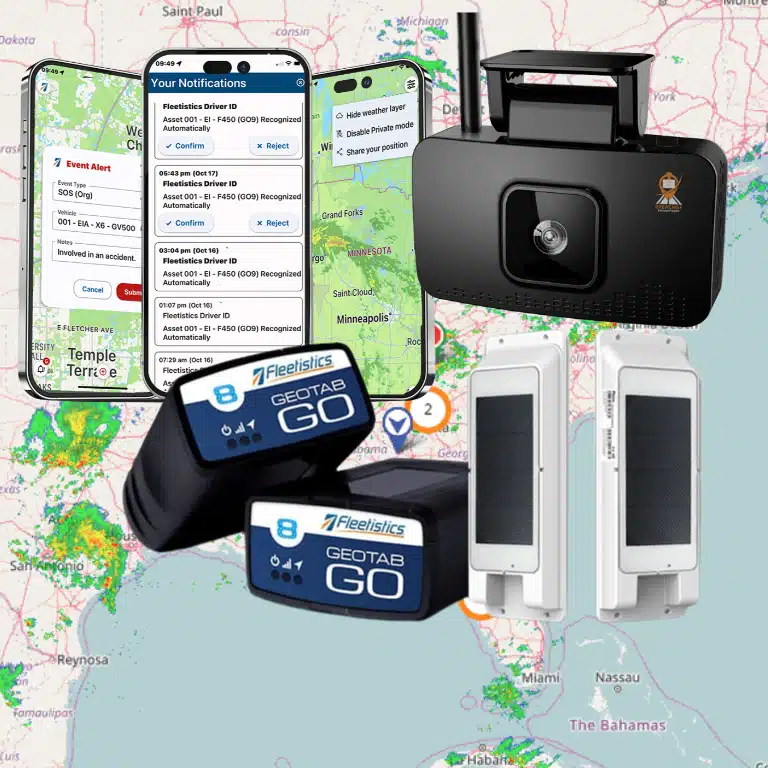
Fleet management software vs GPS tracking is a choice between location visibility and a system for acting on fleet data. GPS tracking shows where vehicles or assets are, and can provide route history, movement details, or location-based alerts for dispatchers making daily decisions. Fleet management software typically uses GPS data while adding maintenance, safety, compliance, reporting, asset, and integration tools in one operating platform across vehicles and equipment. Academic research describes digital road freight platforms as systems that integrate data-driven functions for complex logistics and administrative processes (source). A fleet that only needs vehicle location may begin with GPS tracking; a fleet managing service, risk, audits, or growth may need broader software.
The buyer’s question is simple: do you need a map, or tools that guide maintenance, safety, compliance, and cost decisions? Fleet management software vs GPS tracking: the core difference establishes that starting point for a practical feature comparison. Here’s how:
Fleet management software vs GPS tracking: the core difference
Location visibility or operating control
When buyers compare fleet management software vs GPS tracking, the key difference is scope. GPS tracking answers a focused question: where are vehicles now, and where have they been? Fleetistics explains GPS fleet tracking as the starting point for location visibility across mobile operations.
Fleet management software uses location data as one input in a wider system. It brings fleet data into workflows for dispatch, vehicle care, safety, compliance, reports, and connected business tools. A peer-reviewed review of transport platforms notes that digital platforms bring data-led functions together. Those functions help manage logistics and office work in one setting.
What a broader platform can manage
A dot on a map can help a dispatcher find a truck or confirm a visit. It does not, by itself, tell a fleet team how to handle service alerts, safety events, driver records, or audit needs. A broader system lets teams view those tasks through the same operating lens.
- Safety: review driving events and support coaching work.
- Maintenance: track service needs with vehicle and usage data.
- Compliance: organize records needed for regulated work.
- Reporting: combine fleet activity into useful views for managers.
- Integrations: share relevant fleet data with other business systems.
Central data handling matters when a fleet needs safety and compliance records, not only a map. Published research on fleet operations describes central data systems as tools that support safety compliance and operating results. Buyers can review Fleetistics’ fleet management software when comparing these needs with basic tracking.
Choosing the scope that fits
GPS tracking may fit a team whose main need is vehicle location and trip history. That scope can be enough when managers need to locate vehicles and check completed movement. It keeps the purchase tied to one clear use case.
A fleet may need software when the questions grow. Which vehicles need attention? Which trends affect safety? Which records must be ready for review? Which systems need fleet data? The right answer depends on work needs, fleet rules, and the teams using the data.
This is not a choice between a useful tool and an unnecessary one. GPS data can be part of fleet management software, but it is not the whole operation. Fleetistics starts with the work the fleet must manage. It then matches the solution scope to those needs.
For a buyer, the practical test is simple. If location answers the main problem, start there. If teams must act on maintenance, safety, compliance, reports, or linked data, evaluate a platform built to manage those tasks together.
What GPS tracking does well
Current location and route visibility
GPS tracking answers a basic fleet question quickly: where is each vehicle now? A live map gives dispatchers a shared view of active vehicles, stopped units, and recent movement. That visibility can help them send the closest available driver to a new job. It can also give office staff a clearer basis for customer arrival updates.
Route history adds context after the day ends. Managers can review where a vehicle traveled, when it arrived, and how long it stayed at a job site. For fleets that need clear location records, GPS fleet tracking may meet the main need without a wider system.
Idle time, use, and asset security
Basic tracking can show long stops and repeated idle periods. It can also show whether vehicles are in regular use or spend much of the week parked. These signals help a manager ask useful questions about dispatch plans, vehicle assignment, and spare units. The map shows the pattern, while the team decides what action fits the work.
Location data can also support theft response. If a vehicle or powered asset moves outside an expected time or area, staff can review its last known location. They can then share useful location details with the proper authorities. This support depends on the tracker still reporting, so it should not be treated as a guarantee of recovery.
When a GPS-only tool is enough
A GPS-only tool can fit a fleet with a narrow goal: locate vehicles, confirm stops, review routes, and add first-level accountability. It is often a practical starting point when dispatch needs visibility, but does not yet need linked workflows. Examples include maintenance scheduling, compliance reporting, safety video, and data shared with other business tools.
The comparison changes when location data must drive several teams and records. Research on road freight transport notes that digital platforms combine data-based functions for logistics and administrative work. That broader scope is described in an open-access review of digital transport platforms. In a fleet management software vs GPS tracking choice, GPS is often enough when the job ends with knowing where vehicles are.
If the business also needs maintenance, compliance, safety, or reporting in one place, it may be time to review fleet management software. Starting with a clear problem keeps the investment tied to daily operations, rather than a list of unused features.
What fleet management software adds beyond location
GPS tracking answers a key dispatch question: where is the vehicle now? Fleet management software uses that location data as one part of a wider operating record. It helps teams connect vehicles, drivers, service needs, fuel use, safety events, and paperwork in one workflow.
Vehicle health and operating cost data
A location dot does not show that a truck is due for service. A broader platform can pair mileage, engine data, diagnostic fault codes, and maintenance records. Staff can then plan service from vehicle use and health signals, rather than wait for a missed interval or roadside issue.
Fuel data becomes more useful when viewed with trips, idle activity, vehicles, and drivers. Reports can help managers review fuel use, service spend, utilization, and cost trends by unit. Fleetistics’ Geotab-powered fleet management software is designed for this broader view, with options selected for each fleet’s needs.
- Maintenance schedules tied to vehicle activity and service history.
- Diagnostic alerts that help maintenance staff decide what needs review.
- Fuel and utilization reporting for ongoing operating review.
Compliance and safer driving workflows
Location can support a record, but compliance work often calls for more detail. Fleets may need electronic logging device (ELD) records, driver vehicle inspection reports (DVIRs), or International Fuel Tax Agreement (IFTA) reports. A platform can bring those workflows together instead of leaving teams to compile separate files.
This is one reason the comparison of fleet management software vs GPS tracking is about scope, not just maps. Research on fleet operations notes that centralized data systems can support regulatory compliance and operating safety. Teams still set policies and review records; software can make the needed information easier to find.
Safety tools add context to driver events. Harsh braking, speeding, or rapid acceleration can guide coaching when a fleet chooses those features. AI dashcams can link video with an event, helping staff review what happened during a safety concern. Fleetistics offers dashcam solutions as an option for fleets that need video context.
Reports, connections, and the right scope
Fleet data gains value when it reaches the people and systems that use it. Dashboards can organize maintenance, safety, fuel, and compliance records for review. APIs and integrations can also pass approved information to business systems, reducing repeated entry and disconnected records.
Not every operation needs every module on day one. A team that needs vehicle visibility may begin with tracking, then add workflows as its needs grow. A fleet managing inspections, hours, maintenance, video, fuel, or shared reporting may need the wider software scope from the start.
Fleetistics pairs a Geotab-powered platform with modular options, so buyers can match capabilities to operating needs. The practical question is not whether a map is useful. It is whether location alone provides enough information to run vehicles, support drivers, and document fleet work.
Side-by-side comparison: GPS tracking vs fleet management software
Core difference
In a fleet management software vs GPS tracking review, start with the work your team must manage. GPS tracking helps a team see where vehicles are and review trip movement. A wider system is for teams that must turn vehicle data into shared daily action.
That difference matters when operations involve more than map visibility. Research on digital road freight platforms describes tools that join logistics and office processes. A separate study of centralized fleet data systems links shared records with safety and compliance support.
Comparison by operating need
Use this table as a requirements screen, not a product verdict. List the tasks already owned by dispatch, safety, maintenance, and finance. Then note whether location data completes each task or starts a longer workflow.
| Comparison point | GPS tracking | Fleet management software |
|---|---|---|
| Capabilities | Maps vehicle location and trip movement. | Combines location with wider fleet tools. |
| Best fit | Teams that need asset visibility. | Teams managing cross-department work. |
| Data depth | Location and movement records. | Location plus service and operational records. |
| Operational workflows | Informs dispatch checks. | Supports repeat tasks and shared action. |
| Compliance | Documents travel history. | Supports centralized compliance records. |
| Maintenance | Needs a separate service process. | Connects maintenance activity to vehicle data. |
| Integrations | Provides a location data input. | Shares fleet data with business tools. |
| Scalability | Adds tracking as assets are added. | Adds workflows as operations grow. |
Choosing the right scope
Trace one event from start to finish before choosing a tool. Consider a missed service interval, an audit record request, or a dispatch change. If a map view resolves the issue, added workflow tools may not be needed. If staff re-enter data, a wider system may reduce manual handoffs.
Start with the decisions made each day. A dispatcher who mainly checks arrival status and asset movement may begin with GPS fleet tracking. A team that also manages service records, reports, and linked office work needs more scope.
The distinction is not fleet size alone. It is the number of tasks that depend on vehicle data and shared records. Compare each required workflow with the available fleet management software functions before choosing a system level.
When should a fleet upgrade from GPS tracking?
GPS tracking may be enough when the main need is knowing where vehicles are. The upgrade question appears when location data no longer resolves daily work. In a fleet management software vs GPS tracking decision, look for work that still needs spreadsheets, calls, or guesswork.
Signs that location is not enough
A fleet may have outgrown GPS-only tools when office staff still build compliance files by hand. Service dates may be missed, or dispatch may work in a separate system. Reports may not answer common cost and use questions. These are process gaps, not map gaps.
Basic location history can show where a vehicle traveled. It may not explain repeated hard braking, service risk, or why a route fell behind. Full fleet management software is worth reviewing when managers need those tasks connected in one workflow.
- Compliance records require repeated manual entry or data checks.
- Preventive service depends on calendar reminders or memory.
- Dispatchers switch between tracking, scheduling, and driver messages.
- Driver behavior questions cannot be checked with useful event data.
- Reports show dots on a map, but not useful operating patterns.
Operational work that needs one system
Compliance is a clear test. GPS may support a movement record, but compliance work often needs records tied to the wider operation. Research on fleet operations notes that centralized data management systems assist with safety compliance and operating performance.
Maintenance creates another clear signal. If the shop lacks timely service information, a vehicle can stay on the road while required work waits. Dispatch faces a similar issue when vehicle location is visible, but assignments, route changes, and driver communication remain apart.
Before requesting a broader system, map each repeated task to an owner and a data source. GPS may supply vehicle location. Maintenance, compliance, and dispatch may still rely on separate work. Fleetistics’ guide to GPS fleet tracking can help define the tracking baseline already in place.
Growth from tracking to management
Small fleets often begin with GPS because the immediate question is simple: where is the vehicle? As a fleet reaches more vehicles, routes, drivers, or compliance duties, the questions change. Managers need to know what needs service, what needs review, and which workflow causes delay.
That change does not mean every fleet needs every feature at once. It means buyers should list current manual work, missed alerts, and reporting gaps before choosing a broader platform. Upgrade when connected maintenance, safety, compliance, or dispatch work will solve a real operating problem.
How to choose the right solution for your fleet
The right choice is not always the biggest platform. It is the smallest system that solves the real operating problem today while leaving room to scale tomorrow. A five-vehicle service fleet may need reliable location visibility first. A regional delivery, construction, government, or field service fleet may need a broader system because the work now involves compliance, maintenance, driver safety, asset utilization, and reporting.
Use this decision process before comparing vendors:
- Define the problem you need to solve first. If the main issue is knowing where vehicles are, confirming arrivals, or recovering assets, GPS tracking may be the right first layer. If the issue is missed service, paper DVIRs, fuel waste, safety events, or disconnected reporting, fleet management software is usually the better fit.
- Map the workflows around each vehicle. Location is one data point. Ask what has to happen after that data appears: dispatch decisions, customer updates, maintenance alerts, driver coaching, compliance documentation, payroll review, or fuel analysis.
- Check compliance requirements. Fleets subject to ELD, DVIR, IFTA, or government reporting need more than a dot on a map. They need reliable records, reporting, and workflows that reduce manual administration.
- Look at maintenance and vehicle health. If preventive maintenance is handled in spreadsheets or only after a driver reports a problem, integrated diagnostics and usage-based service reminders can create value quickly.
- Decide how much data needs to connect elsewhere. If your fleet data should feed accounting, dispatch, safety, fuel, HR, or customer systems, prioritize platforms with APIs, marketplace integrations, and open data access.
- Start modularly, then scale. A flexible provider should let you begin with tracking, add dashcams or compliance tools when the need is clear. And move into a fuller fleet management platform without forcing a complete restart.
This is where fleet management software vs GPS tracking becomes a business design question instead of a feature checklist. The better answer depends on the number of vehicles, the cost of downtime. The level of regulatory exposure, and the number of people who need to act on fleet data.
For many organizations, the safest path is a phased rollout. Start with the visibility layer, prove adoption, then add the workflows that remove the most friction. That approach keeps investment tied to operational need and helps avoid both underbuying and overbuying.
Where Fleetistics fits in the decision
A starting point that fits the fleet
The decision should start with the work your fleet must manage, not with the largest feature list. Some teams need dependable location visibility and a clear view of vehicle movement. Fleetistics can support that starting point through GPS fleet tracking, without making a broader platform the first step.
As needs grow, the question changes. Dispatch, safety, service schedules, records, and connected systems may need to work together. Research on digital transport platforms describes this wider role. They combine data-based functions for logistics and office processes. That is the scope of integrated fleet platforms, not location data alone.
Room to add operational tools
Fleetistics provides a path from basic tracking to Geotab-powered fleet management. A fleet can add dashcams, maintenance tools, compliance support, and integrations as its work calls for them. This makes the fleet management software vs GPS tracking choice less rigid. Start with the need in front of you, then add tools for clear problems.
That approach can suit a service business with field vehicles or a transport fleet managing records. It can also suit a public agency using Sourcewell. Fleetistics’ fleet management software page shows the broader system for fleets that need more than dots on a map.
A practical buying check
Before selecting a plan, list what must be visible each day. If vehicle location answers the main question, tracking may be enough today. If the team manages safety video, maintenance, compliance, or data sharing, a full platform may fit better.
- Choose a tracking starting point when location visibility is the main need.
- Consider broader software when several fleet tasks must share data.
- Ask which tools can be added later, so today’s choice does not restrict tomorrow’s work.
Ask practical questions during a review. Does a driver need a camera workflow? Does the office need maintenance reminders or compliance records in the same system? Does another business tool need fleet data?
Fleetistics also offers a 60-day risk-free trial, so buyers can check fit in daily operations. Its Comparison Tool can help teams review options against the work they need to manage.
Frequently Asked Questions
Do I need a full fleet management system or just GPS tracking?
Choose GPS tracking when your main need is vehicle location, route history, or basic utilization visibility. Choose fleet management software when decisions also depend on maintenance, compliance, safety, dispatch, or cost reporting. A practical starting point is to list problems that require action, not just map visibility. A modular platform can let a fleet add broader tools as those needs become clear.
What does fleet management software track beyond location?
Beyond location, fleet management software can combine maintenance schedules, diagnostic alerts, driver behavior, fuel information, compliance records, and operational reporting. This wider record helps teams connect vehicle movement with service needs and administrative work. Research on digital road freight platforms describes integrated data functions that coordinate logistics and administrative processes, as explained in this academic review.
Can basic GPS trackers provide telematics data?
Some GPS trackers provide location, trip history, speed, or limited event data. That may be enough for fleets focused on where vehicles are and how they move. Broader telematics usually connects location with diagnostics, maintenance, safety events, or reporting workflows. A GPS tracking guide describes location-based telematics as the basis for real-time visibility. Buyers should compare included data points and integrations before treating a tracker as a full fleet system.
What is the ROI of using fleet management software compared to GPS tracking?
ROI depends on the fleet’s starting problems and the features it uses. GPS tracking may support savings tied to visibility, routing, utilization, and idling. Fleet management software may also support maintenance planning, compliance workflows, safety review, and reporting. Before selecting a tier, measure current fuel, downtime, administrative time, incidents, and service costs. Then compare changes against hardware, subscription, installation, and training costs.
Ready to compare Fleetistics platform options?
Choosing a tracking tool without mapping your operational needs can leave important decisions unresolved. Waiting also delays the time your team could use clearer information to select an appropriate approach. Starting now helps define which option fits your next step and avoids reviewing features your operation may not use.
Ready to move from comparison to a practical choice? Compare Fleetistics platform options to review the available paths for your fleet. Request a closer look at the options that match your current priorities, vehicle operations, and plans for future needs. Start with a focused comparison today, so your next discussion can center on fit, scope, and implementation timing. Contact Fleetistics to compare next steps with your fleet requirements.