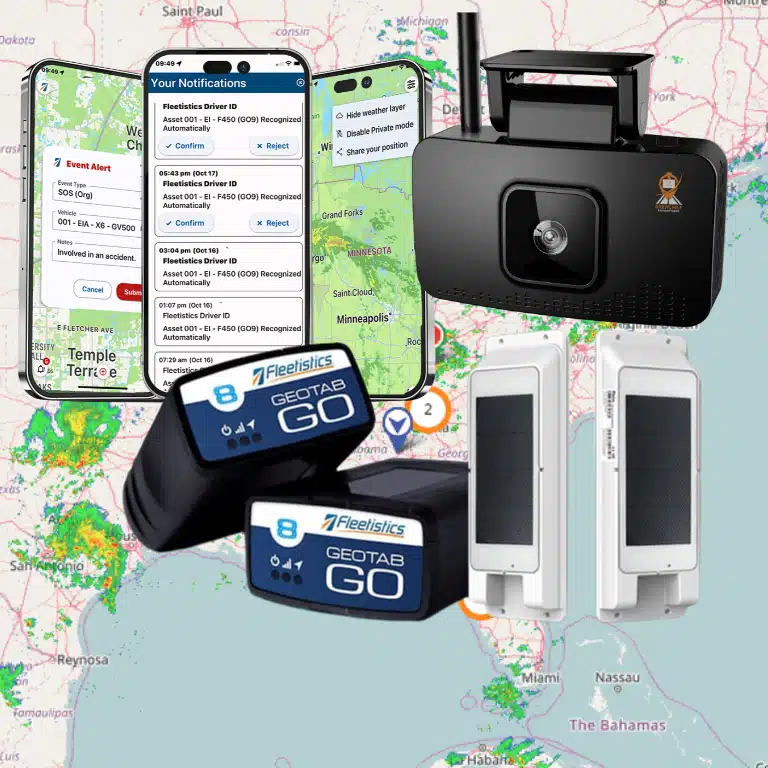

Choosing dash cam front and rear coverage means deciding which events your fleet needs to understand, not simply adding another camera. Forward-facing video can provide context from the road ahead, while rear coverage may help document activity behind a vehicle or during reversing when the system is configured for that view. The right setup depends on vehicle type, operating conditions, incident questions, and how your team will review front-and-rear fleet cameras inside the fleet portal.
Speak with a fleet consultant at 855-300-0527
What does dash cam front and rear coverage mean for a fleet?
A front camera generally records the view in front of the vehicle. A rear camera can record a view behind it, but the exact field of view and behavior depend on the hardware and installation. Do not assume that a product described as a dash cam automatically provides both views. Confirm the supported configuration for the specific vehicle and camera system.
Also distinguish a dashcam from a backup camera. A dashcam is typically evaluated for recording and incident context. A backup camera with a monitor is intended to help a driver see behind the vehicle while maneuvering. Some fleets need one function, some need both, and some may need a camera configuration that supports additional views. Fleetistics offers dashcam systems as well as backup cameras with monitors; discuss the use case before treating them as interchangeable.
For a broader view of available fleet dashcam options, start by listing the events you need to understand. Examples might include a collision ahead, a backing incident in a yard, or a report of damage discovered after a route. The goal is to select coverage that helps answer those questions without assuming one configuration suits every vehicle.
Which camera views should you evaluate first?
Start with operational exposure. A delivery van working in dense urban areas may face different visibility challenges from a highway tractor, utility truck, or service vehicle that frequently reverses at customer sites. Consider vehicle dimensions, cargo or equipment, typical speeds, route environments, driver tasks, and whether a monitor is needed for maneuvering.
- Forward-facing view: Consider whether road-facing context is the priority for reviewing events that occur ahead of the vehicle.
- Rear-facing view: Clarify whether you need a view of the road behind, the vehicle exterior, a cargo area, or the immediate reversing zone. These are not necessarily the same view.
- Backup assistance: If the driver needs a live view while reversing, ask whether a camera-and-monitor arrangement is appropriate, rather than assuming recorded dashcam footage meets that need.
- Additional views: For vehicles with blind spots or specialized work, ask whether side or other cameras are supported by the particular system.
Fleetistics’ GO FOCUS PRO is stated to support adding side and rear cameras. That does not mean every package includes a front-and-rear bundle or guarantees a specific view. Verify the exact components and supported configuration in the proposal for your vehicles.
How can you compare camera options before buying?
Use a written comparison rather than relying on a general label such as “front and rear.” Ask each provider to describe what each camera sees and whether the view is live or recorded. Also ask how the equipment fits the vehicle. The table below gives you a starting point for a fleet-specific review.
| Option or question. | What it may address. | What to verify. |
|---|---|---|
| Forward-facing dashcam. | Road context in front of the vehicle. | Field of view, recording behavior, and fit for the vehicle. |
| Rear camera. | Context behind the vehicle or a defined rear area. | Exact location and view, and whether it is included or an add-on. |
| Backup camera with monitor. | Driver visibility while maneuvering. | Monitor availability, intended use, and vehicle compatibility. |
| Multi-camera configuration. | More than one area around a vehicle. | Supported camera count, views, wiring, and system capabilities. |
| Platform connection. | Potential connection between video and fleet information. | Integration details, access, workflow, and any limits. |
Request answers in plain language. If a provider cannot explain the camera views for your vehicle class, ask for a configuration review before ordering. Fleetistics provides information about the GO FOCUS camera; use a product discussion to validate the exact setup rather than inferring included components from a product name.
What installation questions should you settle?
Installation is part of system selection. Vehicle models differ, and the packet does not establish universal placement, wiring, or installation-time instructions. Ask the installer or provider to confirm the plan for each vehicle group. Fleetistics offers professional installation through a network spanning the USA and Canada, so fleets can discuss installation availability as part of the project.
Before deployment, agree on which vehicles are in scope, which views each one needs, and how the installation will be coordinated with operations. For mixed fleets, group vehicles by make, model, body style, and use. This makes it easier to identify exceptions, such as a vehicle with limited mounting options or equipment that affects the desired view.
- Confirm the camera and monitor components included for each vehicle.
- Ask what the installer needs to know about vehicle configuration and existing equipment.
- Identify scheduling constraints, vehicle downtime windows, and who coordinates access.
- Clarify how the fleet will verify the intended view after installation.
- Document any vehicle that needs a different setup instead of forcing a uniform configuration.
For GPS hardware projects, the same disciplined scoping approach is useful when reviewing GPS tracking hardware. Camera and tracking devices serve different purposes, but both need a defined vehicle fit and operational owner. If your project also includes location visibility, compare the broader fleet tracking capabilities with the video requirements rather than treating them as separate decisions by default.
How should your team plan video review?
A camera is only useful when the organization has a sensible process for handling the information it produces. Before choosing, define who will review an incident, what facts they need to establish, and how the review connects with driver communication and internal procedures. Do not assume a particular portal offers a specific search, retention, export, or sharing feature unless the provider confirms it for the system under consideration.
Build a simple workflow around an incident: record the report, identify the vehicle and approximate event time, assign an authorized reviewer, compare video with other available information, and document the conclusion and follow-up. The workflow should make clear who can access footage and how employees can raise questions. Set expectations with drivers in a transparent way and create a written policy that matches your organization’s practices and applicable requirements.
Where GPS and video are both used, decide how their information will be considered together. Location and time may help a manager identify an event window, while camera views may add visual context. Confirm what your selected platform actually connects and how users access it. Fleetistics describes a broad ecosystem with APIs and more than 300 marketplace integrations; a provider should still verify the specific integration and workflow your business needs.
To understand platform options, review Fleetistics platform comparisons and ask how video fits with the rest of your fleet data. The company is a long-running Geotab distributor, and its modular approach can help teams assess a solution by fleet type and operational need rather than assuming all organizations need the same configuration.
How do front and rear cameras fit into safety and incident response?
Video can contribute context, but it does not replace safe operating practices, training, maintenance, or a fair investigation. Define the questions your team hopes to answer. For example: What happened in the seconds before a reported collision? Was a vehicle maneuvering in a confined area? Is there visual context that helps determine what additional information to collect?
Make the review process consistent. Separate observable facts from interpretations, record missing information, and give relevant employees a chance to provide context under your internal process. If a video does not clearly show an event, do not treat the absence of a visible detail as proof that it did not occur. Camera angle, lighting, obstruction, and system configuration can all affect what a recording captures.
Fleetistics describes accident data capture and reporting as a PRO platform feature. Ask what that feature means for your proposed setup and how it fits your incident workflow. If you are also assessing broader safety tools, explore fleet safety solutions and determine which capabilities are relevant to your vehicles and policies.
What should you consider for mixed vehicle types?
A fleet may include trucks, vans, service vehicles, and equipment with very different visibility needs. A single camera layout can create avoidable compromises. Start by segmenting vehicles based on function and risk exposure, then select a standard configuration for each group only where the requirements are genuinely alike.
For example, a group of highway vehicles may prioritize forward road context, while vehicles that reverse frequently in yards may need a separate assessment of rear visibility and driver assistance. A work truck with specialized body equipment may need a different review again. These are planning examples, not a promise that a particular device or camera position is suitable. Confirm compatibility with the provider and installer.
Make the buying decision modular. Document the minimum configuration, optional additions, and exceptions. This approach keeps you from paying attention only to the unit price while overlooking installation, training, access, and operational fit. It also supports future changes as vehicles are added or replaced.
How can you assess dash cam front and rear integration with your fleet platform?
Integration matters when managers want to connect camera workflows with vehicle data, dispatch, maintenance, or other business systems. Ask what is available now, what requires configuration, and what information passes between systems. Integration can describe different levels of connection, so request a demonstration of the exact workflow you care about.
Fleetistics offers a fleet management platform and describes free APIs and a large integration ecosystem. Those capabilities may be useful when your organization needs to share data with existing systems, but they do not confirm that every camera, application, or workflow is automatically connected. Identify your existing software and ask for a technical review before making integration assumptions.
Use a short scenario to test the fit: a manager receives an incident report, identifies the vehicle, finds the relevant event information, reviews the permitted video, and records an outcome. Ask the provider to show which steps are supported by the proposed solution and which remain manual. You can also review data integration options as part of that discussion.
How do you measure whether the camera program is useful?
Choose measures that reflect your goals, not a promised outcome. If the purpose is incident context, track whether the system provides usable information for the events you investigate. If the purpose is backing safety, assess whether the camera and monitor arrangement fits the driver task and whether the process is used consistently.
- Coverage fit: Are the agreed views available on the vehicle groups where they are needed?
- Operational readiness: Are installations complete, users trained, and responsibilities assigned?
- Review usefulness: Can the authorized team follow its defined incident process?
- Integration fit: Does the system support the specific data handoffs demonstrated during evaluation?
- Governance: Are employee notice, access permissions, and internal handling rules understood?
Compare a baseline period with the period after implementation, while noting changes in vehicle mix, routes, staffing, and reporting practices. Avoid attributing every change to cameras alone. A sound evaluation identifies what the technology contributes and what still depends on management, training, and safe work practices.
What should you ask in a product consultation?
Bring a vehicle list and a short description of the operational questions you want to answer. Then ask:
- Which front and rear views are supported for each vehicle type?
- Does the proposed configuration include a rear camera, or is it an available addition?
- Is the system intended to record events, provide a live reversing view, or both?
- What installation options are available for our locations and vehicle groups?
- How will managers access and review information, and what controls apply?
- Which fleet-platform integrations are confirmed for our specific systems?
- What would a practical evaluation plan look like, and what measures should we use?
Fleetistics’ standard Solution Evaluation Process is 30 days for ordinary fleet customers; a longer period should not be assumed universally. Confirm the appropriate evaluation terms for your circumstances. The PRO platform has a stated 60-day no-risk trial with a full-refund option, which is a specific offer and should not be confused with a universal evaluation period.
For fleets using trucks and compliance tools, the trucking fleet solutions overview can help frame related needs. If camera deployment is part of a wider fleet refresh, also discuss how tracking, safety, maintenance, and operational data should work together.
How should you introduce cameras to drivers?
Explain the purpose of the system before installation begins. Drivers should understand which vehicles have cameras, what the cameras are intended to capture, who may review information, and how the organization handles questions or incidents. Transparent communication helps prevent a safety tool from being misunderstood as a hidden or arbitrary monitoring measure.
Keep the explanation aligned with the actual configuration and written policy. Do not promise that video will answer every question, and do not describe a view or feature that is not part of the installed system. Identify a contact for employees who need to raise a concern, and explain the process managers will use when footage is reviewed. For guidance, see Fleetistics’ resources on introducing tracking and building employee buy-in and creating a written driver policy. The principles of clarity and governance also matter when a program includes video.
How can you keep a rollout manageable?
A staged rollout can surface configuration questions before they affect every vehicle. Select a representative group, confirm the intended views and installation process, and gather feedback from drivers and managers. The pilot should test real operations rather than simply confirm that hardware powers on.
During the first stage, record which vehicle types were included, what tasks they perform, and which questions the system is expected to help answer. Check that managers understand the review process and that drivers know where to direct questions. If the pilot identifies a view that is obstructed or a workflow that is unclear, document the issue and resolve it before expanding the deployment.
Set a decision point with practical criteria: configuration verified, installation responsibilities clear, employees informed, review workflow assigned, and integration claims demonstrated. A staged approach does not guarantee a particular result, but it gives the team an organized way to find mismatches early. Keep exceptions visible so that a vehicle with unusual equipment or operating conditions is not silently placed into a standard setup that does not fit.
Frequently asked questions
Does a front-and-rear dash cam always include two cameras?
No. Product labels do not establish what components are included or which views are supported. Confirm the configuration, camera count, and intended views for the specific vehicle and proposal.
Is a rear dashcam the same as a backup camera?
Not necessarily. A rear dashcam may record a view behind the vehicle, while a backup camera with a monitor is intended to help a driver see while maneuvering. Ask whether you need recorded context, live reversing assistance, or both.
Can I assume every camera setup integrates with my fleet portal?
No. Integration capabilities vary by hardware and software. Ask the provider to demonstrate the exact data connection and workflow required by your team.
Can video alone determine what happened in an incident?
Not always. The view may be incomplete or affected by angle, conditions, or system configuration. Use video alongside reports and other relevant information, and follow a consistent review process.
Where should you begin?
Start with a vehicle-by-vehicle coverage plan: specify the event or task each view should support, identify whether you need recording or live visibility, and list installation and integration questions. Then compare proposed configurations against that plan. This keeps the decision grounded in your fleet’s real work and gives your team a clear way to evaluate whether the system fits.
Book a consultation to review your camera requirements
With the right questions answered before deployment, you can choose front and rear camera coverage that supports a practical, well-governed fleet workflow.