.
After a collision, the first challenge is often not finding data. It is preserving the right records before they are overwritten, separated from the vehicle, or viewed without context. A disciplined workflow can help a fleet manager establish what happened, support a claims review, and identify safety improvements without treating a dashboard alert as a final verdict.
Fleet accident reconstruction uses evidence such as GPS location pings, trip history, speed, harsh-driving events, vehicle performance records, and available dashcam footage to build a time-based picture of a collision. These records can support investigators, insurers, and counsel, but they do not replace qualified analysis or automatically determine fault.
The practical process starts by understanding what each data source can show, how the records relate to one another, and where their limits matter. From there, you can preserve original evidence, correlate telemetry with video and roadway conditions, and manage access responsibly. The first step is defining the evidence set and the role telematics can play in a reconstruction.
What Is Fleet Accident Reconstruction and What Can Telematics Add?
Fleet accident reconstruction is the process of examining available evidence to build a reasoned account of what happened before, during, and after a collision. A qualified reconstruction professional may evaluate vehicle damage, roadway conditions, witness statements, photographs, video, and electronic records. A fleet manager’s telematics review is one part of that larger investigation. It can organize operational data and identify events that deserve closer examination, but it does not replace an insurer, law-enforcement investigation, legal advice, or qualified expert analysis.
That distinction matters because a dashboard report can look precise while still representing only one data source. GPS, event, and video records should support investigation rather than automatically determine fault. The National Highway Traffic Safety Administration describes event data recorder information as crash-related vehicle data that can be used alongside other evidence, not as a stand-alone conclusion. NHTSA’s event data recorder overview provides additional context.
What does telematics contribute?
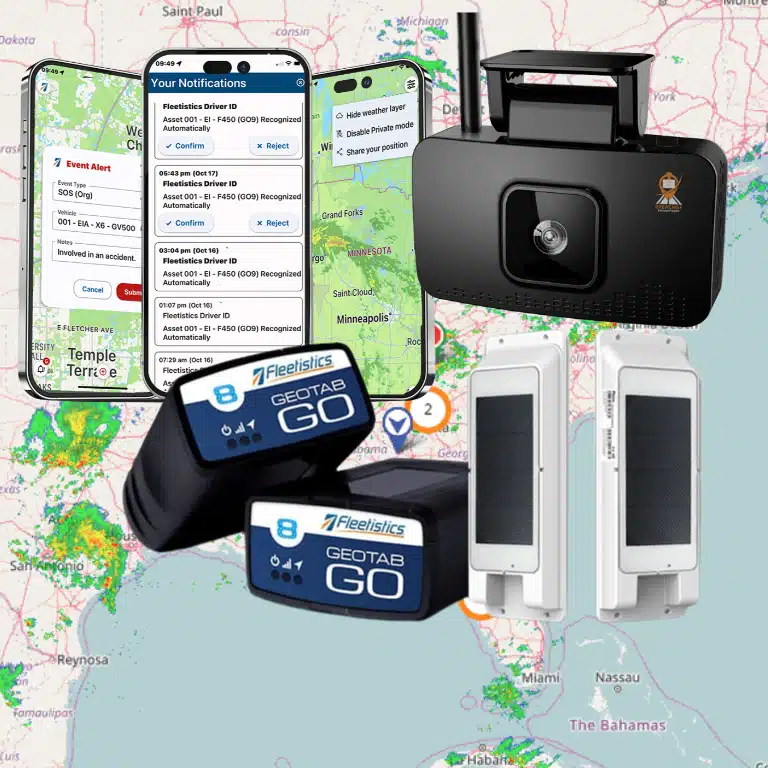
Telematics systems collect information from hardware and software installed on, or connected to, a vehicle. GPS systems produce location messages, often called pings or traces. Depending on the equipment and configuration, those records may be associated with a vehicle or driver and may include vehicle-performance information. Speed and harsh driving events are examples of telematics data that can help investigators compare a vehicle’s reported activity with the known collision sequence.
In practical terms, a post-collision review may ask:
- Where was the vehicle in the relevant period, and which vehicle record corresponds to it?
- What speed or performance signals were recorded near the event?
- Did the system register a harsh event that helps identify the point requiring review?
- Does available video provide visual context that can be compared with the electronic timeline?
These questions help turn a large record set into an organized evidence package. Telematics platforms may also provide accident reconstruction capabilities, dashboards, and custom reports, which can make information easier for fleet, claims, and safety teams to review. The usefulness of each record depends on the device, configuration, timestamps, data continuity, and the circumstances of the collision. Missing data, inaccurate time settings, signal limitations, or an event that was not captured can affect the analysis.
Fleetistics can help you evaluate a fleet accident reconstruction solution that fits your vehicles, operating environment, and evidence needs. The objective is not to make an automatic fault finding. It is to preserve relevant records, correlate them carefully, and give qualified reviewers a clearer starting point for the investigation.
| Evidence source. | What it can help establish. | Important limitation. |
|---|---|---|
| GPS location history. | Route, approximate position, stops, and timing context. | Coverage, timestamps, and reporting intervals affect precision. |
| Speed and harsh-event records. | Recorded performance changes that may identify review points. | Configuration and sensor thresholds vary by device. |
| Dashcam footage. | Roadway, traffic, visibility, and event context. | Camera angle, retention, clock, and image quality matter. |
| Reports and access logs. | Who handled the evidence and how the review progressed. | Records support investigation, not automatic fault findings. |
How Do You Preserve Fleet Accident Evidence Before It Disappears?
The first response after a collision should protect the record before anyone edits, overwrites, or informally distributes it. Treat the initial collection as evidence preservation, not as a rushed attempt to decide fault. GPS, event data, and video can support a qualified investigation, but they do not replace an insurer, investigator, law enforcement, or counsel.
- Identify the incident and define the time window. Record the vehicle, driver, route, approximate collision location, and the time reported by the driver or other first responder. Use the widest reasonable window around the event while details are fresh. Note the time zone and the source of each timestamp. This prevents a later reviewer from confusing an alert time, a video time, and the time a collision was reported.
- Preserve original exports before reviewing or filtering. Export the relevant GPS history, speed and harsh-event records, alerts, driver or vehicle identifiers, and system status data in their original available format. Keep an untouched master copy. Work from a duplicate when creating charts, summaries, screenshots, or a claims packet. Do not rely on a copied screenshot as the only record.
- Secure video and related physical evidence. Download the available camera footage for the same time window, including footage before and after the reported event when available. Preserve the original video file and note the camera, vehicle, export time, and person who performed the export. Also identify roadway photographs, vehicle-damage photographs, inspection notes, and other records that may help a qualified reviewer compare video with roadway and vehicle evidence. NTSB investigation materials illustrate how video evidence, roadway evidence, and speed calculation may appear as distinct parts of a collision analysis: NHTSA guidance on using automotive event data recorder information can provide additional context for handling crash data.
- Record device status and possible tampering indicators. Note whether the telematics device, camera, antenna, power connection, or storage media was operating normally. Preserve alerts for disconnection, loss of power, missing footage, configuration changes, or device tampering. GSA identifies device tampering detection as a telematics capability, but the presence or meaning of an alert depends on the installed hardware and configuration. Record observations without turning them into a conclusion about cause.
- Restrict access and document every handoff. Limit the working files to people with a defined role in safety, operations, claims, or authorized review. Create an access log that records who viewed, exported, copied, annotated, or sent each file, along with the date and purpose. Keep a simple chain-of-custody note for each transfer, including the original file name and any new copy or export name.
- Store the evidence securely and preserve the review path. Keep originals in a controlled location with backups, encryption where available, and role-based permissions. Preserve the system report, export settings, timestamps, and notes needed to reproduce the result. Fleetistics recommends preserving original data, establishing a timeline, and documenting chain of custody and access. A configured fleet accident reconstruction solution can help organize that workflow. Retention and disclosure practices should be reviewed for the applicable jurisdiction with your insurer or qualified counsel.
Once preservation is complete, build the timeline from copies, compare data sources, and clearly separate recorded facts from interpretation. That discipline makes the evidence more useful to the people responsible for the investigation and claims decision.
How Can GPS, Speed, and Harsh-Event Data Build a Collision Timeline?
A useful collision timeline starts with a common clock and a clearly identified vehicle. GPS systems produce location messages, often called pings or traces, while telematics can add vehicle performance details such as speed and harsh driving events. Together, these records can help you organize what the vehicle was doing before, during, and after an incident. The result is a structured starting point for fleet accident reconstruction, not a substitute for a qualified investigation.
Begin by preserving the original records and defining a reasonable time window around the reported event. Then map the vehicle’s location history against its trip history. A sequence of pings can show the route, direction of travel, stops, and approximate position at key moments. Geofences can add operational context by showing when the vehicle entered or left a defined area, such as a worksite, customer location, depot, or restricted zone. Review the timestamps carefully, including the system time zone and any known reporting delays.
Next, correlate location with speed and event signals. A hard-braking or rapid-acceleration alert means more when it is placed on the route at a specific time and compared with the vehicle’s speed trend. A series might show normal travel, a speed change, a harsh event, a stop, and later movement or engine activity. Mileage, number of trips, and total engine hours can help you test whether the vehicle record fits the reported use. These details are available in telematics configurations that support the relevant data sources, so confirm what the installed hardware and settings actually capture.
Driver identity can narrow the review to the person assigned to the vehicle, but driver identification is not universal. Some systems provide Driver ID through a hardware add-on. Vehicle context matters as well. Note the vehicle identity, diagnostic or operational status, and any device-tampering indication, then compare those records with incident reports, roadway observations, photographs, and available video. Do not treat a missing signal as proof that an event did not occur. Coverage, configuration, cellular connectivity, sensor thresholds, and data retention can all affect the record.
A carefully built timeline may reveal sequence and context. For example, an investigation could compare the recorded speed and positions of involved vehicles with roadway and video evidence. An NTSB investigation of one specific five-vehicle chain-reaction collision considered a combination vehicle traveling about 72 mph while four other vehicles were traveling between 3 and 15 mph. That example illustrates why multiple evidence sources matter. It does not establish a universal reconstruction method or imply that telematics alone can reach the same conclusion in every collision.
Use GPS tracking hardware that matches the vehicle and operating environment, and review driver behavior event data with consistent thresholds and documented access. GPS, speed, braking, acceleration, geofence, driver, and vehicle records can support an insurer’s, investigator’s, or counsel’s review. They are contextual evidence, not automatic proof of fault. Preserve originals, record who accessed or exported them, and let the appropriate qualified parties interpret the complete evidence set.
What Can Dashcam Footage Reveal After a Fleet Collision?
Dashcam footage can add visual context that location and vehicle records cannot provide on their own. Depending on the camera position, recording mode, and selected hardware, a clip may show the roadway ahead. Lane markings, traffic movement, weather, nearby vehicles, and the moments around impact. It can help you compare the driver’s view with the event timeline rather than relying only on statements made after the collision.
The available evidence depends on the system installed and how it is configured. Some solutions may provide forward-facing video, event-triggered clips, driver-facing views, or artificial intelligence alerts, while another configuration may not include every feature. Review the specifications for your fleet dashcam options before assuming that a particular angle, retention period, or event trigger exists.
What can the road scene show?
Forward-facing footage may help establish whether traffic was stopped, slowing, merging, turning, or moving freely. It may also preserve visual details such as a blocked lane, road work, standing water, poor visibility, or the position of another vehicle. These observations do not automatically establish who was at fault. They give an investigator a record to compare with physical evidence, witness accounts, and the official incident report.
In a documented NTSB investigation, video evidence and roadway evidence were separate factual-information categories. The analysis also included a speed-calculation section. Read the NTSB collision report for that specific example.
This structure illustrates why video is most useful when reviewed alongside roadway conditions and vehicle data. It should not be treated as a complete reconstruction by itself.
How does video corroborate telemetry?
After preserving the original clip, align its timestamp with the vehicle’s location pings, trip history, speed records, and harsh-event signals. The footage may show a vehicle entering an intersection while telemetry indicates its location and movement. A visible braking response can then be compared with a recorded hard-braking event. The surrounding traffic can be checked against the same time window. If driver identification is enabled, the assigned driver record can add operational context, although that capability may require a separate hardware component.
Use the comparison to identify agreements, gaps, and questions for follow-up. Check whether the camera clock and telematics timestamps are synchronized. Confirm that the clip begins early enough to show the approach. Note whether video quality or obstructions limit what can be observed. Preserve the original file and document who accessed or exported it before sharing a working copy with your claims team, insurer, counsel, or investigator.
Fleetistics combines GPS tracking, telematics, AI-powered dashcams, analytics, and implementation support, so you can evaluate how video and vehicle data should work together for your fleet. The resulting records can support a careful investigation and claims review, but they should not be presented as an automatic determination of fault. For additional context on video-enabled safety workflows, see AI dashcam video evidence.
How Should Claims Teams Use Reconstruction Evidence?
A strong claims process treats reconstruction evidence as a controlled record of what the fleet knows, when it learned it, and how each conclusion was reached. Start with a consistent incident intake, then preserve the available records before anyone edits, overwrites, or exports them. Fleetistics identifies accident data capture and reporting as a platform capability, while GSA lists accident reconstruction capabilities, dashboards, and custom reports among telematics features. Those tools can organize the review, but they do not replace an insurer, counsel, law-enforcement investigation, or qualified reconstruction professional.
1. Open the incident record and preserve the evidence
Record the incident time, approximate location, vehicle and trailer identifiers, assigned driver, reported injuries or property damage, and the people notified. Note who opened the record and which systems may contain relevant information. Then place an evidence hold on the applicable time window. Preserve original GPS and event records, available video, device status, and related reports in their native form before creating working copies.
Do not rely on a screenshot or a manually retyped summary as the primary record. Retain the original export, its time zone and filter settings, and the date and person responsible for producing it. If the platform records device tampering or other status information, preserve that context as well. Fleetistics recommends preserving original data and establishing a timeline, rather than beginning with an edited narrative.
2. Build a reviewable timeline
Use the available trip history, location records, speed or performance signals, harsh-event alerts, driver identification, and dashcam footage to create a chronological account. A useful timeline separates observed data from interpretation. For example, an event record may show a hard-braking signal at a particular time. Video or a qualified investigator may be needed to explain the surrounding traffic and roadway conditions.
Fleetistics provides accident data capture and reporting, and dashboards or custom reports can help claims personnel compare records without losing the source context. Reconcile clock differences, missing intervals, duplicate events, and uncertainty in location or speed. Document any configuration limitations or unavailable footage instead of filling gaps with assumptions.
3. Create and control the claims package
Prepare a report that identifies the incident, lists the source records reviewed, explains the timeline, and distinguishes facts from open questions. Include the original-file location or evidence identifier, export details, relevant access history, and any follow-up requested from operations, the insurer, counsel, or an outside investigator.
Before sending anything externally, confirm the recipient, scope, and approved file set. Use secure exports and role-based access, and maintain an access record showing who viewed, downloaded, or shared the materials. Fleetistics lists role-based access controls, audit trails, configurable retention policies, and automated archival as data-management and security capabilities. Configure those controls around your organization’s policy and applicable requirements. Privacy, recording, employment, and claims rules may differ by jurisdiction, so involve qualified counsel or your insurer when appropriate.
4. Turn findings into corrective action
After the claims handoff, route operational lessons to the safety team. The review may identify a need for driver coaching, route or vehicle changes, equipment inspection, policy clarification, or better evidence coverage. Keep corrective action separate from the claims determination. GPS, event, and video records support investigation and review; they do not automatically determine fault.
To strengthen the broader fleet incident review process, evaluate whether your evidence workflow is repeatable before the next collision. A fleet accident reconstruction solution can help you assess the right combination of telematics, reporting, access controls, and support for your fleet, without forcing every operation into the same configuration.
How Do You Balance Fleet Safety With Driver Privacy?
Safety data is most useful when drivers understand how it is collected and when managers can explain its purpose. GPS location messages may identify a truck or driver, and driver identification can be configured through a hardware add-on. That makes privacy governance part of a responsible fleet accident reconstruction process, not an afterthought.
Start with a plain-language notice before monitoring begins. Explain what the system records, which events may trigger review, who can see the information, and how it supports safety, incident documentation, and operations. Give employees a practical opportunity to ask questions. Fleetistics offers guidance on introducing GPS tracking to employees, which can help managers frame monitoring as a safety and accountability tool rather than unexplained surveillance.
Set a purpose and limit access
Define the approved uses for location, event, driver, and video records. An incident investigator may need a collision timeline, while a supervisor may only need coaching alerts or a summarized report. Use role-based access so each person receives the minimum information necessary for the assigned responsibility. Keep an audit trail of access and exports, especially when records are shared with an insurer, counsel, or another outside reviewer.
Written expectations should cover company vehicles and approved private use. A documented policy can explain when tracking is active and whether personal trips are permitted. It can also explain how safety events are handled and what employees should do if they believe data is inaccurate. Review Fleetistics’ sample driver policy and company driving policy as starting points, then adapt them to your fleet’s actual equipment and practices.
Control retention, exports, and private use
Retention should match a defined operational purpose. Set different rules for routine trip history, coaching records, and an open collision investigation. Preserve relevant originals when an incident occurs, but avoid keeping every record indefinitely. Configurable retention policies and automated archival can help separate routine data from records that require longer preservation.
Secure every export. Use approved storage, limit download permissions, protect shared files, and record who received the information. Encryption in transit, role-based controls, and audit trails are useful safeguards, but configuration still matters. A privacy mode or similar fleet GPS privacy control may be appropriate for authorized private-use situations, provided its limits are understood and it does not interfere with a defined safety or incident workflow.
Finally, review the program by jurisdiction before rollout. Fleetistics serves organizations across the USA, Canada, and Mexico, and privacy, recording, employment, and claims requirements can differ. Do not treat a platform setting as a legal conclusion. Ask qualified counsel or your insurer to review the notice, policy, retention schedule, and investigation process for the locations where your fleet operates.
Frequently Asked Questions
How does fleet accident reconstruction work?
A qualified reviewer combines available evidence into a sequence of events. Sources may include GPS locations, trip history, speed, braking or acceleration events, vehicle identity, dashcam footage, roadway conditions, and witness or incident records. The reviewer compares timestamps and sources. The reviewer preserves original files, documents access, and identifies what the evidence supports and what remains uncertain.
How accurate is accident reconstruction?
Accuracy depends on the quality, coverage, time synchronization, configuration, and preservation of the available evidence. Telematics can help establish patterns and timing, but a data point does not automatically prove speed, intent, or fault. Camera position, signal limitations, missing footage, and conflicting records should be evaluated by a qualified investigator rather than treated as definitive on their own.
How long does fleet accident reconstruction take?
There is no universal timeline. A straightforward review with accessible, synchronized GPS and video records may move quickly. While a complex collision can take longer when multiple vehicles, missing data, roadway evidence, or insurer and counsel requests are involved. Begin preservation promptly, then set timing expectations after the evidence scope is known.
How much does accident reconstruction cost?
Cost varies with the number of vehicles, evidence sources, data recovery needs, technical analysis, and whether a qualified outside expert is required. Fleet technology can make records easier to organize, but it does not create a universal reconstruction price. Request a scope-based estimate from the appropriate investigator, insurer, or counsel instead of relying on a generic figure.
Build a More Defensible Fleet Safety Workflow
A structured review can help you connect GPS, telematics, and dashcam evidence with your incident and claims process while keeping privacy requirements in view. Fleetistics can help you assess your current workflow, identify practical gaps, and discuss a solution matched to your fleet. Contact Fleetistics to review your fleet’s evidence workflow and discuss a tailored Solution Evaluation Process.