
One failed roadside inspection can expose weaknesses in your ELD software decision. Compliance matters first, but a fleet also needs workflows drivers will use and data managers can act on.
ELD software records hours-of-service data for compliant drivers, but a practical buying decision must extend beyond log capture and roadside transfers alone for a working fleet. Start by confirming the system is certified and registered with the FMCSA, the baseline requirement for compliant operation before deployment begins. Then test driver logins, duty-status changes, inspections, edits, and document transfers on each device and vehicle type used during daily work. Compare how the platform connects ELD records with DVIR, IFTA, maintenance, routing, safety tools, payroll, dispatch, and manager reporting needs. A sound choice limits duplicate entry, identifies exceptions quickly, and supports mixed fleet needs without pushing every asset through the same daily workflow.
The buyer’s question is not just whether an ELD logs hours, but whether it works across drivers, vehicles, assets, and back-office systems. Before reviewing compliance and reporting features, consider How ELD software fits into mixed fleet operations. The practical path begins with
How ELD software fits into mixed fleet operations
A mixed fleet may include heavy trucks, service vans, light vehicles, and equipment. Not every asset has the same compliance need. ELD software matters where drivers must document duty status, but its data must still fit the wider operation.
The compliance record
Start with the compliance job. An ELD solution used for compliance must be certified and registered with FMCSA, according to the FMCSA registration rule. That check is more useful than a product label or dashboard promise.
ELD software creates records of duty status from required operating data. FMCSA states that an ELD must synchronize with the commercial vehicle engine. It also records items such as time, location, engine hours, vehicle miles, and driver or vehicle identification. These ELD function rules help buyers verify what the system must capture.
Different assets, one workflow
In a mixed fleet, the first task is mapping which vehicles and drivers need an ELD workflow. Another task is deciding how other assets should appear beside those vehicles. Operations teams should see a usable fleet view without forcing one workflow onto every asset.
That view should separate compliance data from broader tracking data. FMCSA says ELDs are required for HOS compliance data, not vehicle performance details such as braking or steering. Mixed fleet buyers can then decide which other data is needed for safety and operations.
Driver identity is part of that fit. When trucks rotate between drivers, the platform should make duty records easy to assign and review. When other vehicle types share the same pool, dispatch and managers still need clear driver-to-vehicle records. Fleetistics’ Geotab Drive ELD software page gives buyers a focused place to assess driver workflow.
Engine synchronization also affects rollout planning. A buyer should ask how hardware connects across vehicle types, how exceptions are reviewed, and what drivers do during a vehicle change. This turns compliance from a device purchase into a working process.
A system fit test
An ELD should not be judged as a box to check on a feature list. Compliance data can touch driver support, dispatch review, inspection work, fuel reporting, and maintenance planning. If teams must move records between separate systems, the daily burden can outlast the purchase decision.
A useful buyer guide asks practical questions: Can managers review duty records with other fleet activity? Can drivers use the same workflow across assigned vehicles? Can administrators control user access and resolve errors without duplicate work? ELD software fits mixed operations when it keeps required records clear while supporting the work around them.
What compliance requirements should buyers confirm first?
Compliance checks should come before dashboards, alerts, or pricing comparisons. An ELD can simplify daily work only when its core records meet the fleet’s needs. Before selecting ELD software, confirm its registration, device fit, data capture, and inspection workflow.
Registration and supported devices
Start by checking whether the product appears on the FMCSA list of registered ELDs. Providers self-certify their solutions, and an ELD solution must be registered with FMCSA. The agency explains this self-certification and registration requirement for software and compatible devices.
Next, match the listed setup to the devices drivers will use. For a portable or bring-your-own-device platform, FMCSA requires the provider to list compatible operating systems. Buyers can then compare those systems with current phones, tablets, mounts, and replacement plans.
- Ask for the exact registered product name and version used in the proposed setup.
- Check supported operating systems against the devices already in cabs.
- Test login, charging, connectivity, and driver use on a normal route.
Required records and engine connection
Buyers should also confirm what the ELD records without manual entry. FMCSA lists date, time, location, engine hours, vehicle miles, and identity details. Its ELD functions guidance also says the device must synchronize with the commercial vehicle engine.
This review keeps the evaluation focused on hours-of-service records, not feature clutter. Speed, braking, and steering data are not required ELD data for HOS compliance. Those safety tools may be useful, but buyers should score them apart from the ELD compliance check.
- Verify automatic record fields during a live vehicle test.
- Confirm engine-linked mileage and hours appear after a test trip.
- Review how edits, annotations, and unidentified events are handled in daily driver work.
Inspection-ready driver workflow
A compliant product still needs a clear field process. During a demonstration, ask a driver to find records and follow the inspection transfer workflow. Have a supervisor watch the steps and note delays, error messages, or training needs.
Use the same test with the vehicles, devices, and staff roles your fleet plans to deploy. Fleetistics’ overview of ELD compliance software can help buyers frame compliance within broader fleet operations. The goal is a documented evaluation that teams can repeat before rollout.
Driver workflows that make or break adoption
ELD software is only useful when drivers can use it during a real shift. A clean workflow keeps attention on driving, inspections, and accurate records. During evaluation, put the app in a driver’s hands and test common tasks without coaching.
Daily log tasks
Start with sign-in and sign-out. A driver should quickly select the right vehicle, trailer, and shipment, then see the current duty status. Test the change from off duty to on duty, driving, sleeper berth, and yard move when those options apply.
The duty status screen should show what changed, when it changed, and which records need review. Drivers also need a clear way to add notes and accept or reject edits. Hidden menus or unclear prompts turn routine log care into calls to a manager.
- Ask a driver to start a shift with no printed guide.
- Time a duty status change and an annotation for a missed step.
- Check whether sign-out warns about unsigned logs or open tasks.
Inspections and roadside review
DVIR work should match the driver’s route: pre-trip check, defect note, repair status, and post-trip review. For an example, see the Geotab Drive ELD software guide. An evaluator should test defect entry with gloves, low light, and weak service.
Roadside inspection mode must be easy to find and safe to hand to an officer. The FMCSA ELD functions guidance lists data an ELD records. It includes time, location, vehicle miles, and driver identification. Drivers should know which view shows required records without exposing unrelated app tools.
Mobile app reliability matters here. Test login, status changes, DVIR submission, and inspection viewing on supported phones or tablets. Repeat each task after an offline period, then confirm saved actions sync in the right order.
Training and support demand
A simple driver flow does not remove the need for training. It makes training focused and easier to repeat. A fleet can teach core actions first: log in, set status, submit a DVIR, show records, and correct an entry.
- Track where drivers pause, backtrack, or ask for help.
- Record which screens need job aids or supervisor follow-up.
- Retest after training with new drivers and experienced drivers.
These tests show whether normal work fits the software or must bend around it. Fewer confusing steps leave fewer chances for missed forms, unreviewed edits, or avoidable support calls.
ELD software features to compare before signing
Start with the function that makes ELD software an ELD: compliant records of duty status. An ELD solution must be certified and registered with FMCSA. Check the device on the FMCSA compliance requirement page before comparing add-on tools.
Next, check how the system fits daily work. A logbook that meets a rule may still add steps for drivers or office staff. Buyers should test HOS edits, DVIR workflows, IFTA data, reporting, alerts, and support before signing.
Three feature levels
| Area. | Core check. | Why it matters. |
|---|---|---|
| Compliance. | HOS and transfer. | Supports audits. |
| Driver app. | Login and DVIR. | Reduces errors. |
| Reporting. | Exports and alerts. | Speeds review. |
| Integrations. | APIs and apps. | Limits reentry. |
| Support. | Training and setup. | Improves rollout. |
Must-have tools protect the basic compliance workflow. HOS records, roadside transfer, driver access, and engine-linked data need to work without extra workarounds. DVIR and IFTA features can also reduce separate forms and repeated entry for busy operations teams.
Operational tools turn log data into usable fleet work. Compare exception alerts, reports, telematics, and API access against the systems your staff already uses. Fleetistics’ trucking fleet management ELD software page maps these features to dispatch, compliance, and safety needs.
Data connections and safety tools
ELD records alone are not a full safety or fleet platform. Telematics can support location and vehicle insight, while dashcams can add review context for events. Ask whether alerts show action needed, or only add another inbox for managers to clear.
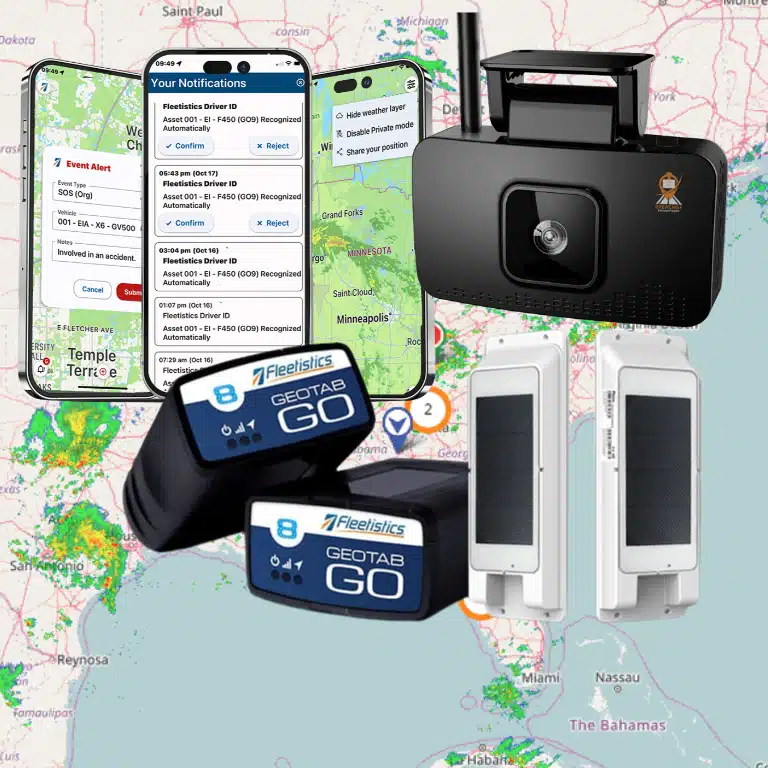
Integration depth matters when payroll, maintenance, fuel, or dispatch systems need the same data. Fleetistics offers GPS tracking, telematics, compliance tools, AI dashcams, and fleet optimization. Its platform supports 300+ marketplace integrations for connected fleet workflows.
Support before commitment
A feature list cannot show how long a rollout will take. Ask who installs hardware, sets driver rules, trains staff, and fixes data gaps after launch. Good implementation help should include a clear setup plan, named support paths, and practical training for drivers and managers.
Compare support with the same care as software functions. Request a demonstration using your driver workflow, DVIR needs, reports, alerts, and required connections. This shows whether the system supports daily work before a contract limits your options.
How should integrations and reporting shape the decision?
Integrations should reflect how your fleet works each day, not just how drivers record logs. A compliant log answers one narrow need. Operations teams may also need payroll, dispatch, maintenance, fuel tax, safety, and accounting data to move without duplicate entry.
An integration map for daily work
Map each workflow before comparing platforms. Ask where hours, vehicle IDs, odometer records, defect reports, fuel purchases, work orders, and job assignments begin. Then ask which system receives them and which team fixes errors.
An integration demo should follow one real event from start to finish. For example, see how a corrected driver log appears in dispatch, payroll, and an audit file. Teams comparing ELD compliance software should check how compliance processes connect to the wider fleet workflow.
- Payroll and accounting: approved hours, cost codes, and billing exports.
- Maintenance and safety: defects, inspections, service actions, and review queues.
- Fuel tax and dispatch: distance records, trips, assignments, and corrections.
- APIs and connectors: field mapping, sync timing, errors, and access rules.
Compliance records and performance reports
Reporting needs two clear layers. The FMCSA states that an ELD records date, time, location, engine hours, vehicle miles, and identification data. Those records support hours-of-service compliance review.
That data is not a full fleet performance report. FMCSA also notes that ELDs do not need to collect speed, braking, steering, or other performance data. For safety, idle, service, or fuel analysis, confirm which added inputs power each dashboard.
Ask to see exception reports, not just polished dashboard screens. Useful review queues may flag missing logs, unidentified driving, DVIR gaps, late maintenance, fuel mismatches, or failed data syncs. Each alert should name an owner and show how staff resolve it.
During a trial, build one compliance report and one operating report from the same week of activity. Staff should be able to trace each field, apply filters, and export the result for review.
Exportability and data control
Data ownership is part of fit. Request sample CSV exports, report schedules, API documents, field definitions, and a way to retrieve old records. Confirm that exports include original records, edits, notes, and audit-ready files, not only dashboard totals.
Run a test with one route, one driver edit, and one back-office handoff. Compare the result in dispatch, payroll, IFTA work, maintenance, and accounting. If data stalls or cannot be exported, the issue grows as the fleet adds drivers and reporting needs.
A practical ELD software rollout checklist
Start with a controlled pilot
Before vehicles go live, confirm that the selected ELD software appears on the FMCSA list of registered solutions. FMCSA states that an ELD solution must be certified and registered to comply. Make this check before training, hardware installs, or reporting setup.
Mixed fleets should begin with a small pilot group that reflects daily operations. Include different vehicle types, routes, driver shifts, and supervisors. A trial lets the team test workflows and support response before a wider rollout decision.
- Select the pilot group. Choose drivers and dispatch staff who cover common and difficult routes. Set start dates, feedback points, and clear measures for success.
- Build the inventory. List vehicles, VINs, engine connection needs, mobile devices, operating systems, mounts, cables, and assigned drivers. Resolve missing or incompatible equipment before deployment.
- Train drivers on real tasks. Practice login, duty status changes, vehicle selection, DVIR workflows, edits, annotations, roadside inspections, and device failure steps.
- Set up admin controls. Assign user roles, terminals, rule sets, exemptions, driver groups, notification rules, and log review owners. Test permissions with drivers and managers.
- Prepare the inspection packet. Place required instructions, transfer guidance, malfunction steps, and backup log supplies where drivers can find them during an inspection.
- Connect needed systems. Test links to dispatch, payroll, maintenance, fuel, or reporting tools one at a time. Confirm that each data handoff reaches the right team.
- Review and hand off. After pilot trips, check logs, unidentified driving, DVIR completion, support tickets, and reports. Assign owners for training, compliance review, and vendor support.
Build compliance into driver routines
Training should match what happens in the cab and back office. The Geotab Drive ELD software guide helps teams map driver actions to daily HOS and DVIR workflows. Admins should also run a mock inspection and correct any missing file, device, or transfer step.
Keep the first review cycle simple. Compare pilot logs against assignments, note repeat questions, and check whether supervisors can resolve exceptions on time. Fix workarounds or manual report cleanup before adding more vehicles.
Move from pilot to support ownership
A rollout is stable when responsibilities are clear. Name the person who reviews logs, the manager who tracks training, and the support contact for device issues. Link the rollout to your ELD compliance software process.
Expand in waves rather than all at once. Bring in similar vehicle groups, repeat the inspection test, and review reports after each wave. This sequence helps a mixed fleet catch setup issues early while keeping daily work moving.
Where Fleetistics fits in your ELD evaluation
Fleetistics can help a fleet turn an ELD software search into a practical review of daily work. The question is not only whether drivers can log hours. It is whether the system supports compliance, dispatch, safety, reporting, and the people who use it each day.
Compliance as the starting point
Start with the nonnegotiable item. FMCSA says an ELD solution must be certified and registered, so that check should come before feature comparisons. A fleet should also confirm hardware fit, driver workflow, and how records are reviewed during an inspection.
Fleetistics supports ELD compliance needs alongside DVIR and IFTA workflows. That matters when a compliance manager needs connected records rather than separate tools and repeated data entry. For HOS and driver tasks, see the Geotab Drive ELD software guide. It shows how that workflow fits into daily operations.
A wider fleet operations review
An ELD does one critical job, but many fleets need more from the same decision. Fleetistics helps buyers assess GPS tracking and telematics with ELD needs in mind. Teams can also review DVIR processes, IFTA data, AI dashcams, and safety tools against their routes, vehicles, and driver policies.
This review should include the systems already in use. Fleetistics works through the Geotab platform as a Geotab Authorized Reseller, with support for open data sharing. Its platform also supports 300+ marketplace integrations, which can help teams plan connections with other fleet and business tools.
A useful demo should follow real tasks. Ask a driver to complete a log and inspection. Ask a manager to review exceptions, prepare fuel tax data, locate vehicles, and retrieve a safety event. This approach shows whether added features reduce work or simply add screens.
Guidance during a pilot
Software fit becomes clearer during implementation, training, and support. Fleetistics brings long-running experience with Geotab deployments and fleet service needs. That background can help buyers plan a pilot around driver adoption, compliance checks, reports, and device installation. It also helps define the support path when questions arise.
Before selecting ELD software, define what a successful pilot must prove. Include accurate logs, manageable inspections, useful telematics reports, needed integrations, and clear support steps. This keeps the evaluation focused on the fleet’s work, rather than on a feature list alone.
Frequently Asked Questions
How can I confirm ELD software meets FMCSA requirements before buying?
Start by asking the provider for the exact ELD product name and its FMCSA registration details. The FMCSA states that a compliant ELD solution must be certified and registered with the agency. Also confirm supported devices, installation needs, driver login steps, record transfer options, and support for roadside inspections before a fleet-wide rollout.
Does ELD software need safety or vehicle performance tracking to be compliant?
No. Compliance-focused ELD software must capture required records, including date, time, location, engine hours, vehicle miles, and identity information. The FMCSA says ELDs are not required to collect speed, braking, steering, or other performance data. Fleets may still choose added telematics or camera tools for safety and operations.
How should a fleet test ELD software before a full rollout?
Run a pilot with representative vehicles, drivers, dispatch staff, and compliance managers. Test log edits, inspections, roadside data transfer, training time, connectivity, support response, and reports used by operations. Compare total costs, including hardware and installation, before committing. Fleetistics states that its ELD and telematics offering includes a 60-day risk-free trial, which can support a structured evaluation.
Can ELD software connect compliance reporting with other fleet systems?
It can, but integration depth varies by product and service plan. A buyer should map required data flows for HOS, DVIR, IFTA, payroll, dispatch, maintenance, and fuel systems before selecting software. Fleetistics states that it supports ELD compliance management for FMCSA, DVIR, and IFTA, along with more than 300 marketplace integrations for data sharing and operational connectivity.
Ready to choose ELD software with confidence?
Delaying an ELD software decision can leave compliance checks, driver steps, and reporting gaps unresolved while growing operational needs demand more attention each week. Starting now gives your team time to compare driver workflows, integration requirements, reporting priorities, and implementation steps before a deadline creates urgency or budget review. A structured evaluation helps you select software that suits daily operations, gives managers needed visibility, and supports your wider fleet management plan as demands evolve.
Before selecting a platform, bring compliance, driver workflow, integration, and reporting questions to a practical review of the requirements your fleet must manage. Ready to proceed? Request a demo to discuss your ELD software priorities and plan an evaluation with Fleetistics.