
Every unreviewed near miss leaves a fleet safety team managing preventable risk. AI-enabled video can turn that moment into evidence, coaching, and a safer next trip.
AI dashcams for fleets are connected video systems that use artificial intelligence to identify distraction, harsh braking, close following, or possible collisions while vehicles operate. Unlike a basic recorder, they can flag events for review, connect road and cab context, and shorten the time from a risky moment to response. Safety teams then use the clips to confirm what happened, preserve evidence, and focus coaching on behaviors that can reduce future risk. That coaching step matters: research on in-vehicle monitoring found greater declines in risky driving when immediate feedback was paired with supervisory coaching. Buyers should test detection quality, footage access, privacy policies, telematics integration, and the workflow for acting on every useful alert.
The decision is not whether video can record a crash. It is whether the system helps your team prevent risk and respond clearly after an incident. Start with the core question, What are AI dashcams for fleets? The path begins with:
What are AI dashcams for fleets?
A camera system built for safety review
AI dashcams for fleets are onboard cameras paired with software that flags possible safety events. Instead of searching long recordings first, a safety reviewer can start with clips tied to an alert. For buyers, the point is simple: the camera records context, while the system helps teams sort it.
A road-facing lens records what happens ahead of the vehicle. A driver-facing lens can show in-cab activity around an event, when the fleet chooses that setup. This two-view approach helps a safety team compare road conditions with driver actions. Fleet managers can explore AI dashcams for driver coaching as one relevant product path.
How video and vehicle data connect
Edge AI means some video review occurs on the camera or in the vehicle. When a system spots an event, it can mark a clip for review and trigger an alert. The team then reviews the video before choosing coaching, documentation, or no action.
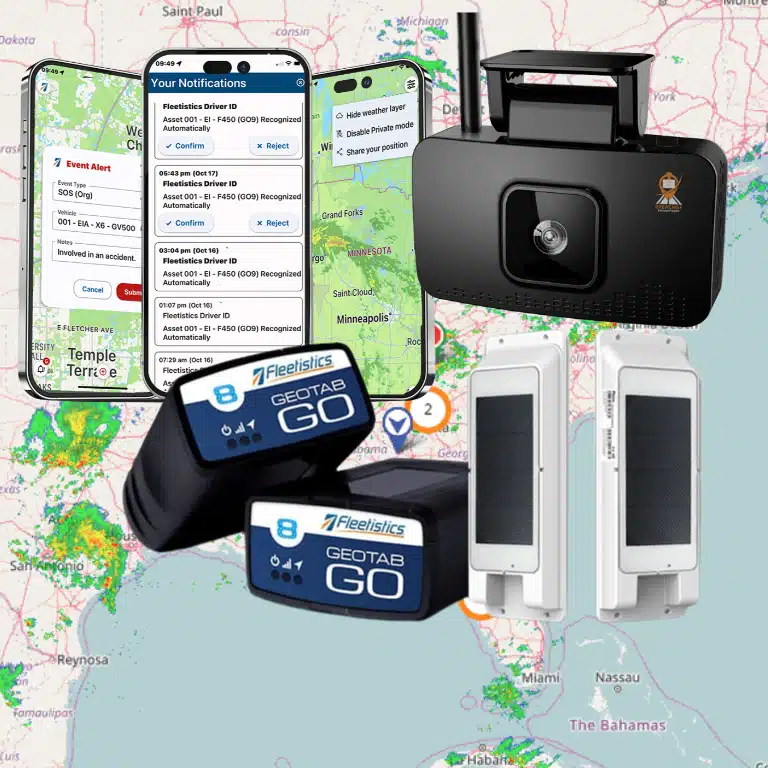
Telematics and GPS add vehicle context to that review. A flagged clip may appear with trip location, time, and related driving data in one workflow. Fleetistics supports dashcam integration with telematics through MyGeotab, so video and vehicle records can be reviewed together.
Cloud access gives approved staff a place to review clips outside the cab. It also supports the same review process across vehicles and locations. A safety manager can check events, record decisions, and track coaching needs over time.
What safety teams should evaluate
The camera is only one part of the safety program. Buyers should ask how events are flagged, what context is attached, and who reviews each clip. They should also define driver communication, privacy rules, access controls, and coaching steps after a confirmed event.
That final step matters because alerts alone do not make a coaching program. A study of in-vehicle monitoring found the largest drop in risky driving with supervisory coaching and in-cab lights. Safety teams can review the study on feedback and supervisory coaching when shaping an evaluation plan.
In practice, an AI dashcam system should help staff move from an event to a fair review. The best fit depends on fleet risk, vehicle types, policy needs, and coaching workflow. Evaluation should test both the technology and the team’s response process.
Features that matter in an AI fleet dashcam
AI dashcams for fleets should do more than save clips after a crash. A useful system helps safety teams find risk early, review events fast, and coach with context. Buyers should test how each feature works in daily operations, not just compare a feature checklist.
Safety events worth acting on
Start with incident detection, distracted-driving alerts, and harsh event capture, such as hard braking or sharp turns. Ask which events trigger in-cab alerts and which notify a manager. For a closer look at this workflow, review Fleetistics’ AI dashcams for driver coaching.
Detection alone is not a safety program. In a field study, risky driving declined most when instant feedback was paired with supervisory coaching. The study of in-vehicle monitoring and coaching gives buyers a useful test: can managers turn an alert into timely, fair coaching?
- Risk events: Confirm which events are flagged for review, and how record-only cameras differ from connected systems.
- Driver alerts: Ask whether drivers can receive in-cab warnings during selected events.
- GPS context: Check whether each video clip stays tied to route and trip details.
- Video retrieval: Test cloud access for approved users before rollout.
- Fleet workflow: Make sure events connect to reports and coaching notes.
| Need | What to check |
|---|---|
| Risk events | Which events are flagged for review. |
| Driver alerts | Which warnings drivers hear in the cab. |
| GPS context | Whether clips stay tied to trip details. |
| Video access | Who can view, share, or export clips. |
Context, access, and privacy
Video has more value when reviewers can see where an event occurred and retrieve the clip quickly. During a demo, request a harsh-braking event with GPS context. Then ask a supervisor to locate, view, label, and share that clip through the cloud portal.
Test real-time notifications with care. The right alert should reach the right person, with enough detail to choose the next step. Too many alerts can slow review and make urgent events harder to spot.
Privacy controls deserve the same test. Confirm who can view inward-facing video, download footage, or change retention rules. Ask whether role-based access, audit logs, audio settings, and driver-facing policy tools are available for your use case.
Platform fit and real-world testing
A camera creates extra work if safety events sit outside the fleet reporting process. Check whether notifications, GPS history, video, and coaching records appear in one workflow. Fleetistics provides an example of dashcam integration with telematics for fleets evaluating platform fit.
Set up a trial scorecard before selecting a system. Use real routes and several driver roles, while keeping clear notice and access rules in place. Have the team document:
- Which alerts were useful, and which needed adjustment.
- How long it took to retrieve a requested video clip.
- Whether GPS details helped explain the event.
- Whether coaching steps were easy to assign and track.
- Whether privacy permissions matched each staff role.
This process keeps the buying decision tied to safety work. It also reveals whether alerts, video access, privacy controls, and integration support the people who must use them each day.
How AI dashcams improve driver coaching
AI dashcams for fleets are most useful when a safety team turns an event into a coaching conversation. A clip can show what occurred before harsh braking, distraction, or a near miss. It should start a review, not stand alone as a verdict.
Event review with context
Fair coaching starts with a clear rule for which events require review. Safety managers can define event types, review the clip, and compare it with route or vehicle context. This keeps a single alert from becoming an instant judgment about a driver.
The coach can ask what the driver saw, what action they took, and what could be done next time. That conversation matters. A field study found the largest drop in risky driving when instant feedback was paired with supervisory coaching.
A repeatable coaching workflow
A useful workflow gives each manager the same review steps. It also helps drivers know what to expect after an alert. Safety teams can start with the following routine:
- Review event footage and related trip details before speaking with the driver.
- Discuss the behavior shown, without guessing at intent or blame.
- Agree on one clear action, such as increasing following distance or limiting phone use.
- Track similar events over time, then close the coaching item when the pattern improves.
This structure shifts attention from watching drivers to managing risk. It also creates a record of support, not just a list of flagged clips. Managers can use shared review notes so the same type of event receives the same type of follow-up.
Fleetistics can help a team shape this process around its routes, job duties, and safety policy. The goal is a practical workflow that managers can use and drivers can understand.
Recognition and repeat-risk trends
Coaching should include safe choices, not only mistakes. A manager may find a driver who leaves room in traffic or responds well to a hazard. Calling out those moments makes the program more balanced and gives the team examples it can use in training.
Event trends help managers choose where coaching time is needed most. Repeated alerts for one behavior may call for follow-up with a driver. The same trend across many vehicles may point to training, scheduling, route conditions, or policy review.
Video is more useful when it fits the wider safety program. A team evaluating AI dashcams for driver coaching can plan event rules, manager reviews, recognition, and follow-up before rollout. That approach makes the technology a coaching tool, rather than a surveillance measure.
Risk reduction, evidence capture, and claims support
A usable incident record
AI dashcams for fleets can give safety teams a clearer record of events that need review. Video may show the seconds around a hard brake, a collision, or a near miss. That record helps a manager ask focused questions instead of relying on memory alone.
Before choosing a system, define what a saved event must contain. Look for road-facing video, a clear time stamp, vehicle identity, and event type. If location or driver assignment matters to your process, confirm that those details remain attached when a clip is exported.
A camera should also make clips simple to retrieve after an incident is reported late. Ask how event clips are tagged, how long they remain available, and who can download them. These details matter when staff must review a theft report or answer a disputed account of a crash.
Video joined with fleet data
Footage becomes more useful when it can be reviewed with vehicle event data. Fleetistics provides dashcam integration with telematics for buyers considering a joined review process. A safety manager can then check whether a flagged event and the related video tell the same story.
That workflow should distinguish evidence from an alert. An alert marks an event for review; it does not prove fault or explain every cause. Buyers should test whether harsh braking clips capture enough road context. They should also check whether impact clips are protected and whether exports stay clear for later review.
Build a simple review checklist before rollout. Record the clip ID, vehicle, date and time, trigger, reviewer, and follow-up action. Limit access by role and keep an audit trail for exports, so the fleet can show how a file was handled.
Claims support without promises
Video can support a fact-based response when stories differ after a crash, theft, or roadside event. It cannot promise a claim decision, lower premium, or legal result. Each insurer, investigator, and court may weigh records within its own process.
Risk reduction also depends on what happens after a clip is reviewed. A study of in-vehicle monitoring found the largest drop in risky driving with feedback and supervisory coaching. See the published research record for the study detail. Video can guide a fair coaching conversation, not just collect files.
During evaluation, run sample scenarios: a hard brake, a near miss, a collision report, and a suspected theft. Confirm the system can find and export the needed record without broad access to unrelated footage. For more buying criteria, use Fleetistics’ guide to choosing the best fleet dashcam.
What should buyers ask before choosing an AI dashcam system?
A vendor meeting should test more than camera features. Before comparing AI dashcams for fleets, define what your safety team must see, manage, explain to drivers, and pay for over time.
Operational fit and rollout
Start with the systems and vehicles already in use. If your fleet uses GPS tracking, ask the vendor to show one trip and one safety event. Then ask to see that event in the reporting workflow. Fleetistics outlines dashcam integration with telematics for teams assessing this type of connection.
-
How does the camera connect with our tracking platform? Ask whether video, GPS location, vehicle details, and driver records appear together. Request a live demo using a common incident, such as harsh braking followed by video review.
-
What does installation require? Confirm hardware placement, power source, vehicle downtime, mobile installation choices, and who tests each camera. Ask how replacements, transfers, or new vehicle additions are handled after launch.
-
Which footage is saved, and for how long? Separate event clips from video retrieved after a complaint or crash. Ask about storage limits, download access, retention settings, and the steps used to preserve needed evidence.
-
Which alerts will reach our team? List the behaviors you want reviewed, then ask which are in-cab alerts and which notify a manager. Request sample reports that show trends by driver, vehicle, group, and date.
-
How will privacy and driver communication work? Ask whether audio, inward video, or live access can be enabled or limited. Clarify user permissions, audit history, policy resources, and how drivers can raise questions before rollout.
-
What is the full cost as the fleet grows? Compare hardware, installation, subscriptions, data or storage fees, support, replacements, training, and cancellation terms. Ask for pricing at today’s vehicle count and at your likely future count.
Alerts, coaching, and driver trust
A camera alone does not define a safety process. Ask who reviews events, how false alerts are handled, and how supervisors turn clear events into consistent coaching conversations.
There is evidence behind that question. A field study found risky driving fell most when in-cab feedback was paired with supervisor coaching, as reported in an NIH-indexed study. Ask vendors how alerts support coaching, follow-up, and documented improvement.
Support and decision proof
Before signing, ask who supports administrators and drivers during setup and daily use. Confirm support hours, response routes, escalation steps, reporting help, update schedules, and the process for replacing failed hardware.
Finally, ask how the vendor will prove fit before a large rollout. A limited trial should define vehicles, users, alert settings, privacy steps, reports, training, and success measures. Use a guide to choosing the best fleet dashcam as a checklist when comparing vendor answers.
How to roll out AI dashcams without losing driver trust
Shared goals and written rules
A trusted rollout starts before a camera is installed. Define the safety problems the fleet is trying to address, such as distracted driving reviews or disputed incidents. Keep the goal specific: coach safer habits and review events fairly, not monitor drivers without limits.
Write a video and privacy policy in plain language. State what triggers a recording, who can view footage, how access is logged, and when video is removed. Explain whether audio or inward-facing views are used. Drivers should know how footage supports coaching and how they can ask questions.
Match the system to that policy before launch. A page on AI dashcams for driver coaching can help safety teams map camera features to a coaching process. Do not enable alerts or recording settings that the written policy does not cover.
Driver communication and a pilot
Meet with drivers before installation, and allow time for direct questions. Show which events may create a clip and who reviews each clip. Address concerns about privacy, false alerts, and fair treatment. Give drivers a copy of the policy and a named contact for issues.
Start with a small pilot group that represents common routes, vehicle types, and shift patterns. Include willing drivers and supervisors who will give useful feedback. During the pilot, review alert quality, clip context, mounting issues, and driver concerns. Record changes before adding more vehicles.
Tune thresholds before wider use. Too many alerts can distract drivers and burden coaches; missed events can reduce confidence in the program. Adjust settings with pilot feedback, then explain what changed and why. This shows that driver input has a clear role in rollout decisions.
Fair coaching and ongoing review
Create one coaching workflow for every supervisor. Use event context, allow the driver to explain what happened, and focus on a safer next action. Research on in-vehicle monitoring found greater declines in risky driving when instant feedback was paired with supervisory coaching than with feedback alone. The published driver feedback study supports a coaching-led approach.
Set a review schedule for the pilot and the full rollout. Track alert volume, confirmed coaching events, disputed clips, driver feedback, and repeat patterns. Look for uneven coaching across teams or alerts that do not lead to useful action. These checks keep AI dashcams for fleets tied to safety work rather than surveillance concerns.
As the program grows, connect video review with the fleet safety process already in place. Fleetistics outlines dashcam integration with telematics for teams that need vehicle and video data together. Keep policy updates visible, retrain supervisors when settings change, and invite driver feedback after each rollout stage.
Frequently Asked Questions
What is the best dash cam for fleet management?
There is no single best dash cam for every fleet. Safety teams should compare event detection, video retrieval, retention controls, driver privacy settings, coaching workflows, telematics integration, and support. If the fleet already uses Geotab, Fleetistics identifies unified video and vehicle reporting as a supported integration. Run a pilot with set measures for alert accuracy, review time, and coaching use before selecting a system.
Which AI dash cam is best for heavy equipment?
Choose a system designed for the equipment and work environment, not only a road-going truck camera. Confirm rugged mounting, power compatibility, dust and weather protection, adequate visibility around the asset, night video, reliable event upload, and accessible footage for incident review. For mixed fleets, confirm one dashboard can separate equipment events from highway-driving events and support consistent safety coaching.
How much does Samsara AI Dashcam cost?
Samsara AI Dashcam pricing should be confirmed through a current quote, because fleet camera costs can depend on hardware, installation, connectivity, video storage, features, and vehicle count. Before comparing quotes, ask for the total cost over the proposed term, retention limits, replacement terms, support scope, integration charges, and any pilot options. Compare those costs against the same safety and evidence requirements for every vendor.
Ready to make fleet safety decisions sooner?
Every week without a clear camera plan leaves safety teams reacting to incidents instead of addressing risk patterns early. Delayed decisions can postpone more consistent coaching workflows and the evidence review process your team needs after events. Starting now gives you time to compare options, align stakeholders, and plan a rollout built around your safety priorities.
Ready to take the next step? Schedule a consultation about AI dashcams and fleet safety technology. Discuss fleet needs, implementation concerns, and your evaluation plan with Fleetistics. You can compare systems with a clearer view of operational fit and rollout timing. Contact the team now to identify what your safety program should assess first.